

 中文
中文 
黄生举 deepin
2022-05-26 18:48 deepin 自己顶一个
Reply Like 0 View the author
deepin 自己顶一个

 deepin
 这是官方的设置说明:
https://support.brother.com/g/b/downloadhowto.aspx?c=as_ot&lang=en&prod=dcp7030_all&os=128&dlid=dlf006642_000&flang=4&type3=566
下面是我设置Brother MFC-8680DN的步骤。 修改打印机IP地址为实际地址。
2. Install scanner

   2.1 Install scanner driver

$ sudo dpkg -i brother-udev-rule-type1-1.0.2-0.all.deb \
               brscan3-0.2.13-1.amd64.deb \
               brscan-skey-0.3.1-1.amd64.deb

$ sudo apt install libusb-0.1-4


   2.2 Configure scanner

$ sudo brsaneconfig3 -a name=MFC-8680DN model=MFC-8680DN ip=192.168.10.19
$ brsaneconfig3 -q
=======================================================================
Devices on network
  0 MFC-8680DN          "MFC-8680DN"        I:192.168.10.19
=======================================================================

$ brscan-skey -l
=======================================================================
MFC-8680DN        : brother3:net1;dev0  : 192.168.10.19        Active
=======================================================================

# ls -lh /usr/local/Brother/sane/brsanenetdevice3.cfg
-rw-rw-rw- 1 root root 75 Oct 25 19:46 /usr/local/Brother/sane/brsanenetdevice3.cfg
# more /usr/local/Brother/sane/brsanenetdevice3.cfg
DEVICE=MFC-8680DN , "MFC-8680DN" , 0x4f9:0x23f , IP-ADDRESS=192.168.10.19


   2.3 Copy driver files

sudo cp /usr/lib64/sane/libsane-brother* /usr/lib/x86_64-linux-gnu/sane

   Reboot.
 deepin
 https://bbs.chinauos.com/zh/post/11443
deepin 这是官方的设置说明:
https://support.brother.com/g/b/downloadhowto.aspx?c=as_ot&lang=en&prod=dcp7030_all&os=128&dlid=dlf006642_000&flang=4&type3=566
下面是我设置Brother MFC-8680DN的步骤。 修改打印机IP地址为实际地址。
2. Install scanner

   2.1 Install scanner driver

$ sudo dpkg -i brother-udev-rule-type1-1.0.2-0.all.deb \
               brscan3-0.2.13-1.amd64.deb \
               brscan-skey-0.3.1-1.amd64.deb

$ sudo apt install libusb-0.1-4


   2.2 Configure scanner

$ sudo brsaneconfig3 -a name=MFC-8680DN model=MFC-8680DN ip=192.168.10.19
$ brsaneconfig3 -q
=======================================================================
Devices on network
  0 MFC-8680DN          "MFC-8680DN"        I:192.168.10.19
=======================================================================

$ brscan-skey -l
=======================================================================
MFC-8680DN        : brother3:net1;dev0  : 192.168.10.19        Active
=======================================================================

# ls -lh /usr/local/Brother/sane/brsanenetdevice3.cfg
-rw-rw-rw- 1 root root 75 Oct 25 19:46 /usr/local/Brother/sane/brsanenetdevice3.cfg
# more /usr/local/Brother/sane/brsanenetdevice3.cfg
DEVICE=MFC-8680DN , "MFC-8680DN" , 0x4f9:0x23f , IP-ADDRESS=192.168.10.19


   2.3 Copy driver files

sudo cp /usr/lib64/sane/libsane-brother* /usr/lib/x86_64-linux-gnu/sane

   Reboot.
我的打印机是通过USB连接的,下一步不知道怎么办了
deepin 这个是设备信息截图
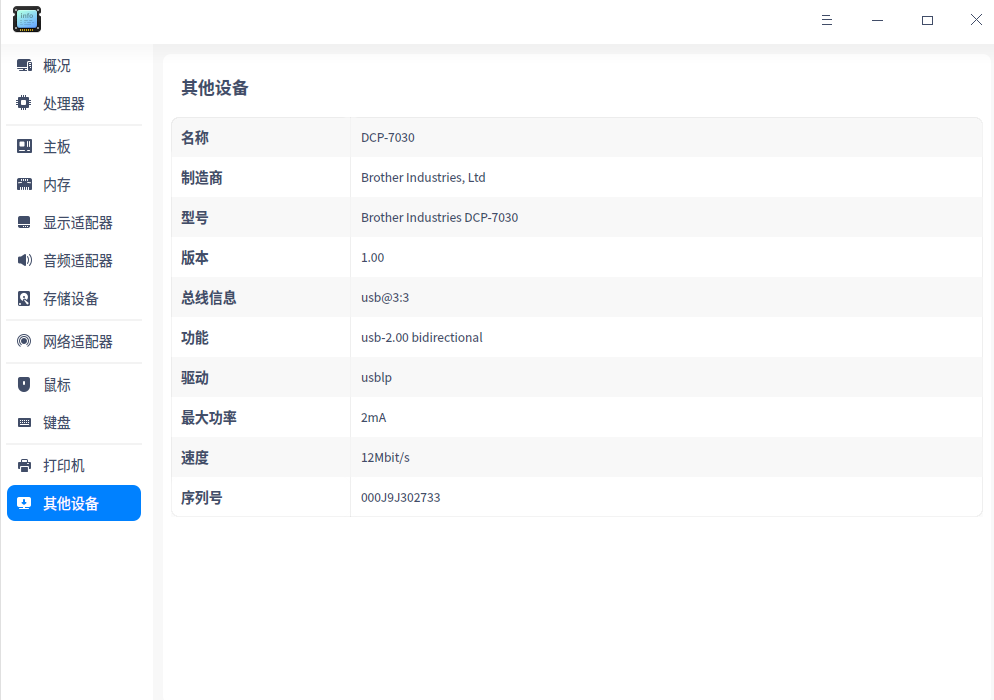
deepin 通过USB连接的扫描仪的设置可以用以下官方的说明:
https://support.brother.com/g/b/faqend.aspx?c=as_ot&lang=en&prod=dcp7030_all&faqid=faq00100604_000
试试那些针对ubuntu 10以上的说明。 主要是修改udev rules文件。 设置/dev/usb/scanner*的许可。
另外用户帐号要加入用户组scanner.
sudo usermoad -a -G scanner <用户名>
Popular Ranking
ChangePopular Events
More


 Which version of the Deepin system is the best?
可以正常打印,扫描仪驱动安装到这一步,进行不下去了,请指点一下,谢谢!
作为办公操作系统,有了扫描仪驱动就完美了