

 中文
中文 
忘记、过去 deepin
2022-05-12 19:54 deepin 控制中心里面,点击你使用的无线网络连接右边的箭头进入设置页面,最底下看看能不能指定设备 MAC 地址,修改保存后看看有没有效果
Reply Like 0 View the author
 deepin
 控制中心里面,点击你使用的无线网络连接右边的箭头进入设置页面,最底下看看能不能指定设备 MAC 地址,修改保存后看看有没有效果
 deepin
 控制中心里面,点击你使用的无线网络连接右边的箭头进入设置页面,最底下看看能不能指定设备 MAC 地址,修改保存后看看有没有效果
谢谢,我试试

 deepin
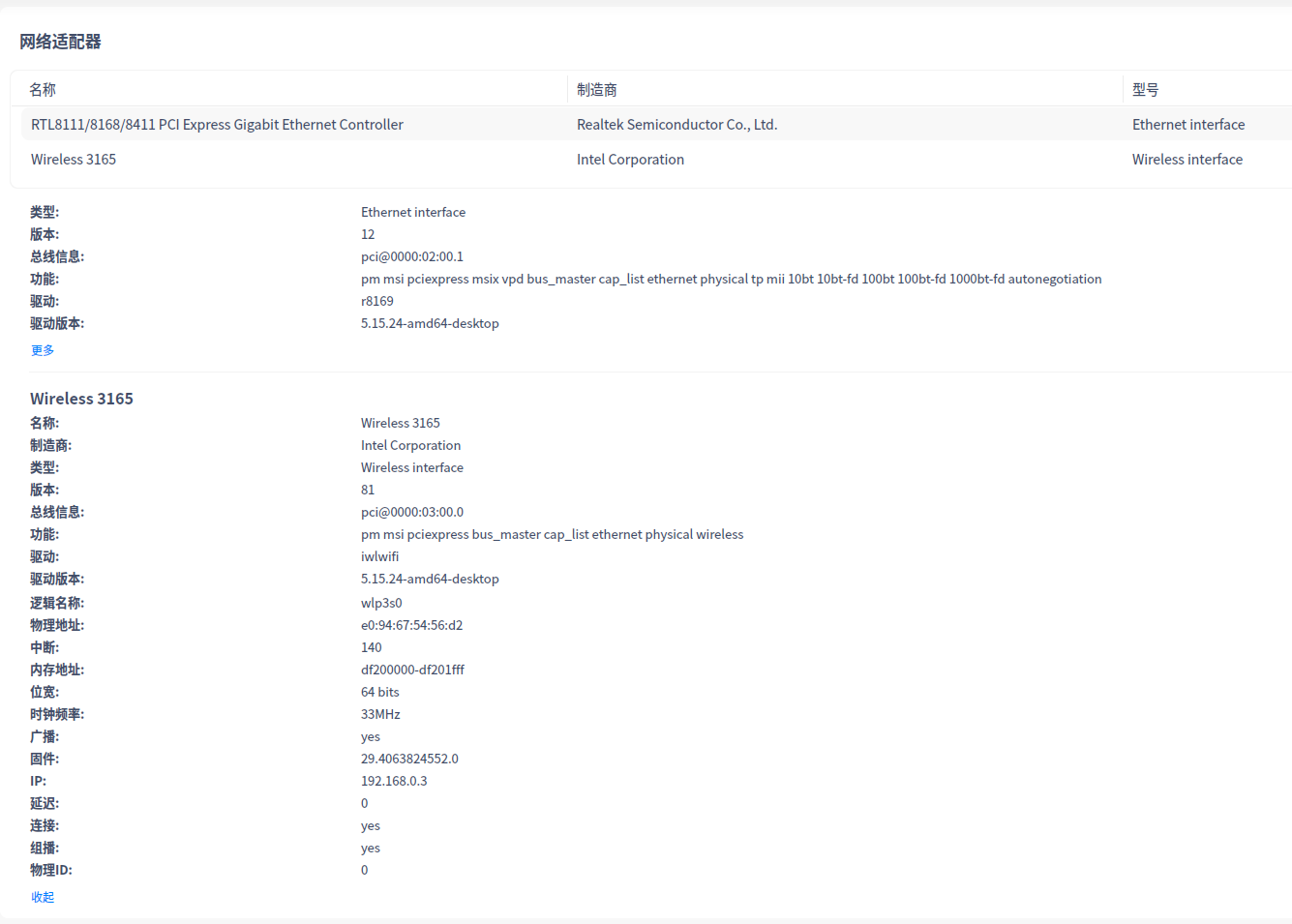
 同3165无线网卡,刚安装20.5 测试没有发现这样的问题。设备详情如下:
你试试在终端里ping baidu.com 看看能ping通吗?
ip a 看一下网络有些什么
cat /etc/resolv.conf 看一下当前DNS是什么
ping 223.5.5.5 看看能不能ping通,能的话把这个设置成dns试试
deepin 控制中心里面,点击你使用的无线网络连接右边的箭头进入设置页面,最底下看看能不能指定设备 MAC 地址,修改保存后看看有没有效果
看了一下,MAC默认就是指定的,跟我的无线网卡MAC一致
deepin $ ping baidu.com
ping: baidu.com: 未知的名称或服务
$ ip a
1: lo: mtu 65536 qdisc noqueue state UNKNOWN group default qlen 1000
link/loopback 00:00:00:00:00:00 brd 00:00:00:00:00:00
inet 127.0.0.1/8 scope host lo
valid_lft forever preferred_lft forever
inet6 ::1/128 scope host
valid_lft forever preferred_lft forever
2: enp2s0: mtu 1500 qdisc pfifo_fast state UP group default qlen 1000
link/ether a4:bb:6d:c9:9c:ac brd ff:ff:ff:ff:ff:ff
3: wlp3s0: mtu 1500 qdisc noqueue state UP group default qlen 1000
link/ether 34:7d:f6:a3:d7:2a brd ff:ff:ff:ff:ff:ff
inet 192.168.10.101/24 brd 192.168.10.255 scope global dynamic noprefixroute wlp3s0
valid_lft 7043sec preferred_lft 7043sec
inet6 fe80::d6e8:a0df:2dbc:398c/64 scope link noprefixroute
valid_lft forever preferred_lft forever
4: uengine0: mtu 1500 qdisc noqueue state UP group default qlen 1000
link/ether 0a:b9:0d:e4:6d:98 brd ff:ff:ff:ff:ff:ff
inet 192.168.250.1/24 scope global uengine0
valid_lft forever preferred_lft forever
inet6 fe80::8b9:dff:fee4:6d98/64 scope link
valid_lft forever preferred_lft forever
6: veth5PRK0S@if5: mtu 1500 qdisc noqueue master uengine0 state UP group default qlen 1000
link/ether fe:54:92:77:36:fa brd ff:ff:ff:ff:ff:ff link-netnsid 0
inet6 fe80::fc54:92ff:fe77:36fa/64 scope link
valid_lft forever preferred_lft forever
$cat /etc/resolv.conf
#Generated by NetworkManager
nameserver 202.99.166.4
nameserver 202.99.160.68
这两个是本地联通提供的DNS
deepin $ ping 223.5.5.5
PING 223.5.5.5 (223.5.5.5) 56(84) bytes of data.
64 bytes from 223.5.5.5: icmp_seq=1 ttl=128 time=25.3 ms
DNS设置为223.5.5.5,仍无法上网,显示DNS_PROBE_FINISHED_NO_INTERNET
deepin 
deepin $ ping 223.5.5.5
PING 223.5.5.5 (223.5.5.5) 56(84) bytes of data.
64 bytes from 223.5.5.5: icmp_seq=1 ttl=128 time=25.3 ms
DNS设置为223.5.5.5,仍无法上网,显示DNS_PROBE_FINISHED_NO_INTERNET
dns 改为223.5.5.5后,在终端里能不能ping通baidu.com
deepin dns 改为223.5.5.5后,在终端里能不能ping通baidu.com
不能。
应该不是DNS设置的问题,因为原来的DNS也是联通公司官方提供的
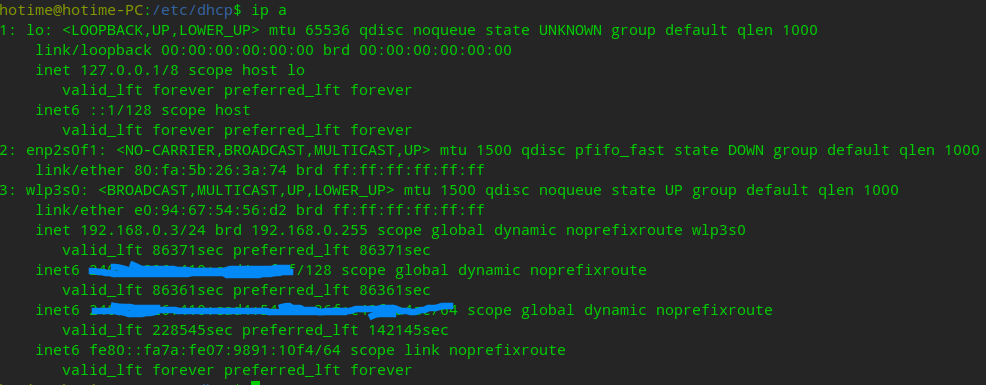
deepin 全新安装的deepin20.5,网络里应该是没有uengin和veth的,尤其是这个veth,虚拟网络,估计是它影响了。你在安装deepin20.5之前是不是本身就在用其他版本的deepin?然后安装20.5的时候保留了用户目录?
这是我 ip a的结果
deepin 全新安装的deepin20.5,网络里应该是没有uengin和veth的,尤其是这个veth,虚拟网络,估计是它影响了。你在安装deepin20.5之前是不是本身就在用其他版本的deepin?然后安装20.5的时候保留了用户目录?
这是我 ip a的结果
系统是全新安装的,安装了virtual box
deepin 全新安装系统,不装任何软件,也不能Wi-Fi上网
deepin 再试试nslookup baidu.com看看结果?(虽然不会太有用)
hotime@hotime-PC:~$ nslookup baidu.com
Server:         223.5.5.5
Address:        223.5.5.5#53

Non-authoritative answer:
Name:   baidu.com
Address: 220.181.38.251
Name:   baidu.com
Address: 220.181.38.148
再试试nslookup baidu.com看看结果?(虽然不会太有用)
hotime@hotime-PC:~$ nslookup baidu.com
Server:         223.5.5.5
Address:        223.5.5.5#53

Non-authoritative answer:
Name:   baidu.com
Address: 220.181.38.251
Name:   baidu.com
Address: 220.181.38.148
感谢热心帮助。明天到单位试试
deepin 感谢热心帮助。明天到单位试试
另外,还有这个也试一下cat /etc/nsswitch.conf
里面的hosts字段的值如果缺少dns的话,也会无法解析域名。
下图是我这边正常使用的(没做过任何修改):
hotime@hotime-PC:~$ cat /etc/nsswitch.conf
# /etc/nsswitch.conf
#
# Example configuration of GNU Name Service Switch functionality.
# If you have the `glibc-doc-reference' and `info' packages installed, try:
# `info libc "Name Service Switch"' for information about this file.

passwd:         compat
group:          compat
shadow:         compat
gshadow:        files

hosts:          files dns myhostname
networks:       files

protocols:      db files
services:       db files
ethers:         db files
rpc:            db files

netgroup:       nis
谢谢。有线连接正常,是不是跟这个文件无关?
deepin 谢谢。有线连接正常,是不是跟这个文件无关?
嘛只是看一看,按理说它应该是没问题的,毕竟有线网络没问题,连手机热点也没问题
deepin 还有试试进live模式把网卡的设备详情截个图和现在的对比一下看有没有不一样的地方。比方说无线网卡版本:你的是79,我的是81,还有中断:你的是143,我的是140。不知道有没有影响,这问题实在古怪的很,还真不好确定问题出在哪里
deepin 还有试试进live模式把网卡的设备详情截个图和现在的对比一下看有没有不一样的地方。比方说无线网卡版本:你的是79,我的是81,还有中断:你的是143,我的是140。不知道有没有影响,这问题实在古怪的很,还真不好确定问题出在哪里
好的,谢谢
deepin 还有试试进live模式把网卡的设备详情截个图和现在的对比一下看有没有不一样的地方。比方说无线网卡版本:你的是79,我的是81,还有中断:你的是143,我的是140。不知道有没有影响,这问题实在古怪的很,还真不好确定问题出在哪里
无线网卡版本、中断从哪儿看到了的?
Popular Ranking
ChangePopular Events
More


 Which version of the Deepin system is the best?
问题:
全新安装的deepin20.5,Intel 3165无线网卡无法上网(5.10、5.15内核都一样)。现象是:连接路由器后,执行ping 202.99.166.4,显示 64 bytes from 202.99.166.4: icmp_seq=6 ttl=250 time=5.04 ms……,说明网络是通的。但用系统自带浏览器打开网页时,一般都会显示DNS_PROBE_FINISHED_NO_INTERNET,不能上网,设置固定的DNS,也没有效果。换用Firefox浏览器,还是无法上网。wifi连接另一台路由器,也是同样的问题(网线连接这些路由器上网没有问题;手机连接这些路由器,都能正常上网)。
奇怪之处:
1.上述软硬件均不变的情况下,无线网卡连接手机热点可以正常上网。
2.用deepin20.5安装镜像启动,删除引导项linux一句中的livercd-installer,F10启动到live模式,无线上网正常。
求解:
1.为什么同一台机器,同样的安装镜像,live模式能够wifi上网,安装好的系统就不能?
2.为什么同样的硬件、同样的系统,连接路由器无法上网,却能连接手机热点上网?