[3rd-Party Apps] tkinter,pyqt5deepin平台设置控件透明度无效。 Resolved
Tofloor
poster avatar
进士
deepin
2022-05-11 02:59
Author

本人在使用python3.7下的tkinter和pyqt5时发现设置控件的透明度均失效。相同代码在windows和ubuntu下是有效的.

开始觉得可能是系统主题的问题,后来改成浅色和自动,还是无效。

python3.7,tkinter8.6,pyqt5

代码如下:

# -*- coding: utf-8 -*-
try:
    import Tkinter as _tk
    import  tkMessageBox as msgbox 
except:
    import tkinter as _tk
    from tkinter import messagebox as msgbox

def mark_canvas(width, height, x, y, during=2000):
    root = _tk.Tk()
    try:
        root.overrideredirect(True)
        root.attributes('-type', 'normal') 
        root.attributes("-alpha", 0.3)#窗口透明度30 %
        root.geometry("{}x{}+{}+{}".format(width, height, x, y))  # 调整窗口的位置
        print(1)
    finally:
        print(2)
        root.after(during, root.destroy)
        print(3)
    print(4)
    root.mainloop()

mark_canvas(1000, 1000, 0, 0)

import sys
 
from PyQt5.QtCore import Qt, QTimer
from PyQt5.QtGui import QIcon, QBitmap, QPainter, QPixmap, QCursor, QMovie, QImage
from PyQt5.QtWidgets import QHBoxLayout, QPushButton, QMessageBox, QApplication, QVBoxLayout, QWidget, \
    QLabel, QGridLayout, QLineEdit, QTextEdit, QFormLayout, QComboBox
 
'''
PyQt5 创建透明窗口并设置透明度 案例
'''
 
 
class OpacityWindowDemo(QWidget):
 
    def __init__(self):
        super().__init__()
        self.initUI()
 
    def initUI(self):
        # 设置定位和左上角坐标
        self.setGeometry(300, 300, 360, 260)
        # 设置窗口标题
        self.setWindowTitle('窗口透明度设置 的演示')
        # 设置窗口图标
        # self.setWindowIcon(QIcon('../web.ico'))
 
 
        btn = QPushButton('第一个按钮',self)
 
 
        vbox = QVBoxLayout()
        vbox.addWidget(btn)
 
        self.setLayout(vbox)
 
 
    def mousePressEvent(self,event):
        # 左击
        if event.button() == Qt.LeftButton:
 
            print(event.globalPos())
            print(event.pos())
            print(self.pos())
 
        # 右击
        if event.button() == Qt.RightButton:
            self.close()
 
 
if __name__ == '__main__':
    app = QApplication(sys.argv)
    # 设置应用图标
    app.setWindowIcon(QIcon('../web.ico'))
    w = OpacityWindowDemo()
 
    # 0-1,1表示不透明,0表示完全透明
    w.setWindowOpacity(0.2)
 
    w.show()
    sys.exit(app.exec_())
Reply Favorite View the author
All Replies
咿呀
deepin
2022-05-11 06:20
#1

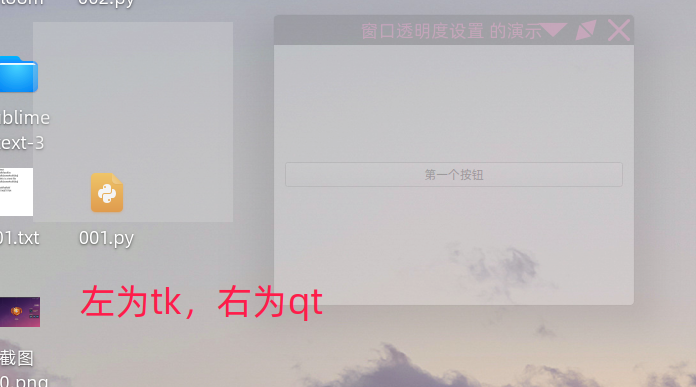
我这里是有效的,如下图:
图片.png

Reply View the author
[^_^]
deepin
2022-05-11 17:14
#2

你是不是关闭了系统的特效模式?

Reply View the author
进士
deepin
2022-05-11 19:16
#3
[^_^]

你是不是关闭了系统的特效模式?

真的是啊,打开特效模式就可以了😂

Reply View the author
进士
deepin
2022-05-11 19:17
#4
咿呀

我这里是有效的,如下图:
图片.png

谢谢你的演示,因为是关了特效模式😭

Reply View the author