

 中文
中文 
BG7ZAG deepin
2022-05-08 01:45 deepin 
Reply Like 0 View the author
 deepin

 deepin
 好像没有用
idea 2022.1 + 华宇拼音输入法
 deepin
 我的2022.1一直可以输入中文啊。搜狗拼音。

 deepin
 好像没有用
idea 2022.1 + 华宇拼音输入法
把那段代码放在idea.sh文件的开头位置,追加在后面不行的,然后重启一下idea就好了
deepin 把那段代码放在idea.sh文件的开头位置,追加在后面不行的,然后重启一下idea就好了
没有用 idea 2022.1.1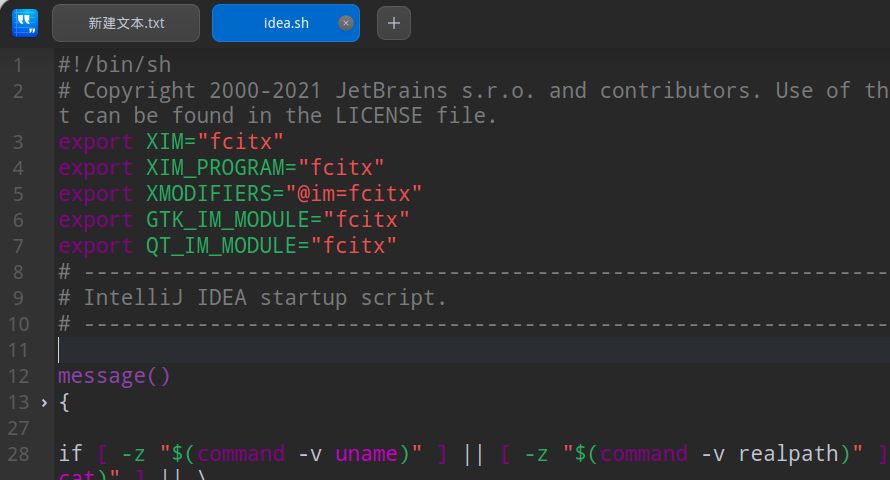
deepin 没有用 idea 2022.1.1
idea重启了吗?
deepin 没用+1
deepin 没用+1
这都是去年的帖子了。现在新版idea和系统相结合,应该没无法输入汉字的问题了吧
deepin 这都是去年的帖子了。现在新版idea和系统相结合,应该没无法输入汉字的问题了吧
21.2还是不行呢
deepin 21.2还是不行呢
用最新版idea吧,老版本不好用 新版都不用配置可以直接用
Popular Ranking
ChangePopular Events
More


 Which version of the Deepin system is the best?
PS: jetbrains其他产品也适用
后来测试发现,因为我的jetbrains工具都是以root管理员身份运行的,然后加入这个配置就有效