
[System Installation] 系统最近突然无法更新
Tofloor
poster avatar
183******07
deepin
2022-05-05 00:06
Author

最近尝试了很多次系统更新,但是一直提示说系统备份失败,不知道怎么操作,一直没有更新成功

截图_dde-control-center_20220504155909.png

Reply Favorite View the author
All Replies
jjcui8595
deepin
2022-05-05 00:10
#1

终端更新看看卡在哪里了

Reply View the author
ljq790615
deepin
2022-05-05 04:44
#2

是不是分区满了?

Reply View the author
babyfengfjx
Super Moderator
CQA
2022-05-05 21:49
#3
  • 这个提示一般可能是B区间空间不足了,在通过控制中心更新会先做一次备份操作;
  • 这个时候,可以通过终端更新:sudo apt update && sudo apt upgrade
Reply View the author
183******07
deepin
2022-05-06 00:48
#4
jjcui8595

终端更新看看卡在哪里了

Reply View the author
183******07
deepin
2022-05-06 00:49
#5
ljq790615

是不是分区满了?

我上次调整磁盘的时候看到有个备份的分区,很小,感觉肯是他满了,但是不知道怎么处理。

Reply View the author
183******07
deepin
2022-05-06 00:50
#6
babyfengfjx
  • 这个提示一般可能是B区间空间不足了,在通过控制中心更新会先做一次备份操作;
  • 这个时候,可以通过终端更新:sudo apt update && sudo apt upgrade

多谢,我现在去试试

Reply View the author
183******07
deepin
2022-05-06 01:03
#7
babyfengfjx
  • 这个提示一般可能是B区间空间不足了,在通过控制中心更新会先做一次备份操作;
  • 这个时候,可以通过终端更新:sudo apt update && sudo apt upgrade

更新成功了,谢谢你 大佬。

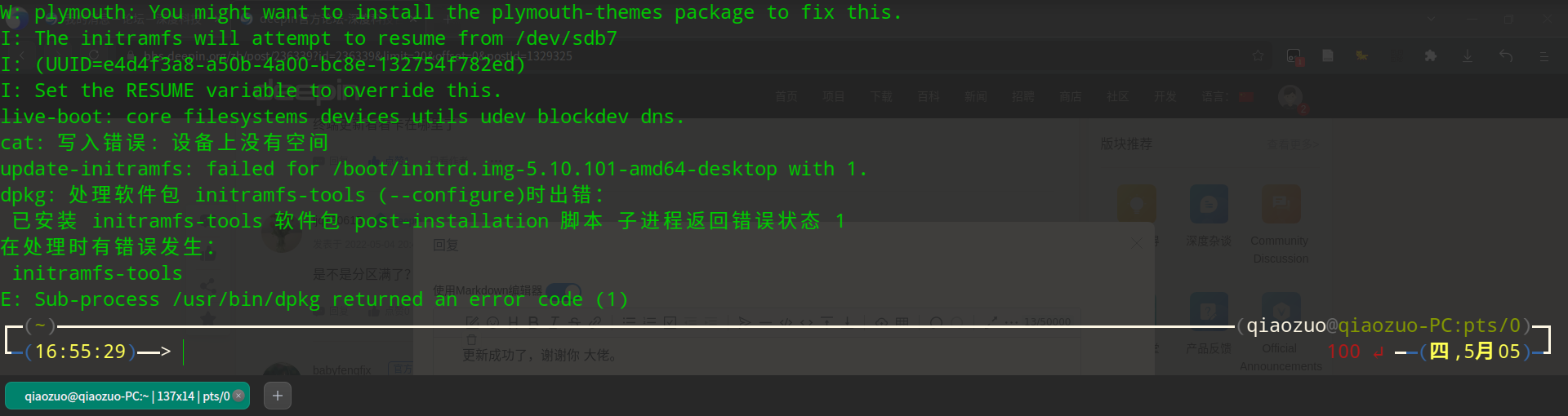
不过还有个小问题不知道能不能再请教您一下,我安装任何东西的时候都会有这样一个错误,但是不影响使用,不知道如何处理,刚才更新也弹出练这个错误。截图_deepin-terminal_20220505170026.png
Reply View the author

