

 中文
中文 
心平气和 deepin
2022-04-27 23:45 deepin Reply Like 0 View the author
 deepin deepin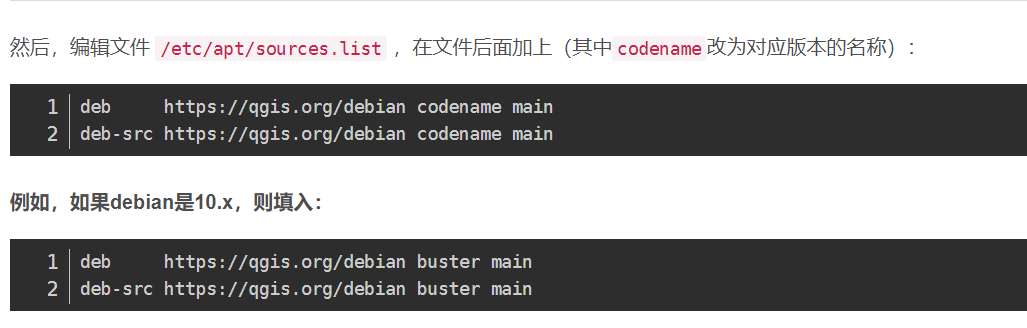
这个地方是关键

 deepin
 应该是sudo add-apt-repository这一步出问题了,deepin没法用这个命令添加软件更新源,所以最后安装时用的是deepin的更新源,可以自己手动编辑更新源文件,把软件的更新源加进去就行了
deepin 用flatpak安装最简单,一行命令的事情,而且一直可以保持最新
flatpak安装
https://flathub.org/apps/details/org.qgis.qgis
安装:
flatpak install --from https://flathub.org/repo/appstream/org.qgis.qgis.flatpakref
运行: flatpak run org.qgis.qgis
更新flatpak QGIS: flatpak update
 deepin
 谢谢各位!
最后还是选择在星火商店安装了3.18.3版,免得折腾。
只是打开后出现错误提示,使用没问题。

Popular Ranking
ChangePopular Events
More


 Which version of the Deepin system is the best?
官网安装步骤如下: