

 中文
中文 
whoam1 deepin
2022-04-24 02:54 deepin 错误信息正常的
在bios里面把安全启动关了就可以了
Reply Like 0 View the author
 deepin
 错误信息正常的
在bios里面把安全启动关了就可以了

 deepin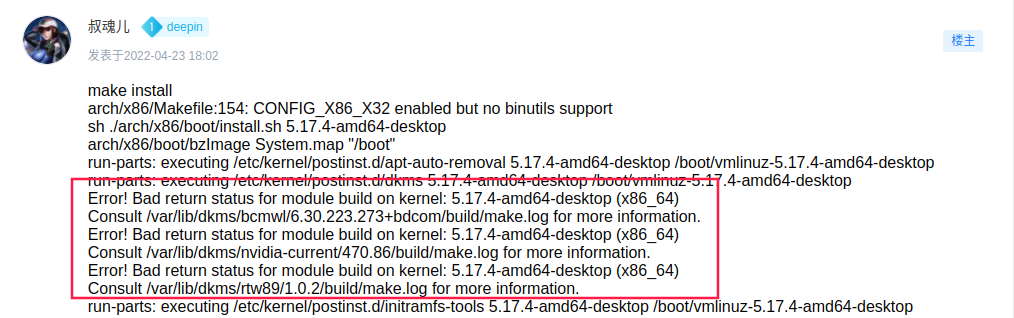
博通无线网卡、瑞昱无线网卡、NVIDIA 显卡驱动编译失败,不用这 3 家的硬件的话问题不大

 deepin
 前面我也编译了5.17.4,发现开机后,卡在启动画面要差不多一分钟左右才能进入桌面,后面还是用回了系统自带的5.15.24内核就好了
Popular Ranking
ChangePopular Events
More


 Which version of the Deepin system is the best?
make install
arch/x86/Makefile:154: CONFIG_X86_X32 enabled but no binutils support
sh ./arch/x86/boot/install.sh 5.17.4-amd64-desktop
arch/x86/boot/bzImage System.map "/boot"
run-parts: executing /etc/kernel/postinst.d/apt-auto-removal 5.17.4-amd64-desktop /boot/vmlinuz-5.17.4-amd64-desktop
run-parts: executing /etc/kernel/postinst.d/dkms 5.17.4-amd64-desktop /boot/vmlinuz-5.17.4-amd64-desktop
Error! Bad return status for module build on kernel: 5.17.4-amd64-desktop (x86_64)
Consult /var/lib/dkms/bcmwl/6.30.223.273+bdcom/build/make.log for more information.
Error! Bad return status for module build on kernel: 5.17.4-amd64-desktop (x86_64)
Consult /var/lib/dkms/nvidia-current/470.86/build/make.log for more information.
Error! Bad return status for module build on kernel: 5.17.4-amd64-desktop (x86_64)
Consult /var/lib/dkms/rtw89/1.0.2/build/make.log for more information.
run-parts: executing /etc/kernel/postinst.d/initramfs-tools 5.17.4-amd64-desktop /boot/vmlinuz-5.17.4-amd64-desktop
update-initramfs: Generating /boot/initrd.img-5.17.4-amd64-desktop
cryptsetup: WARNING: The initramfs image may not contain cryptsetup binaries
nor crypto modules. If that's on purpose, you may want to uninstall the
'cryptsetup-initramfs' package in order to disable the cryptsetup initramfs
integration and avoid this warning.
I: The initramfs will attempt to resume from /dev/nvme0n1p5
I: (UUID=8e9a097f-b2fc-4f57-874d-79c22f432f6f)
I: Set the RESUME variable to override this.
live-boot: core filesystems devices utils udev blockdev dns.
run-parts: executing /etc/kernel/postinst.d/reconfigure-dde-daemon 5.17.4-amd64-desktop /boot/vmlinuz-5.17.4-amd64-desktop
fix systemd/logind config
run-parts: executing /etc/kernel/postinst.d/zz-update-grub 5.17.4-amd64-desktop /boot/vmlinuz-5.17.4-amd64-desktop
get rootb uuid error: failed to get "rootb" uuid
正在生成 grub 配置文件 ...
找到主题:/boot/grub/themes/deepin-fallback/theme.txt
Found background image: /boot/grub/themes/deepin-fallback/background.jpg
找到 Linux 镜像:/boot/vmlinuz-5.17.4-amd64-desktop
找到 initrd 镜像:/boot/initrd.img-5.17.4-amd64-desktop
找到 Linux 镜像:/boot/vmlinuz-5.15.24-amd64-desktop
找到 initrd 镜像:/boot/initrd.img-5.15.24-amd64-desktop
找到 Linux 镜像:/boot/vmlinuz-5.10.101-amd64-desktop
找到 initrd 镜像:/boot/initrd.img-5.10.101-amd64-desktop
File descriptor 26 (anon_inode:[eventpoll]) leaked on lvs invocation. Parent PID 384194: /bin/sh
File descriptor 28 (pipe:[48209]) leaked on lvs invocation. Parent PID 384194: /bin/sh
File descriptor 30 (pipe:[48209]) leaked on lvs invocation. Parent PID 384194: /bin/sh
找到 Windows Boot Manager 位于 /dev/sda1@/efi/Microsoft/Boot/bootmgfw.efi
Adding boot menu entry for EFI firmware configuration
完成