

 中文
中文 
ludongping deepin
2022-04-23 17:07 deepin 好像商店挂了,能搜索,但是突然就安装不了软件了,一开始还好好的
Reply Like 0 View the author
 deepin
 好像商店挂了,能搜索,但是突然就安装不了软件了,一开始还好好的
deepin 命令行执行也是报错:
sudo apt --fix-broken install
将会同时安装下列软件:
libglib2.0-0:i386
下列【新】软件包将被安装:
libglib2.0-0:i386
升级了 0 个软件包,新安装了 1 个软件包,要卸载 0 个软件包,有 0 个软件包未被升级。
有 53 个软件包没有被完全安装或卸载。
需要下载 0 B/1,334 kB 的归档。
解压缩后会消耗 4,307 kB 的额外空间。
您希望继续执行吗? [Y/n]
(正在读取数据库 ... 系统当前共安装有 251299 个文件和目录。)
准备解压 .../libglib2.0-0_2.58.3.6-1+eagle_i386.deb ...
正在解压 libglib2.0-0:i386 (2.58.3.6-1+eagle) ...
dpkg: 处理归档 /var/cache/apt/archives/libglib2.0-0_2.58.3.6-1+eagle_i386.deb (--unpack)时出错:
尝试覆盖共享的 '/usr/share/doc/libglib2.0-0/changelog.Debian.gz', 它与软件包 libglib2.0-0:i386 中的其他实例不同
在处理时有错误发生:
/var/cache/apt/archives/libglib2.0-0_2.58.3.6-1+eagle_i386.deb
needrestart is being skipped since dpkg has failed
E: Sub-process /usr/bin/dpkg returned an error code (1)
 deepin
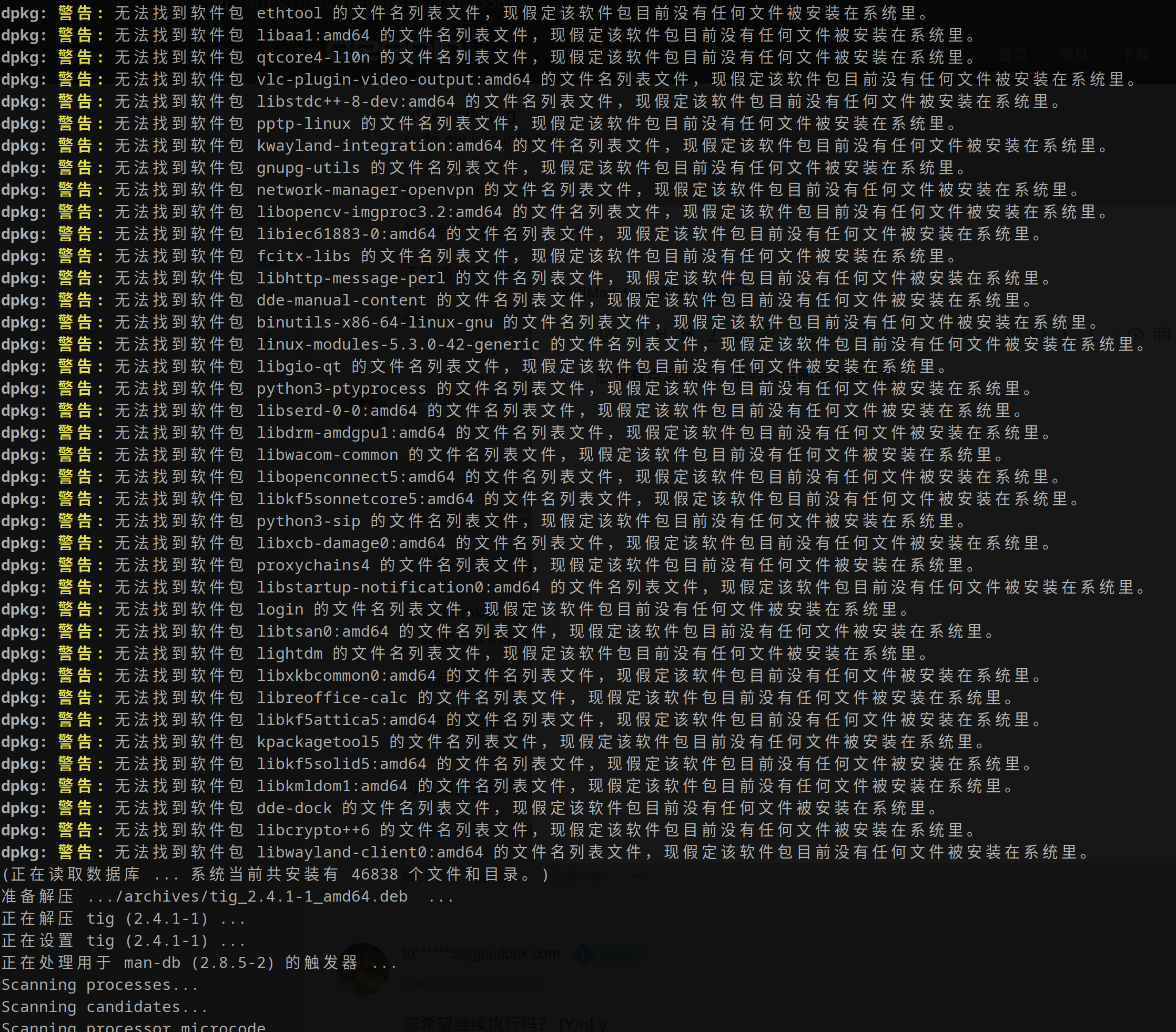
 刚刚解决啦:一下是解决方法
cd /var/lib/dpkg
sudo mv info info.bak
sudo mkdir into
sudo apt install -f
然后就可以使用商店了
不知道是否通用
deepin 刚刚解决啦:一下是解决方法
cd /var/lib/dpkg
sudo mv info info.bak
sudo mkdir into
sudo apt install -f
然后就可以使用商店了
不知道是否通用
可以的,我按照你这个方法弄了就可以继续安装软件了。
但是目前我 apt-file 还是不能用,总是让我去update下,其实我都update好几遍了 。。。
 deepin
 您希望继续执行吗? [Y/n] y
dpkg: 错误: 无法新建文件 '/var/lib/dpkg/info/format-new': 没有那个文件或目录
E: Sub-process /usr/bin/dpkg returned an error code (2)
deepin 您希望继续执行吗? [Y/n] y
dpkg: 错误: 无法新建文件 '/var/lib/dpkg/info/format-new': 没有那个文件或目录
E: Sub-process /usr/bin/dpkg returned an error code (2)
我的情况跟你的一样,期待解决方法
deepin 刚刚解决啦:一下是解决方法
cd /var/lib/dpkg
sudo mv info info.bak
sudo mkdir into
sudo apt install -f
然后就可以使用商店了
不知道是否通用
cd /var/lib/dpkg
sudo mv info info.bak
sudo mkdir into
sudo apt install -f
都做好文件备份了,怎么还创建一个不一样的目录出来了,应该是mkdir info,然后在执行apt install -f 指令吧?
deepin dpkg: 错误: 无法新建文件 '/var/lib/dpkg/info/format-new': 没有那个文件或目录
E: Sub-process /usr/bin/dpkg returned an error code (2)
deepin 可以的,我按照你这个方法弄了就可以继续安装软件了。
但是目前我 apt-file 还是不能用,总是让我去update下,其实我都update好几遍了 。。。
感觉有点后遗症,不晓得后面会出啥问题
Popular Ranking
ChangePopular Events
More


 Which version of the Deepin system is the best?
应用商店软件安装失败,请问如何解决