[Others] LibreOffice
Tofloor
poster avatar
Sa******HE@gmail.com
deepin
2022-04-16 02:49
Author

LibreOffice crashing when opening a PDF file

I Tried to open a PDF file of about 40 Mb, with default app (libreoffice), all the system freez then the libreoffice closes automatically, without opening the file

Every time I try to open a PDF file

Reply Favorite View the author
All Replies
learner
deepin
2022-04-16 03:48
#1

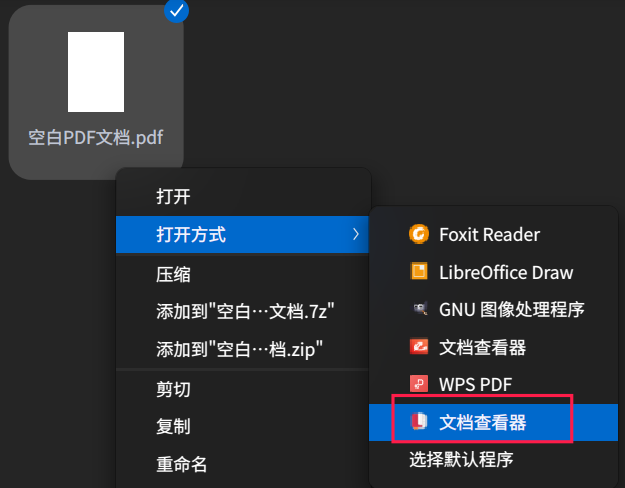
Do you want to view or edit the pdf file? If you just want to view the pdf file, there are several other pdf viewers you can choose. For example you can use the deepin-reader to view a pdf file.
截图_选择区域_20220415194409.png

You can also install evince or WPS PDF or FoxitReader from the App Store or install them with apt, and use them to view a pdf file.

Reply View the author
神末shenmo
deepin
Spark-App
Q&A Team
2022-04-16 03:50
#2

Try use another tool

Reply View the author
Sa******HE@gmail.com
deepin
2022-04-16 05:27
#3

Yes Actually I want to edit my PDF file ( highlight some paragraphs...)

Can you help me out with updating LibreOffice, Bcs when I checked the version Iinstalled in My Deepin 20.5, it's 7.0. but in their Website they already released the v 7.3

Thanks

Reply View the author
bigben446
deepin
2022-04-16 05:53
#4

use okular

Reply View the author
learner
deepin
2022-04-16 09:20
#5

emmm if you want to download the newest version of LibreOffice, you can go to the official site of LibreOffice and download LibreOffice (choose Linux (64-bit) (deb)). You'll get a .tar.gz file containing a lot of .deb files in it. You can use sudo dpkg -i *.deb to install them, or you open deepin-deb-installer and drag these files into it to install them. But this may lead to breaking some dependancies of some software packages installed on the system (I'm not sure ...)

But if you just want to highlight some sentences in the pdf file, many pdf viewers also provide this basic function, such as FoxitReader, evince, etc. You can just install one of them or you can also choose one from these pdf viewers: https://www.linuxlinks.com/capable-linux-pdf-viewers/.

Reply View the author
Sa******HE@gmail.com
deepin
2022-04-16 09:36
#6
learner

emmm if you want to download the newest version of LibreOffice, you can go to the official site of LibreOffice and download LibreOffice (choose Linux (64-bit) (deb)). You'll get a .tar.gz file containing a lot of .deb files in it. You can use sudo dpkg -i *.deb to install them, or you open deepin-deb-installer and drag these files into it to install them. But this may lead to breaking some dependancies of some software packages installed on the system (I'm not sure ...)

But if you just want to highlight some sentences in the pdf file, many pdf viewers also provide this basic function, such as FoxitReader, evince, etc. You can just install one of them or you can also choose one from these pdf viewers: https://www.linuxlinks.com/capable-linux-pdf-viewers/.

Your help is precious, thanks a lot 😃

Reply View the author
hotime
deepin
2022-04-17 00:04
#7

LibreOffice is not a professional tool for PDF edit.

I used LibreOffice v7.3 for win10x64 to open a PDF file of about 42.6MiB, and it took over 5min to open it. but Adobe Acrobat just took 2s for the same file.

If you check the software list of LibreOffice, you can see LibreOffice Writer, LibreOffice Calc, LibreOffice Impress and others, but no one named LibreOffice Pdf, they didn't creater a professional tool for PDF edit. When you try to open a PDF file, it called LibreOffice Draw to open it, its like use phtoshop to edit document, not a good choice. Small file? maybe okay. Large file? it spend more and more time or even crashes.

So I suggest you choose other tools like "Master PDF Editor", you can search it in deepin store, good for use.

Reply View the author
Sa******HE@gmail.com
deepin
2022-04-18 11:22
#8
hotime

LibreOffice is not a professional tool for PDF edit.

I used LibreOffice v7.3 for win10x64 to open a PDF file of about 42.6MiB, and it took over 5min to open it. but Adobe Acrobat just took 2s for the same file.

If you check the software list of LibreOffice, you can see LibreOffice Writer, LibreOffice Calc, LibreOffice Impress and others, but no one named LibreOffice Pdf, they didn't creater a professional tool for PDF edit. When you try to open a PDF file, it called LibreOffice Draw to open it, its like use phtoshop to edit document, not a good choice. Small file? maybe okay. Large file? it spend more and more time or even crashes.

So I suggest you choose other tools like "Master PDF Editor", you can search it in deepin store, good for use.

Thanks for the convencing reply

Reply View the author
Sa******HE@gmail.com
deepin
2022-04-18 11:33
#9
Sa******HE@gmail.com

Thanks for the convencing reply

I've just finished installing, " Master PDF Editor ", I admit that it's a great tool, I really appreciate your help*

Reply View the author
promisehalle
deepin
2022-08-18 17:54
#10
The user is banned, and the content is hidden.