[3rd-Party Apps] 更新后virt-manager无法进入虚拟机界面
Tofloor
poster avatar
itangh
deepin
2022-04-13 17:53
Author

如题,虚拟机管理器问题。

更新系统并删除多余包操作后,virt-manager打开报错:

$ virt-manager
Traceback (most recent call last):
  File "/usr/share/virt-manager/virt-manager", line 20, in 
    from virtinst import util
ImportError: cannot import name 'util' from 'virtinst' (/usr/share/virt-manager/virtinst/__init__.py)

或者在商店安装virt-view能打开机器列表界面无法打开查看和控制界面。

希望能得到大家的建议和帮助。

参考论坛另外一个帖子未能解决这个问题:

sudo apt install --reinstall python3-minimal
Reply Favorite View the author
All Replies
deepinuser17
deepin
2022-04-13 18:12
#1

安装virt-manager时会安装以下软件包:

The following NEW packages will be installed:
  gir1.2-gtk-vnc-2.0 gir1.2-libosinfo-1.0 gir1.2-libvirt-glib-1.0 gir1.2-spiceclientglib-2.0 gir1.2-spiceclientgtk-3.0 gir1.2-vte-2.91 ipxe-qemu libbrlapi0.6 libcacard0 libcapstone3
  libfdt1 libgovirt-common libgovirt2 libgtk-vnc-2.0-0 libgvnc-1.0-0 libnss-mymachines libosinfo-1.0-0 libphodav-2.0-0 libphodav-2.0-common librdmacm1 libspice-client-glib-2.0-8
  libspice-client-gtk-3.0-5 libspice-server1 libusbredirhost1 libusbredirparser1 libvdeplug2 libvirglrenderer0 libvirt-clients libvirt-daemon libvirt-daemon-config-network
  libvirt-daemon-config-nwfilter libvirt-daemon-driver-lxc libvirt-daemon-driver-qemu libvirt-daemon-driver-vbox libvirt-daemon-driver-xen libvirt-daemon-system
  libvirt-daemon-system-systemd libvirt-glib-1.0-0 libvirt0 libvte-2.91-0 libvte-2.91-common libxencall1 libxendevicemodel1 libxenevtchn1 libxenforeignmemory1 libxengnttab1
  libxenmisc4.11 libxenstore3.0 libxentoolcore1 libxentoollog1 osinfo-db ovmf python-asn1crypto python-certifi python-cffi-backend python-chardet python-cryptography python-enum34
  python-idna python-ipaddress python-openssl python-requests python-urllib3 python3-certifi python3-chardet python3-idna python3-libvirt python3-libxml2 python3-pkg-resources
  python3-requests python3-six python3-urllib3 qemu-kvm qemu-system-common qemu-system-data qemu-system-gui qemu-system-x86 qemu-utils seabios spice-client-glib-usb-acl-helper
  systemd-container virt-manager virt-viewer virtinst


可以试试重新安装virt-manager, 或者重新安装python相关的软件包。

sudo apt --reinstall install virt-manager


或者:

sudo apt --reinstall install python-asn1crypto python-certifi python-cffi-backend python-chardet python-cryptography python-enum34 python-idna python-ipaddress python-openssl python-requests python-urllib3 python3-certifi python3-chardet python3-idna python3-libvirt python3-libxml2 python3-pkg-resources python3-requests python3-six python3-urllib3
Reply View the author
babyfengfjx
Super Moderator
CQA
2022-04-13 18:14
#2
  • 敢问阁下是在哪个版本升级的系统?
  • 是升级到最新V20.5版本后,这个就出现这个问题了么?
  • 除了升级之外有没有做过其他相关的配置类操作,或者应用安装类操作?比如可能的Python相关的配置啥得?
Reply View the author
神末shenmo
deepin
Spark-App
Q&A Team
2022-04-13 18:18
#3
babyfengfjx
  • 敢问阁下是在哪个版本升级的系统?
  • 是升级到最新V20.5版本后,这个就出现这个问题了么?
  • 除了升级之外有没有做过其他相关的配置类操作,或者应用安装类操作?比如可能的Python相关的配置啥得?

我在排查网络插件的时候似乎也见到这样的报错了

楼主试试sudo dmesg -wH,看看有没有virt-manager的

Reply View the author
deepinuser17
deepin
2022-04-13 18:25
#4

首先查看是否已经安装了python3-distutils。 如果没有,安装一下看看是否有帮助.


dpkg -l python3-distutils

# 安装python3-distutils

sudo apt install python3-distutils


python3-distutils包提供了util.py

https://packages.debian.org/buster/all/python3-distutils/filelist


Reply View the author
itangh
deepin
2022-04-13 20:30
#5
deepinuser17

首先查看是否已经安装了python3-distutils。 如果没有,安装一下看看是否有帮助.


dpkg -l python3-distutils

# 安装python3-distutils

sudo apt install python3-distutils


python3-distutils包提供了util.py

https://packages.debian.org/buster/all/python3-distutils/filelist


谢谢回复,我检查了下安装了您提到的软件包,可能是其他原因。

~$ dpkg -l python3-distutils
期望状态=未知(u)/安装(i)/删除(r)/清除(p)/保持(h)
| 状态=未安装(n)/已安装(i)/仅存配置(c)/仅解压缩(U)/配置失败(F)/不完全安装(H)/触发器等待(W)/触发器未决(T)
|/ 错误?=(无)/须重装(R) (状态,错误:大写=故障)
||/ 名称 版本 体系结构 描述
+++-=================-============-============-=================================
ii python3-distutils 3.7.3-1 all distutils package for Python 3.x
~$ sudo apt install python3-distutils
请输入密码:
验证成功
正在读取软件包列表... 完成
正在分析软件包的依赖关系树
正在读取状态信息... 完成
python3-distutils 已经是最新版 (3.7.3-1)。
python3-distutils 已设置为手动安装。
升级了 0 个软件包,新安装了 0 个软件包,要卸载 0 个软件包,有 0 个软件包未被升级。
:~$ virt-manager
Traceback (most recent call last):
File "/usr/share/virt-manager/virt-manager", line 20, in
from virtinst import util
ImportError: cannot import name 'util' from 'virtinst' (/usr/share/virt-manager/virtinst/__init__.py)

Reply View the author
itangh
deepin
2022-04-13 20:35
#6
神末shenmo

我在排查网络插件的时候似乎也见到这样的报错了

楼主试试sudo dmesg -wH,看看有没有virt-manager的

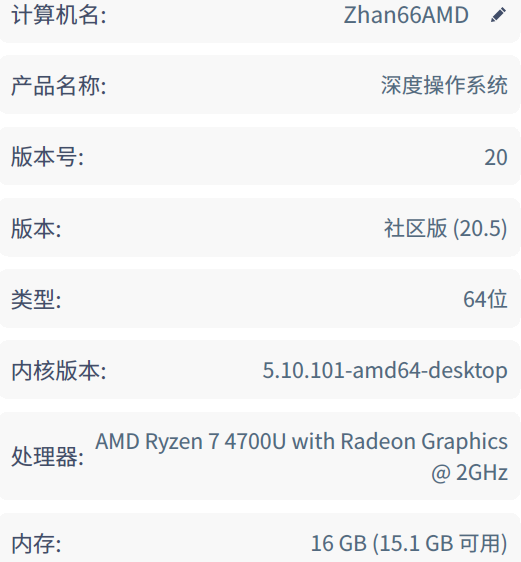
我用的是社区版20.5;是昨晚日常更新后出现的情况。我经常检查更新和接受推送。

升级后按提示做了 sudo apt autoremove的清理工作,安装过软件商店首页推荐的 uTools后来卸载了,有卸载了中望CAD

sudo dmesg -wH | grep virt-manager 没有输出

image.png

Reply View the author
itangh
deepin
2022-04-13 20:42
#7
deepinuser17

安装virt-manager时会安装以下软件包:

The following NEW packages will be installed:
  gir1.2-gtk-vnc-2.0 gir1.2-libosinfo-1.0 gir1.2-libvirt-glib-1.0 gir1.2-spiceclientglib-2.0 gir1.2-spiceclientgtk-3.0 gir1.2-vte-2.91 ipxe-qemu libbrlapi0.6 libcacard0 libcapstone3
  libfdt1 libgovirt-common libgovirt2 libgtk-vnc-2.0-0 libgvnc-1.0-0 libnss-mymachines libosinfo-1.0-0 libphodav-2.0-0 libphodav-2.0-common librdmacm1 libspice-client-glib-2.0-8
  libspice-client-gtk-3.0-5 libspice-server1 libusbredirhost1 libusbredirparser1 libvdeplug2 libvirglrenderer0 libvirt-clients libvirt-daemon libvirt-daemon-config-network
  libvirt-daemon-config-nwfilter libvirt-daemon-driver-lxc libvirt-daemon-driver-qemu libvirt-daemon-driver-vbox libvirt-daemon-driver-xen libvirt-daemon-system
  libvirt-daemon-system-systemd libvirt-glib-1.0-0 libvirt0 libvte-2.91-0 libvte-2.91-common libxencall1 libxendevicemodel1 libxenevtchn1 libxenforeignmemory1 libxengnttab1
  libxenmisc4.11 libxenstore3.0 libxentoolcore1 libxentoollog1 osinfo-db ovmf python-asn1crypto python-certifi python-cffi-backend python-chardet python-cryptography python-enum34
  python-idna python-ipaddress python-openssl python-requests python-urllib3 python3-certifi python3-chardet python3-idna python3-libvirt python3-libxml2 python3-pkg-resources
  python3-requests python3-six python3-urllib3 qemu-kvm qemu-system-common qemu-system-data qemu-system-gui qemu-system-x86 qemu-utils seabios spice-client-glib-usb-acl-helper
  systemd-container virt-manager virt-viewer virtinst


可以试试重新安装virt-manager, 或者重新安装python相关的软件包。

sudo apt --reinstall install virt-manager


或者:

sudo apt --reinstall install python-asn1crypto python-certifi python-cffi-backend python-chardet python-cryptography python-enum34 python-idna python-ipaddress python-openssl python-requests python-urllib3 python3-certifi python3-chardet python3-idna python3-libvirt python3-libxml2 python3-pkg-resources python3-requests python3-six python3-urllib3

谢谢,我按您的提示重新安装了,启动报错是和之前相比没有变化。

Reply View the author
itangh
deepin
2022-04-13 20:59
#8
babyfengfjx
  • 敢问阁下是在哪个版本升级的系统?
  • 是升级到最新V20.5版本后,这个就出现这个问题了么?
  • 除了升级之外有没有做过其他相关的配置类操作,或者应用安装类操作?比如可能的Python相关的配置啥得?

是日常更新,不是跨版本升级。

如果有相关可能的两个软件我后来排查问题时候都卸载了

Reply View the author
deepinuser17
deepin
2022-04-13 21:30
#9

软件包安装卸载的日志文件是/var/log/apt/history.log和/var/log/apt/term.log.

查看一下日志里哪些包被卸载了。

$ ls -lh /var/log/apt
total 268K
-rw-r--r-- 1 root root  76K Apr 12 17:42 eipp.log.xz
-rw-r--r-- 1 root root 1.5K Apr 12 17:43 history.log
-rw-r--r-- 1 root root  364 Jun 29  2021 history.log.10.gz
-rw-r--r-- 1 root root 3.2K May 30  2021 history.log.11.gz
-rw-r--r-- 1 root root 6.8K Apr 15  2021 history.log.12.gz
-rw-r--r-- 1 root root 4.0K Mar 31 08:11 history.log.1.gz
-rw-r--r-- 1 root root 1.6K Feb 27 21:33 history.log.2.gz
-rw-r--r-- 1 root root 3.1K Jan 28 07:48 history.log.3.gz
-rw-r--r-- 1 root root  275 Dec 24 18:14 history.log.4.gz
-rw-r--r-- 1 root root 2.3K Nov 30 21:09 history.log.5.gz
-rw-r--r-- 1 root root  727 Oct 31 13:24 history.log.6.gz
-rw-r--r-- 1 root root 1.9K Sep 30  2021 history.log.7.gz
-rw-r--r-- 1 root root 2.4K Aug 23  2021 history.log.8.gz
-rw-r--r-- 1 root root 4.0K Jul 30  2021 history.log.9.gz
-rw-r----- 1 root adm  8.8K Apr 12 17:43 term.log
-rw-r----- 1 root adm  1.2K Jun 29  2021 term.log.10.gz
-rw-r----- 1 root adm   12K May 30  2021 term.log.11.gz
-rw-r----- 1 root adm   19K Apr 15  2021 term.log.12.gz
-rw-r----- 1 root adm   13K Mar 31 08:11 term.log.1.gz
-rw-r----- 1 root adm  4.7K Feb 27 21:33 term.log.2.gz
-rw-r----- 1 root adm   11K Jan 28 07:48 term.log.3.gz
-rw-r----- 1 root adm   818 Dec 24 18:14 term.log.4.gz
-rw-r----- 1 root adm  7.2K Nov 30 21:09 term.log.5.gz
-rw-r----- 1 root adm  2.3K Oct 31 13:24 term.log.6.gz
-rw-r----- 1 root adm  6.6K Sep 30  2021 term.log.7.gz
-rw-r----- 1 root adm  8.6K Aug 23  2021 term.log.8.gz
-rw-r----- 1 root adm   13K Jul 30  2021 term.log.9.gz
Reply View the author
babyfengfjx
Super Moderator
CQA
2022-04-13 21:40
#10
itangh

我用的是社区版20.5;是昨晚日常更新后出现的情况。我经常检查更新和接受推送。

升级后按提示做了 sudo apt autoremove的清理工作,安装过软件商店首页推荐的 uTools后来卸载了,有卸载了中望CAD

sudo dmesg -wH | grep virt-manager 没有输出

image.png

  • sudo apt autoremove 感觉这个命令执行后很可能有点猫腻;
  • 目前按照楼上的铁子们的建议,重装都不贼了么,直接卸载再重装呢😂
Reply View the author
打击越
deepin
2022-04-14 00:24
#11
itangh

谢谢回复,我检查了下安装了您提到的软件包,可能是其他原因。

~$ dpkg -l python3-distutils
期望状态=未知(u)/安装(i)/删除(r)/清除(p)/保持(h)
| 状态=未安装(n)/已安装(i)/仅存配置(c)/仅解压缩(U)/配置失败(F)/不完全安装(H)/触发器等待(W)/触发器未决(T)
|/ 错误?=(无)/须重装(R) (状态,错误:大写=故障)
||/ 名称 版本 体系结构 描述
+++-=================-============-============-=================================
ii python3-distutils 3.7.3-1 all distutils package for Python 3.x
~$ sudo apt install python3-distutils
请输入密码:
验证成功
正在读取软件包列表... 完成
正在分析软件包的依赖关系树
正在读取状态信息... 完成
python3-distutils 已经是最新版 (3.7.3-1)。
python3-distutils 已设置为手动安装。
升级了 0 个软件包,新安装了 0 个软件包,要卸载 0 个软件包,有 0 个软件包未被升级。
:~$ virt-manager
Traceback (most recent call last):
File "/usr/share/virt-manager/virt-manager", line 20, in
from virtinst import util
ImportError: cannot import name 'util' from 'virtinst' (/usr/share/virt-manager/virtinst/__init__.py)

--reinstall 试试

不加的话,看到已经安装了,是不会处理的

加了的话,会强制覆盖一遍

Reply View the author