

 中文
中文 
vivian_me
2022-04-12 18:42 deepin testing team
可以右击图片或视频,打开所在文件夹哦
Reply Like 1 View the author

可以右击图片或视频,打开所在文件夹哦

 deepin
 可以右击图片或视频,打开所在文件夹哦
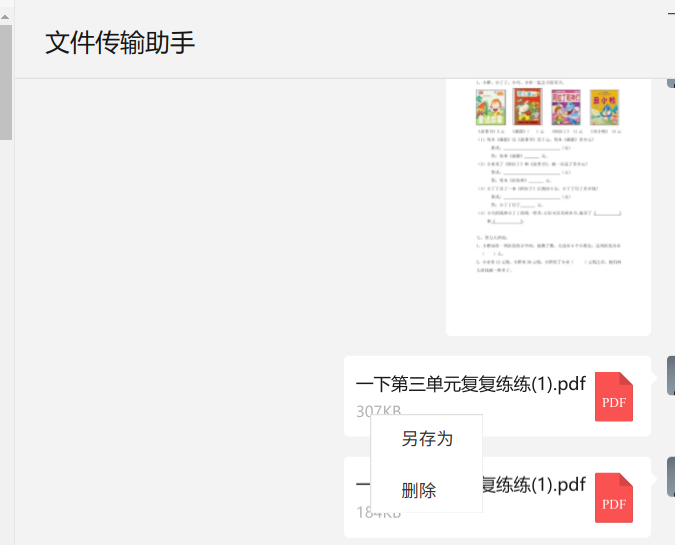
Linux原生微信右键只有另存为和删除两个选项。

 deepin
 /home/系统用户名/Documents/WeChat Files/微信账号/FileStorage
里面
deepin /home/系统用户名/Documents/WeChat Files/微信账号/FileStorage
里面
你这个路径是wine版微信的缓存路径吧。
deepin 你这个路径是wine版微信的缓存路径吧。
文件先打开一次,再系统全局搜索文件名,文件保存的路径就是微信缓存的路径
deepin 文件先打开一次,再系统全局搜索文件名,文件保存的路径就是微信缓存的路径
(1)我电脑上Linux原生微信里接收的Word和PDF,点击了没反应,也就是无法在微信里打开。
(2)文件管理器的搜索功能很鸡肋,经常搜文件就在眼前它都搜不到。
(3)我在终端中利用find /home -name “文件名”这样的命令,也搜不到微信接收的文件。
deepin 算了,linux原生微信打不开接收的文件,估计该微信连缓存功能都没上。看应用商店评论区,都在骂这款微信功能太简单。

 deepin
 算了,linux原生微信打不开接收的文件,估计该微信连缓存功能都没上。看应用商店评论区,都在骂这款微信功能太简单。
~/.config/下吧应该
不记得了
deepin上能用的那个微信Linux是我做的,然而我自己都忍不下去用wine了
deepin ~/.config/下吧应该
不记得了
deepin上能用的那个微信Linux是我做的,然而我自己都忍不下去用wine了
感谢,确实在.config文件夹。
具体路径:~/.config/weixin/wechat/users/账号/message/cache里面
 deepin
 ~/.config/下吧应该
不记得了
deepin上能用的那个微信Linux是我做的,然而我自己都忍不下去用wine了
大神牛逼~
Popular Ranking
ChangePopular Events
More


 A bug with the language select
各位大佬,请问linux版原生微信缓存的聊天文件、图片在哪个文件夹?