

 中文
中文 
zccrs deepin
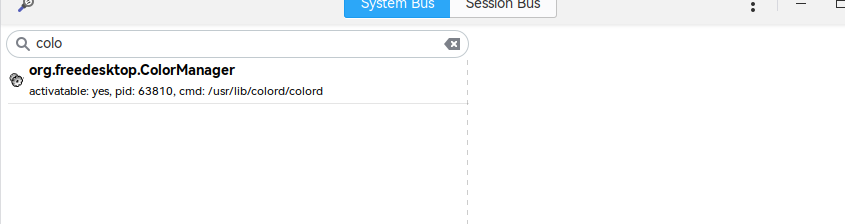
2022-04-11 22:44 deepin colord 安装了吗,用d-feet工具看一下org.freedesktop.ColorManager是不是在运行
Reply Like 0 View the author
 deepin
 colord 安装了吗,用d-feet工具看一下org.freedesktop.ColorManager是不是在运行

 deepin
 colord 安装了吗,用d-feet工具看一下org.freedesktop.ColorManager是不是在运行
安装完成后,还是没有用
deepin 安装完成后,还是没有用
看下报错信息还是不是一样的
deepin 这玩意自动保存在数据盘的PDF文件夹,你找找,开始我也没找到
 deepin
  deepin
 Popular Ranking
ChangePopular Events
More


 A bug with the language select
在使用wps或者chrome中使用打印功能,选择虚拟的PDF的打印机打印文件时,文件管理器会提示打印成功,但是在用户目录下的pdf文件夹下没有生成文件,
/var/log/cups/error_log日志
/var/log/cups/
on Apr 11 10:13:03 2022 [STATUS] PDF creation successfully finished for callmain
Mon Apr 11 10:15:11 2022 [DEBUG] *** Final Configuration ***
Mon Apr 11 10:15:11 2022 [DEBUG] AnonDirName = "/var/spool/cups-pdf/ANONYMOUS"
Mon Apr 11 10:15:11 2022 [DEBUG] AnonUser = "nobody"
Mon Apr 11 10:15:11 2022 [DEBUG] GhostScript = "/usr/bin/gs"
Mon Apr 11 10:15:11 2022 [DEBUG] GSCall = "%s -q -dCompatibilityLevel=%s -dNOPAUSE -dBATCH -dSAFER -sDEVICE=
pdfwrite -sOutputFile="%s" -dAutoRotatePages=/PageByPage -dAutoFilterColorImages=false -dColorImageFilter=/FlateEncode -d
PDFSETTINGS=/prepress -c .setpdfwrite -f %s"
Mon Apr 11 10:15:11 2022 [DEBUG] Grp = "lpadmin"
Mon Apr 11 10:15:11 2022 [DEBUG] GSTmp = "TMPDIR=/var/tmp"
Mon Apr 11 10:15:11 2022 [DEBUG] Log = "/var/log/cups"
Mon Apr 11 10:15:11 2022 [DEBUG] PDFVer = "1.5"
Mon Apr 11 10:15:11 2022 [DEBUG] PostProcessing = ""
Mon Apr 11 10:15:11 2022 [DEBUG] Out = "${HOME}/PDF"
Mon Apr 11 10:15:11 2022 [DEBUG] Spool = "/var/spool/cups-pdf/SPOOL"
Mon Apr 11 10:15:11 2022 [DEBUG] UserPrefix = ""
Mon Apr 11 10:15:11 2022 [DEBUG] RemovePrefix = ""
Mon Apr 11 10:15:11 2022 [DEBUG] OutExtension = "pdf"
Mon Apr 11 10:15:11 2022 [DEBUG] Cut = 3
Mon Apr 11 10:15:11 2022 [DEBUG] Truncate = 64
Mon Apr 11 10:15:11 2022 [DEBUG] DirPrefix = 0
Mon Apr 11 10:15:11 2022 [DEBUG] Label = 2
Mon Apr 11 10:15:11 2022 [DEBUG] LogType = 7
Mon Apr 11 10:15:11 2022 [DEBUG] LowerCase = 1
Mon Apr 11 10:15:11 2022 [DEBUG] TitlePref = 0
Mon Apr 11 10:15:11 2022 [DEBUG] DecodeHexStrings = 1
Mon Apr 11 10:15:11 2022 [DEBUG] FixNewlines = 0
Mon Apr 11 10:15:11 2022 [DEBUG] AllowUnsafeOptions = 0
Mon Apr 11 10:15:11 2022 [DEBUG] AnonUMask = 0000
Mon Apr 11 10:15:11 2022 [DEBUG] UserUMask = 0077
Mon Apr 11 10:15:11 2022 [DEBUG] *** End of Configuration ***
Mon Apr 11 10:15:11 2022 [DEBUG] set new gid: lpadmin
Mon Apr 11 10:15:11 2022 [DEBUG] initialization finished: v3.0.1
Mon Apr 11 10:15:11 2022 [DEBUG] user identified: callmain
Mon Apr 11 10:15:11 2022 [DEBUG] output directory name generated: /home/XXXX/PDF
Mon Apr 11 10:15:11 2022 [DEBUG] user information prepared
Mon Apr 11 10:15:11 2022 [DEBUG] spoolfile name created: /var/spool/cups-pdf/SPOOL/cups2pdf-20236
Mon Apr 11 10:15:11 2022 [DEBUG] source stream ready
Mon Apr 11 10:15:11 2022 [DEBUG] destination stream ready: /var/spool/cups-pdf/SPOOL/cups2pdf-20236
Mon Apr 11 10:15:11 2022 [DEBUG] owner set for spoolfile: /var/spool/cups-pdf/SPOOL/cups2pdf-20236
Mon Apr 11 10:15:11 2022 [DEBUG] using traditional fgets
Mon Apr 11 10:15:14 2022 [DEBUG] found beginning of postscript code: %!PS-Adobe-3.0
Mon Apr 11 10:15:14 2022 [DEBUG] now extracting postscript code
Mon Apr 11 10:15:14 2022 [DEBUG] found title in ps code: (\346\234\211\346\262\241\346\234\211PDF\346\211\223\345\215\26
0\346\234\272\357\274\237\357\274\215\350\256\272\345\235\233\357\274\215\346\267\261\345\272\246\347\247\221\346\212\200
)
PDFSETTINGS=/prepress -c .setpdfwrite -f %s
Mon Apr 11 10:15:14 2022 [DEBUG] found end of postscript code: %%EOF
Mon Apr 11 10:15:14 2022 [DEBUG] all data written to spoolfile: /var/spool/cups-pdf/SPOOL/cups2pdf-20236
Mon Apr 11 10:15:14 2022 [DEBUG] trying to use PS title: (\346\234\211\346\262\241\346\234\211PDF\346\211\223\345\215\26
0\346\234\272\357\274\237\357\274\215\350\256\272\345\235\233\357\274\215\346\267\261\345\272\246\347\247\221\346\212\200
)
PDFSETTINGS=/prepress -c .setpdfwrite -f %s
Mon Apr 11 10:15:14 2022 [STATUS] ***Experimental Option: DecodeHexStrings
Mon Apr 11 10:15:14 2022 [DEBUG] checking for hex strings: (\346\234\211\346\262\241\346\234\211PDF\346\211\223\345\215
260\346\234\272\357\274\237\357\274\215\350\256\272\345\235\233\357\274\215\346\267\261\345\272\246\347\247\221\346\212\2
00)
PDFSETTINGS=/prepress -c .setpdfwrite -f %s
Mon Apr 11 10:15:14 2022 [DEBUG] not a hex string, has no start marker: (\346\234\211\346\262\241\346\234\211PDF\346\211
\223\345\215\260\346\234\272\357\274\237\357\274\215\350\256\272\345\235\233\357\274\215\346\267\261\345\272\246\347\247
221\346\212\200)
PDFSETTINGS=/prepress -c .setpdfwrite -f %s
Mon Apr 11 10:15:14 2022 [DEBUG] calling alternate_replace_string
Mon Apr 11 10:15:14 2022 [DEBUG] removing alternate special characters from title: (\346\234\211\346\262\241\346\234\211
PDF\346\211\223\345\215\260\346\234\272\357\274\237\357\274\215\350\256\272\345\235\233\357\274\215\346\267\261\345\272\2
46\347\247\221\346\212\200)
PDFSETTINGS=/prepress -c .setpdfwrite -f %s
Mon Apr 11 10:15:14 2022 [DEBUG] removing leading _ from title: 346_234_211_346_262_241_346_234_211PDF_346_211_223_345
215_260_346_234_272_357_274_237_357_274_215_350_256_272_345_235_233_357_274_215_346_267_261_345_272_246_347_247_221_346
212_200__PDFSETTINGS__prepress-c.setpdfwrite_-f__s
Mon Apr 11 10:15:14 2022 [DEBUG] truncating title: 346_234_211_346_262_241_346_234_211PDF_346_211_223_345_215_260_3
Mon Apr 11 10:15:14 2022 [DEBUG] title successfully retrieved: 346_234_211_346_262_241_346_234_211PDF_346_211_223_345_21
5_260_3-job_22
Mon Apr 11 10:15:14 2022 [DEBUG] input data read from stdin
Mon Apr 11 10:15:14 2022 [DEBUG] output filename created: /home/XXXX/PDF/346_234_211_346_262_241_346_234_211PDF_346_
211_223_345_215_260_3-job_22.pdf
Mon Apr 11 10:15:14 2022 [DEBUG] ghostscript commandline built: /usr/bin/gs -q -dCompatibilityLevel=1.5 -dNOPAUSE -dBATC
H -dSAFER -sDEVICE=pdfwrite -sOutputFile="/home/XXXX/PDF/346_234_211_346_262_241_346_234_211PDF_346_211_223_345_215_2
60_3-job_22.pdf" -dAutoRotatePages=/PageByPage -dAutoFilterColorImages=false -dColorImageFilter=/FlateEncode -dPDFSETTING
S=/prepress -c .setpdfwrite -f /var/spool/cups-pdf/SPOOL/cups2pdf-20236
Mon Apr 11 10:15:14 2022 [DEBUG] output file unlinked: /home/XXXX/PDF/346_234_211_346_262_241_346_234_211PDF_346_211
_223_345_215_260_3-job_22.pdf
Mon Apr 11 10:15:14 2022 [DEBUG] TMPDIR set for GhostScript: /var/tmp
Mon Apr 11 10:15:14 2022 [DEBUG] waiting for child to exit
Mon Apr 11 10:15:14 2022 [DEBUG] entering child process
Mon Apr 11 10:15:14 2022 [DEBUG] GID set for current user
Mon Apr 11 10:15:14 2022 [DEBUG] supplementary groups set for current user
Mon Apr 11 10:15:14 2022 [DEBUG] UID set for current user: XXXX
Mon Apr 11 10:15:14 2022 [DEBUG] ghostscript has finished: 256
Mon Apr 11 10:15:14 2022 [ERROR] failed to set file mode for PDF file: /home/XXXX/PDF/346_234_211_346_262_241_346_23
4_211PDF_346_211_223_345_215_260_3-job_22.pdf (non fatal)
Mon Apr 11 10:15:14 2022 [DEBUG] ERRNO: 2 (No such file or directory)
Mon Apr 11 10:15:14 2022 [DEBUG] no postprocessing
Mon Apr 11 10:15:14 2022 [DEBUG] spoolfile unlinked: /var/spool/cups-pdf/SPOOL/cups2pdf-20236
Mon Apr 11 10:15:14 2022 [DEBUG] all memory has been freed
Mon Apr 11 10:15:14 2022 [STATUS] PDF creation successfully finished for XXXX
问题解决:
/var/tmp目录没有权限,修改/etc/cups/cups-pdf.conf,修改临时目录为有权限写的目录