

 中文
中文 
andktan deepin
2022-04-09 05:32 deepin 
Reply Like 1 View the author
 deepin

 deepin
 我这也遇到了
不知道原因
deepin 我这也遇到了
不知道原因
 deepin
为什么呢,我的两天电脑都出现同样的问题,每次输入都要等一段时间
deepin 为什么呢,我的两天电脑都出现同样的问题,每次输入都要等一段时间
两台电脑
deepin 证明我的没问题
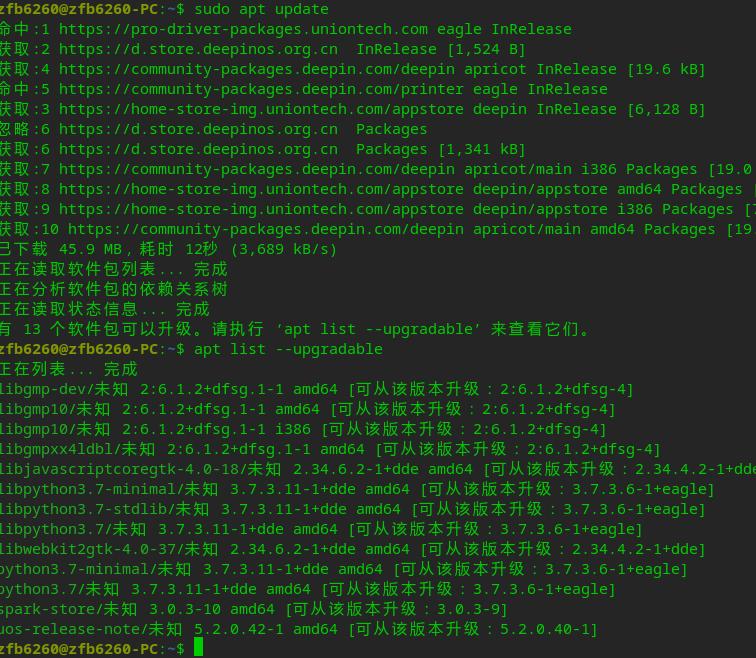

 deepin
 查看一下账户查找次序:
$ cat /etc/nsswitch.conf
# /etc/nsswitch.conf
#
# Example configuration of GNU Name Service Switch functionality.
# If you have the `glibc-doc-reference' and `info' packages installed, try:
# `info libc "Name Service Switch"' for information about this file.

passwd:         files
group:          files
shadow:         files
gshadow:        files

hosts:          files dns
networks:       files
.....
查看域名解析服务器是否无法到达:
$ cat /etc/resolv.conf
# Generated by NetworkManager
search home
nameserver 192.x.x.x
nameserver 10.10.10.1
另外可以用strace查看是否有些文件无法读取.
sudo apt install strace

strace git ...
strace sudo ...
strace pip ...证明我的没问题
我之前也问题升了20.5 就开始会了
deepin 查看一下账户查找次序:
$ cat /etc/nsswitch.conf
# /etc/nsswitch.conf
#
# Example configuration of GNU Name Service Switch functionality.
# If you have the `glibc-doc-reference' and `info' packages installed, try:
# `info libc "Name Service Switch"' for information about this file.

passwd:         files
group:          files
shadow:         files
gshadow:        files

hosts:          files dns
networks:       files
.....
查看域名解析服务器是否无法到达:
$ cat /etc/resolv.conf
# Generated by NetworkManager
search home
nameserver 192.x.x.x
nameserver 10.10.10.1
我和这个没有关系把我打个sudo docker ps 都卡4,5秒
打个sudo chmod 755 -R ./* 也要卡个4,5秒才有反应
deepin 查看一下账户查找次序:
$ cat /etc/nsswitch.conf
# /etc/nsswitch.conf
#
# Example configuration of GNU Name Service Switch functionality.
# If you have the `glibc-doc-reference' and `info' packages installed, try:
# `info libc "Name Service Switch"' for information about this file.

passwd:         files
group:          files
shadow:         files
gshadow:        files

hosts:          files dns
networks:       files
.....
查看域名解析服务器是否无法到达:
$ cat /etc/resolv.conf
# Generated by NetworkManager
search home
nameserver 192.x.x.x
nameserver 10.10.10.1
我和这个没有关系把我打个sudo docker ps 都卡4,5秒
打个sudo chmod 755 -R ./* 也要卡个4,5秒才有反应
deepin 查看一下账户查找次序:
$ cat /etc/nsswitch.conf
# /etc/nsswitch.conf
#
# Example configuration of GNU Name Service Switch functionality.
# If you have the `glibc-doc-reference' and `info' packages installed, try:
# `info libc "Name Service Switch"' for information about this file.

passwd:         files
group:          files
shadow:         files
gshadow:        files

hosts:          files dns
networks:       files
.....
查看域名解析服务器是否无法到达:
$ cat /etc/resolv.conf
# Generated by NetworkManager
search home
nameserver 192.x.x.x
nameserver 10.10.10.1
我和这个没有关系把我打个sudo docker ps 都卡4,5秒
打个sudo chmod 755 -R ./* 也要卡个4,5秒才有反应
 deepin
 是不是不加 sudo 的命令速度会快一点?
deepin 是不是不加 sudo 的命令速度会快一点?
不加sudo好像都正常
deepin 不加sudo好像都正常
应该是 hosts 的问题
https://blog.csdn.net/charles_neil/article/details/69488055
https://www.escapelife.site/posts/3ee4a863.html
deepin 应该是 hosts 的问题
https://blog.csdn.net/charles_neil/article/details/69488055
https://www.escapelife.site/posts/3ee4a863.html
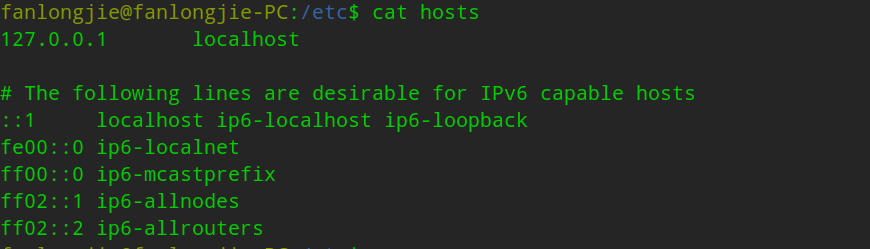 这样吗,但是效果好像好一些了
deepin 这样吗,但是效果好像好一些了
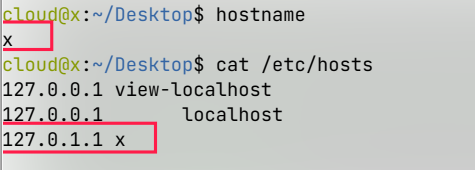
这样
deepin
这样
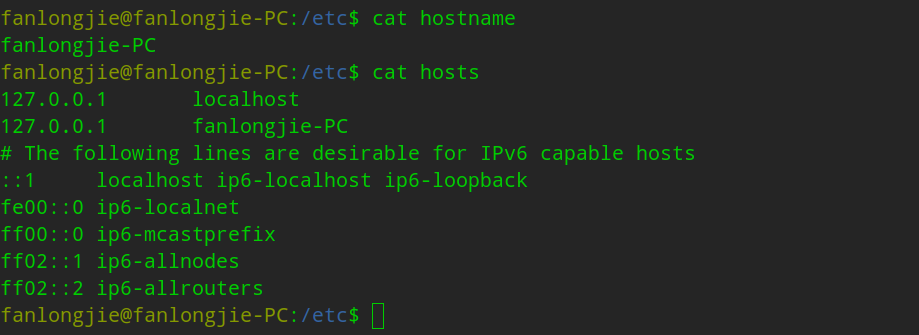
deepin
这样
可以了现在的速度基本没啥问题了
deepin 如果在/etc/nsswitch.conf里passwd, group, shadow, gshadow的值为compat, 系统会首先到ldap,账户服务器上去寻找账户信息,然后查看本地账户信息。如果没有设置ldap, 或是账户服务器,从远程服务器查看账户的过程的时间就是用户等待的时间。 这个时间是timeout的时间。 在远程服务器上查看账户失败以后, 机器再查看本机上的账户。
/etc/nsswitch.conf定义里查看账户,组的优先顺序。 为了系统的运行性能,查看的顺序永远都应该是首选查看本地账户,然后再查看远程用户,而且本机账户优先,即使有同名的账户。
root账户下没有类似等待时间是因为root永远都是本机/本地账户,系统不会到远程的账户服务器上查看root账户。
如果机器确实是设置了远端账户服务器,而且使用账户服务器,那么就不会出现等待时间了,因为远程服务器,很快就会回应该账户的信息。 但是如果因为网络,或是服务器的原因,连接不上的时候,也会出现等待的问题。
要把passwd, group, shadow, gshadow设置为 files compat或着是files就不会再有问题了。 见我上面的帖子。
Popular Ranking
ChangePopular Events
More


 A bug with the language select
最近更新了20.5版本后,发现我在终端输入sudo,pip,git等命令时,终端出现了很长的无响应时间!!!!!