

 中文
中文 
g3tak deepin
2022-04-06 21:48 deepin 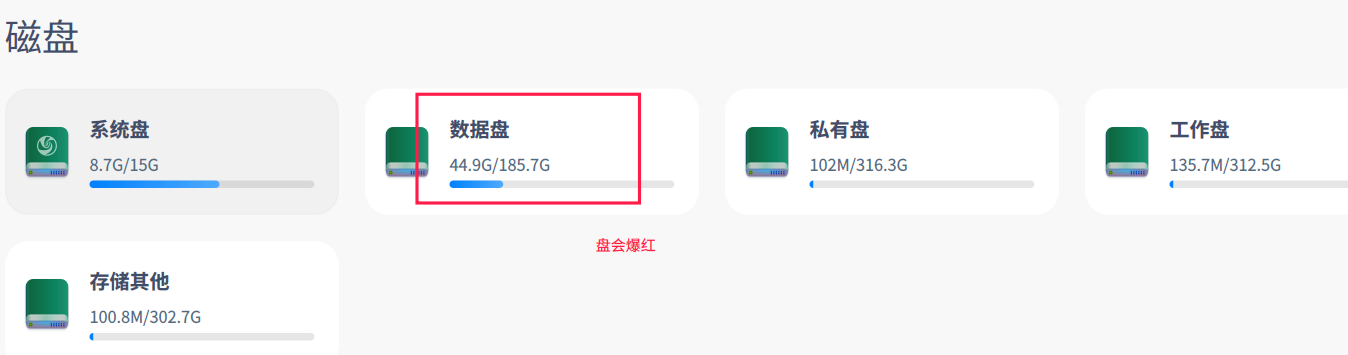 重装系统,手动分区【已解决】
Reply Like 0 View the author
deepin 重装系统,手动分区【已解决】
deepin 安装时,是采取默认的全盘安装的,磁盘是256G的SSD + 1T的HDD
 deepin
 deepin自动分这么多区干嘛,这是我双系统自己分的区。

deepin 从图上看不出有什么问题,如果data盘会红,可能是安卓造成的。

 deepin
 看一下哪个文件夹占用了那么多空间。

 deepin
 linux系统,搞这么多分区。思路比较清奇
 deepin
 其实单独一个数据盘分区还是有必要的。
/分区保存系统文件,
/home分区保存用户配置,
/data保存数据资料。
以前我把数据资料直接放在/home分区下,后来发现有时候需要重置home文件夹的用户配置文件,还得转移备份数据资料。所以现在把数据资料也分开了。
 deepin
 可以搜一下“Linux 查找大文件”的命令,看看有没有什么异常占用的文件

 deepin
 后续怎么说 怎么解决呀
怎么解决呀
Popular Ranking
ChangePopular Events
More


 A bug with the language select
问题/建议描述
问题如何重现
问题重现频率