

 中文
中文 

MeowVing deepin
2022-04-05 18:34 deepin 首先,安装深度“安全中心”。
终端执行:
sudo apt install deepin-defender
输入密码后,按“y”-“ENTER”确认安装。完成后打开——
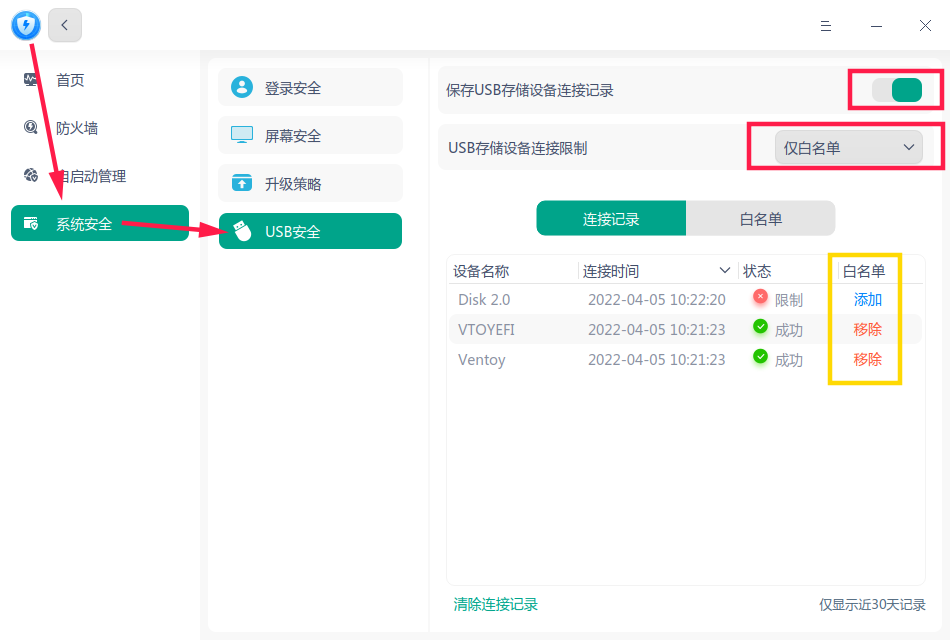
如上图,转到“USB安全”,先打开“保存 USB 存储设备连接记录”开关,插入你允许使用的特定U盘,它会出现在下面的表格中。
按“添加”按钮,验证密码添加到白名单,再将上面的选项改为“仅白名单”。
此后,如果插入了白名单以外的 USB 设备,就会如下提示且无法访问:

除非对方知道这台电脑的密码,否则该设备无法加入白名单。
Reply Like 3 View the author





 A bug with the language select


请问怎样设置deepin系统,让电脑只能使用特定U盘?