

 中文
中文 
大多时候吃素 deepin
2022-03-24 22:28 deepin https://bbs.deepin.org/phone/zh/post/232826
第3条备注里边写啦
Reply Like 0 View the author
 deepin
 https://bbs.deepin.org/phone/zh/post/232826
第3条备注里边写啦

 deepin
 好的,谢谢
 deepin
 升级内核的正确姿势如下
1: https://kernel.ubuntu.com/~kernel-ppa/mainline/ 先找个适合的内核版本 , 这个地址是乌班图的,,
2: 下载内核文件,以5.16.17为例
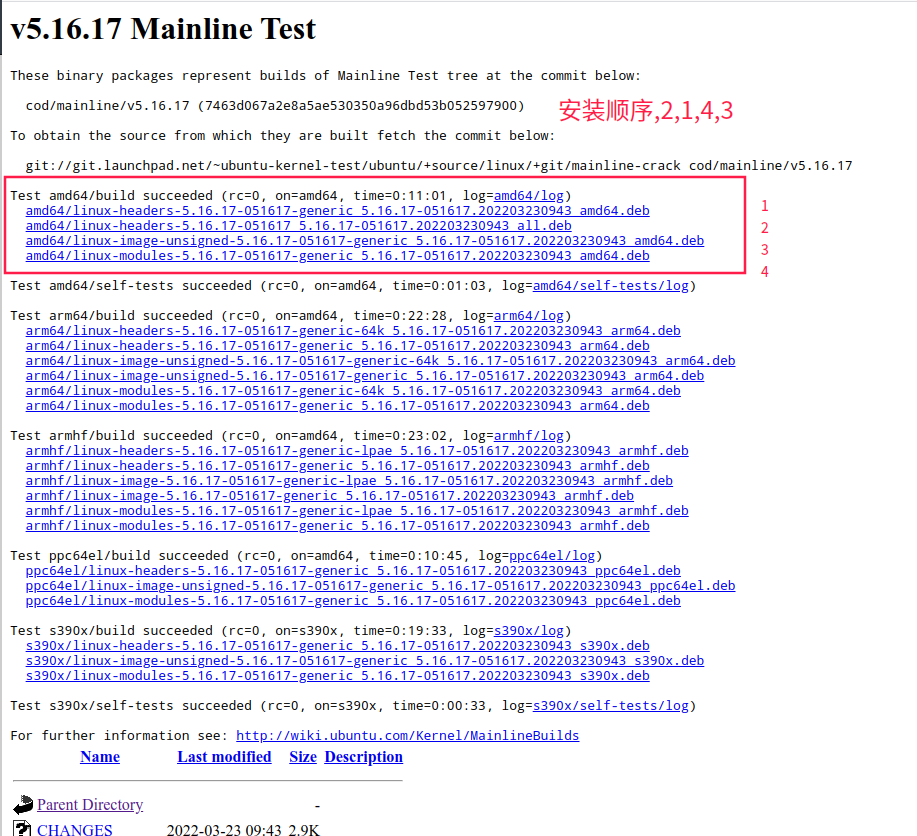
3: 安装命令 sudo dpkg -i *****.deb 注意顺序,安装完成后,重启就好了.
写在最后的话
TimeShift 先备份再安装,先备份再安装,先备份再安装!!!
重要的事情说三遍
 deepin
 升级内核的正确姿势如下
1: https://kernel.ubuntu.com/~kernel-ppa/mainline/ 先找个适合的内核版本 , 这个地址是乌班图的,,
2: 下载内核文件,以5.16.17为例
3: 安装命令 sudo dpkg -i *****.deb 注意顺序,安装完成后,重启就好了.
写在最后的话
TimeShift 先备份再安装,先备份再安装,先备份再安装!!!
重要的事情说三遍
你的那个命令,不是一下子四个文件都安装了,哪有什么顺序呀?
deepin 升级内核的正确姿势如下
1: https://kernel.ubuntu.com/~kernel-ppa/mainline/ 先找个适合的内核版本 , 这个地址是乌班图的,,
2: 下载内核文件,以5.16.17为例
3: 安装命令 sudo dpkg -i *****.deb 注意顺序,安装完成后,重启就好了.
写在最后的话
TimeShift 先备份再安装,先备份再安装,先备份再安装!!!
重要的事情说三遍
这个安装方法,十有八九要失败。Deepin好像已经不能使用ubuntu的内核。
sudo apt-cache search linux-image 找给比较新的内核试试看。
deepin 这个安装方法,十有八九要失败。Deepin好像已经不能使用ubuntu的内核。
sudo apt-cache search linux-image 找给比较新的内核试试看。
呵呵,没有试过可别太肯定哟
deepin sudo apt install linux-image-deepin-stable-amd64 linux-headers-deepin-stable-amd64 这个命令升级内核就好了,我的是这么做的,可以了,暂时没发现什么大毛病。

 deepin
 呵呵,没有试过可别太肯定哟
虽然不排除这个方法“能用”,但 deepin 不会支持第三方内核,ubuntu 也不会支持其他发行版用 ubuntu 的内核,结果就是出问题的时候也不知道该找谁
 deepin
 升级内核的正确姿势如下
1: https://kernel.ubuntu.com/~kernel-ppa/mainline/ 先找个适合的内核版本 , 这个地址是乌班图的,,
2: 下载内核文件,以5.16.17为例
3: 安装命令 sudo dpkg -i *****.deb 注意顺序,安装完成后,重启就好了.
写在最后的话
TimeShift 先备份再安装,先备份再安装,先备份再安装!!!
重要的事情说三遍
你好,有没有深度的内核下载地址?求
Popular Ranking
ChangePopular Events
More


 A bug with the language select
我的新电脑是Dell Vostro,12代处理器,新系统安装之后,不识别蓝牙和无线驱动,如何才能升级到最新的内核呢?