

 中文
中文 
云的眼泪 deepin
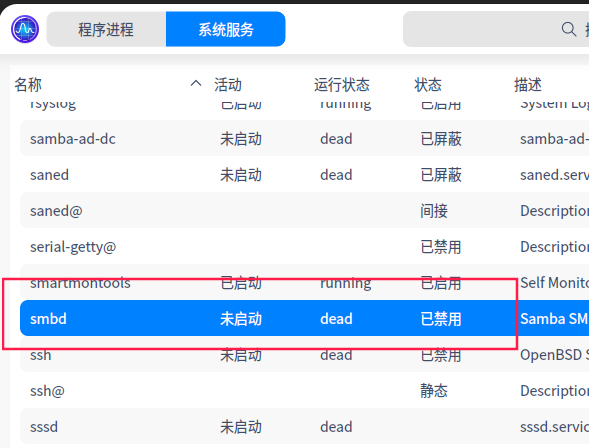
2022-03-23 19:40 deepin 打开smb服务看看,默认是禁用的。
Reply Like 0 View the author
 deepin
 打开smb服务看看,默认是禁用的。

 deepin
 Get了,系统服务可以操作

 deepin
 smb://ip 直接访问目标IP 可以访问win的共享
自建一个脚本
#!/bin/bash
dde-file-manager smb://目标IP
发送到桌面上,,可以直接访问
 deepin
 打开smb服务看看,默认是禁用的。
好像文件管理器还是没变化
deepin 系统文件管理器里的"网络邻居"受 samba 协议版本影响不能直接连接, 其他的文件管理器在这个功能上也是一致的.
deepin smb://ip 直接访问目标IP 可以访问win的共享
自建一个脚本
#!/bin/bash
dde-file-manager smb://目标IP
发送到桌面上,,可以直接访问
怎么自建一个脚本啊
deepin 系统文件管理器里的"网络邻居"受 samba 协议版本影响不能直接连接, 其他的文件管理器在这个功能上也是一致的.
ubuntu可以正常浏览
deepin ubuntu可以正常浏览
我说的我觉得已经很严谨了, 我没说 ubuntu 不行. 我说受限与当前 deepin 的 samba 版本, 目前不能支持网络邻居中的共享目录挂载.
deepin 怎么自建一个脚本啊
...............
1:新建 空白文档
2:输入内容
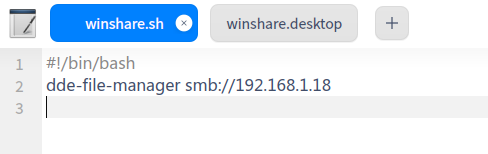
目标IP改为共享机IP
3:文档另存到 /home/<自己的用户名>/xxxxxx**.sh**
4:打开终端,给自己建 的那个文档赋权 chmod +x /home/<自己的用户名>/xxxxxx.sh
5:桌面新建空白文档.
6:输入如下内容
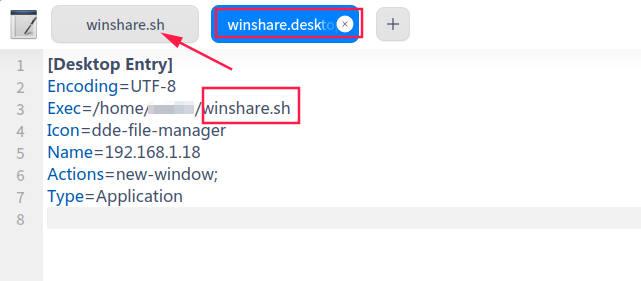
7另存为xxxxxx.desktop
deepin ...............
1:新建 空白文档
2:输入内容
目标IP改为共享机IP
3:文档另存到 /home/<自己的用户名>/xxxxxx**.sh**
4:打开终端,给自己建 的那个文档赋权 chmod +x /home/<自己的用户名>/xxxxxx.sh
5:桌面新建空白文档.
6:输入如下内容
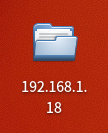
7另存为xxxxxx.desktop
尝试了,非常好,解决了一直困扰我的问题。
Popular Ranking
ChangePopular Events
More


 A bug with the language select
今天换了下ubuntu,发现ubuntu可以发现到同一办公室的电脑共享和我的玩客云设备。
deepin那个网络邻居好像是假一样,啥都没有