

 中文
中文 
神末shenmo deepin
2022-03-13 03:50 deepin Spark-App
Q&A Team
期待
Reply Like 1 View the author
 deepin
 期待
 deepin
 休眠后有一定概率无法使用键盘,会失效

 deepin
 临时解决方案: sudo apt install linux-image-deepin-stable-amd64 linux-headers-deepin-stable-amd64

 deepin
 临时解决方案: sudo apt install linux-image-deepin-stable-amd64 linux-headers-deepin-stable-amd64
切换回 5.10.83 也可以

 deepin
deepin  deepin
 希望尽快解决,deepin越来越好!!!
deepin 呃,为啥我 sudo apt-get update 一直没有下载呢?之前每次有更新都会下载一个 19M 的东西
 deepin
 没有收到更新,使用临时解决方案,发热严重,笔记本啥也不运行风扇没停过
deepin 没有收到更新,使用临时解决方案,发热严重,笔记本啥也不运行风扇没停过
sudo apt update
命中:2 https://community-packages.deepin.com/deepin apricot InRelease
命中:3 https://community-packages.deepin.com/printer eagle InRelease
命中:1 https://home-store-img.uniontech.com/appstore deepin InRelease
命中:4 https://d.store.deepinos.org.cn InRelease
正在读取软件包列表... 完成
正在分析软件包的依赖关系树
正在读取状态信息... 完成
所有软件包均为最新。
deepin 刚刚通过升级重启了,没有自动启动起来。要按电源键重启下。
deepin 刚刚通过升级重启了,没有自动启动起来。要按电源键重启下。
重启后,进入系统了,再通过休眠操作看看有没有根本上解决了问题。
deepin 这个问题,其实它也不是最近一次更新才出现的,以前也有过,只是没有那么多,也没有那么严重而已。
不知道大家更新了之后,现在待机唤醒是否都正常了呢?我还没有重装Deepin,希望大家更新过的(尤其是使用AMD处理器的笔记本用户)告诉我一声。
 deepin
 切换回 5.10.83 也可以
切换回去无线网卡直接不识别了
deepin 更新后,系统空闲自动休眠后还是无法唤醒,只能是按重启键重新启动系统。希望技术人员继续找出解决的办法。
deepin 更新后,系统空闲自动休眠后还是无法唤醒,只能是按重启键重新启动系统。希望技术人员继续找出解决的办法。
用上边的终端命令行模式重新更新了下,看看效果,更新后,点重启还是无法自动进行启动系统,还得按重启键启动起来看看。继续测试中。。
 deepin
 现在休眠后仍然无法唤醒,开机还有dmesg报错,不知道是不是和这个报错相关
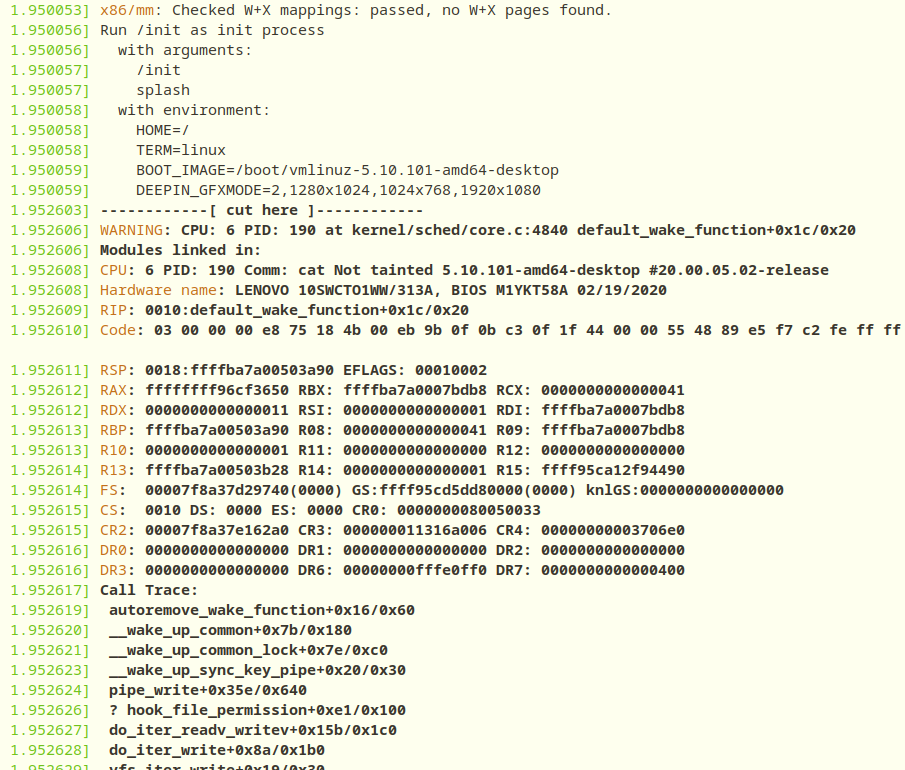
deepin 现在休眠后仍然无法唤醒,开机还有dmesg报错,不知道是不是和这个报错相关
使用上方临时方案后,开机dmesg报错消失
deepin 
 deepin
 请问我手动安装的,已经开了swap且swap大小大于内存大小,为什么还是没有休眠功能
Popular Ranking
ChangePopular Events
More


 A bug with the language select
最近一次系统更新有部分用户遇到休眠后无法唤醒的问题,对此我们深表歉意!
对于大家的反馈我们高度重视,目前我们的技术小伙伴正在全面修复!
目前问题已解决,更新重启即可,感谢大家的理解和支持!