

 中文
中文 
liwl deepin
2022-03-10 23:13 deepin 是虚拟机安装吗?
efi分区创建了嘛?
Reply Like 0 View the author
 deepin
 是虚拟机安装吗?
efi分区创建了嘛?

 deepin
 是虚拟机安装吗?
efi分区创建了嘛?
不是虚拟 。 efi分区是啥 ,是不是 什么efi4 ,好像安装的时候问了,这个要自己分吗
deepin 不是虚拟 。 efi分区是啥 ,是不是 什么efi4 ,好像安装的时候问了,这个要自己分吗
看日志是efi报错。
你直接分个efi分区,默认大小就可以了
然后分boot分区,大小默认。根分区/
home分区,和swap可以分也可以不分。
如果分了home分区,大小给大一点,剩下的给根分区就行了
如果不分Home分区,都给根分区就行了。
swap分区,一般是内存2倍,(也不知道哪来的歪理)
deepin 看日志是efi报错。
你直接分个efi分区,默认大小就可以了
然后分boot分区,大小默认。根分区/
home分区,和swap可以分也可以不分。
如果分了home分区,大小给大一点,剩下的给根分区就行了
如果不分Home分区,都给根分区就行了。
swap分区,一般是内存2倍,(也不知道哪来的歪理)
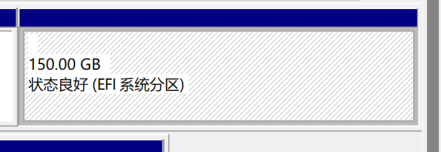
我看我之前分的区变成这样了 没法操作,怎么破,之前是个啥都没设定的分区。
deepin
我看我之前分的区变成这样了 没法操作,怎么破,之前是个啥都没设定的分区。
啊,这个啊,是直接分了一部分磁盘空间来安装deepin吗?这个没操作过,不敢妄言。感觉你把全部空间都用做efi分区了呢
deepin 啊,这个啊,是直接分了一部分磁盘空间来安装deepin吗?这个没操作过,不敢妄言。感觉你把全部空间都用做efi分区了呢
我分了一部分固态的空间,然后这部分我没设置,这个是安装的时候系统设置成这个格式的,,,,,

 deepin
我看我之前分的区变成这样了 没法操作,怎么破,之前是个啥都没设定的分区。
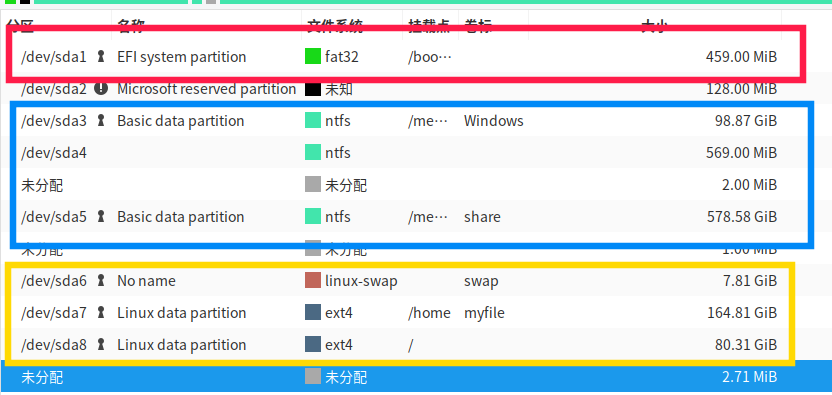
这个efi有点大,一般为300M上下,其他可以让dp分区一般为ext4

 deepin
 我看到个 secure boot ,是不是没关闭
deepin 我看到个 secure boot ,是不是没关闭
极有可能,我没关过这东西
deepin 我看到个 secure boot ,是不是没关闭
关了之后又试了一遍 还是不行。。。
deepin 啊,这个啊,是直接分了一部分磁盘空间来安装deepin吗?这个没操作过,不敢妄言。感觉你把全部空间都用做efi分区了呢
不知道 我看别人就是这么安装的直接成功的

 deepin
 把安全启动关掉,UEFI启动对于GPT磁盘,https://www.bilibili.com/video/BV1ZQ4y1C7n3
 deepin
 如果要装双系统,现在windows上划出一块磁盘空间,直接装的话会覆盖系统,建议先保存好数据
deepin 如果要装双系统,现在windows上划出一块磁盘空间,直接装的话会覆盖系统,建议先保存好数据
这个我分了
deepin 把安全启动关掉,UEFI启动对于GPT磁盘,https://www.bilibili.com/video/BV1ZQ4y1C7n3
搞好了,重新搞了几遍就好了,问一下没有无线网络那个选项是因为啥,
deepin 这个efi有点大,一般为300M上下,其他可以让dp分区一般为ext4
好了 谢谢帮助!!!
deepin 我看到个 secure boot ,是不是没关闭
谢谢帮助!安装好了
deepin 如果要装双系统,现在windows上划出一块磁盘空间,直接装的话会覆盖系统,建议先保存好数据
谢谢帮助! 安装好了
deepin 是虚拟机安装吗?
efi分区创建了嘛?
谢谢帮助 安装好了

 deepin
 搞好了,重新搞了几遍就好了,问一下没有无线网络那个选项是因为啥,
没有装驱动可能,lspci |grep -i 'eth' 看一下网卡型号,然后找对应的驱动安装
Popular Ranking
ChangePopular Events
More


 A bug with the language select
电脑是联想R7000P,3060显卡,第一次搞这种东西,就分了150G给新系统用,不知道多还是少。
系统是win11 ,安装的应该是20.4 deepin 帮帮我 谢谢大佬们