浏览器打印,或者pdf查看器打印能出彩色不?会不会是驱动得问题额~
babyfengfjx
2022-03-10 16:13 Super Moderator
CQA
Reply Like 0 View the author
andktan
deepin
2022-03-10 17:30 还有墨吗
😄
Reply Like 0 View the author
云的眼泪
deepin
2022-03-10 18:09 在打印界面点高级设置,选中“彩色”
Reply Like 0 View the author
美好明天
deepin
2022-03-11 01:45 babyfengfjx:
浏览器打印,或者pdf查看器打印能出彩色不?会不会是驱动得问题额~
其他看图软件打印的都是正常的
Reply Like 0 View the author
美好明天
deepin
2022-03-11 01:45 云的眼泪:
在打印界面点高级设置,选中“彩色”
设置了没用
Reply Like 0 View the author
美好明天
deepin
2022-03-11 01:46 andktan:
还有墨吗
😄
必须的呀😄
Reply Like 0 View the author
babyfengfjx
2022-03-11 17:18 Super Moderator
CQA
美好明天:
必须的呀😄
哈哈,要的呢~
Reply Like 0 View the author
depend
deepin
2022-03-11 17:41 看图是啥版本呢
Reply Like 0 View the author
depend
deepin
2022-03-11 17:41 
Reply Like 0 View the author
美好明天
deepin
2022-03-12 22:59 depend:
看图是啥版本呢
5.8.13
Reply Like 0 View the author
babyfengfjx
2022-03-15 01:08 Super Moderator
CQA
- 老铁,这个让研发做了一个独立的程序,看通过这个应用打印出来是否OK?
使用方法:
- 先下载上面的附件,并解压,此时会得到一个“print-suport_0.1-1_amd64”的安装文件;
- 双击安装此文件;
- 执行如下命令启动:/opt/print-suport/bin/print-suport
- 启动后选择一张彩色照片,选择彩色打印,看看是否OK
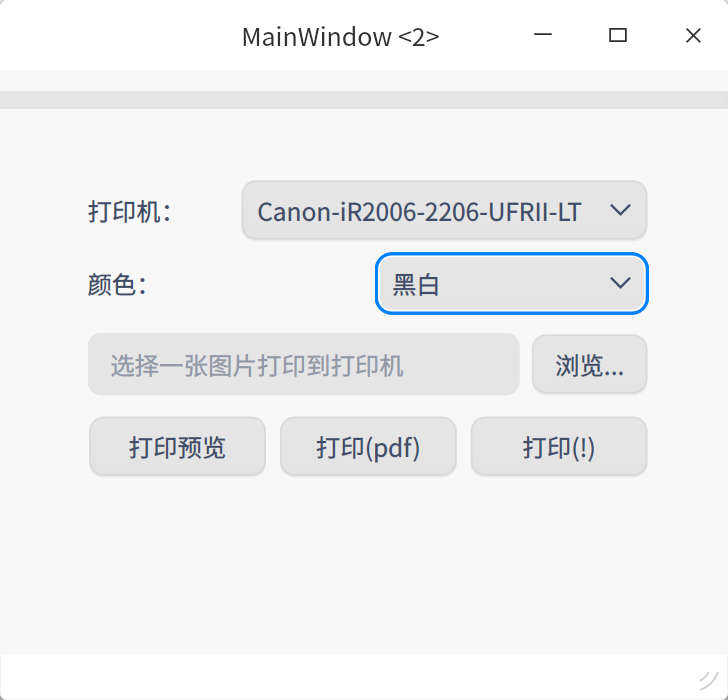
界面大概是这个样子:

Reply Like 0 View the author
depend
deepin
2022-03-15 18:35 美好明天:
5.8.13
看图的打印应该是依赖与系统的DTK打印,我具体也不太清楚他们这个
Reply Like 0 View the author
美好明天
deepin
2022-03-17 05:43 babyfengfjx:
- 老铁,这个让研发做了一个独立的程序,看通过这个应用打印出来是否OK?
使用方法:
- 先下载上面的附件,并解压,此时会得到一个“print-suport_0.1-1_amd64”的安装文件;
- 双击安装此文件;
- 执行如下命令启动:/opt/print-suport/bin/print-suport
- 启动后选择一张彩色照片,选择彩色打印,看看是否OK
界面大概是这个样子:

这个程序可以的
Reply Like 0 View the author
美好明天
deepin
2022-03-17 05:49 babyfengfjx:
- 老铁,这个让研发做了一个独立的程序,看通过这个应用打印出来是否OK?
使用方法:
- 先下载上面的附件,并解压,此时会得到一个“print-suport_0.1-1_amd64”的安装文件;
- 双击安装此文件;
- 执行如下命令启动:/opt/print-suport/bin/print-suport
- 启动后选择一张彩色照片,选择彩色打印,看看是否OK
界面大概是这个样子:

安装了怎么卸载呢
Reply Like 0 View the author
babyfengfjx
2022-03-17 05:57 Super Moderator
CQA
卸载可以直接在终端中执行: sudo apt purge print-surpot

Reply Like 0 View the author
美好明天
deepin
2022-03-17 06:00 babyfengfjx:
卸载可以直接在终端中执行: sudo apt purge print-surpot

卸载不了哇~
Reply Like 0 View the author
babyfengfjx
2022-03-17 06:03 Super Moderator
CQA
美好明天:

卸载不了哇~
那这个是包名我打错了应该,因为现在不在公司,不好直接确定,你可以打一个print 然后tab键补全一下应该会自动出来
或者换成 sudo apt remove XXX
如果还不行,可以直接删除opt下面那个目录就可以了
Reply Like 0 View the author
美好明天
deepin
2022-03-17 06:05 babyfengfjx:
那这个是包名我打错了应该,因为现在不在公司,不好直接确定,你可以打一个print 然后tab键补全一下应该会自动出来
或者换成 sudo apt remove XXX
如果还不行,可以直接删除opt下面那个目录就可以了
卸载成功了
Reply Like 0 View the author
babyfengfjx
2022-03-17 06:07 Super Moderator
CQA
美好明天:
卸载成功了
嗯嗯,好的,这个问题我们继续推进优化
Reply Like 0 View the author
babyfengfjx
2022-03-18 06:05 Super Moderator
CQA
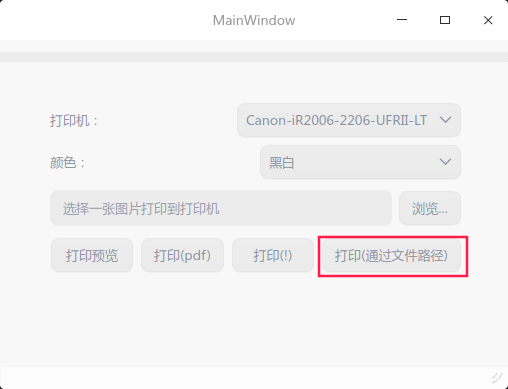
- 非常感谢老铁帮忙看试试这个版本是否打印彩色OK;
- 还是老操作法子,看看这个版本新加的一个"打印(通过文件路径)”方式打印是否正常。

Reply Like 0 View the author
Please sign in first
Popular Ranking
ChangePopular Events
More

中文 
deepin默认的看图工具打印彩色图片,输出黑白,打印机epson sl310