

 中文
中文 
望不穿这暧昧的眼 deepin
2022-03-04 04:32 deepin 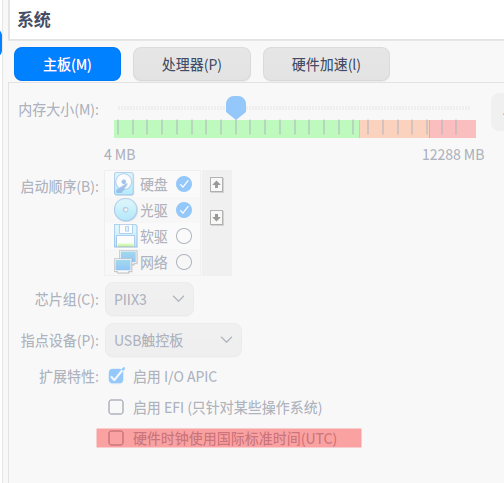
更改一下 硬件时钟 设置,看看有效果不
Reply Like 0 View the author
 deepin
更改一下 硬件时钟 设置,看看有效果不

 deepin
更改一下 硬件时钟 设置,看看有效果不
在virtual box设置?找不到设置项啊
deepin 在virtual box设置?找不到设置项啊
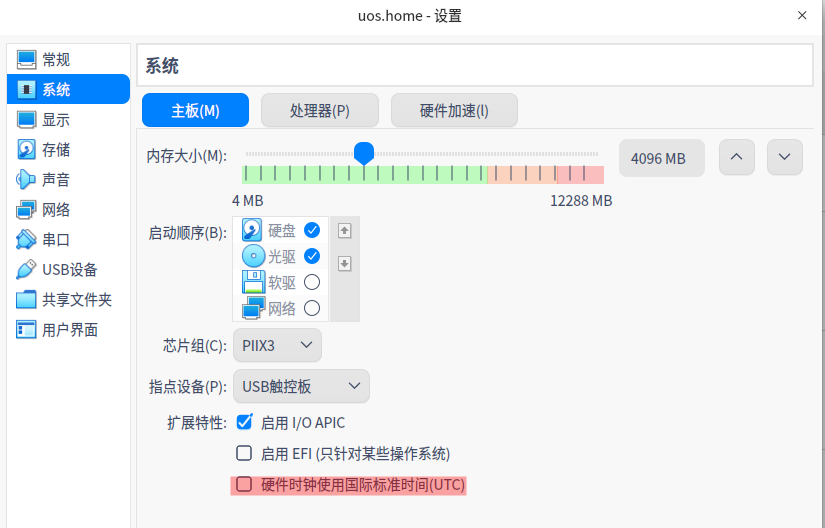
deepin
谢谢,我试试
deepin
问题解决了,非常感谢

 deepin
 你应该是windows系统安装的deepin虚拟机,你可以可以给deepin开时间同步,把deepin的时区调成utc+0就好了。因为Windows 与 Linux 看待硬件时间的方式不同。Windows 把电脑的硬件时钟(RTC)看成是本地时间,即 RTC = Local Time,Windows 会直接显示硬件时间;而 Linux 则是把电脑的硬件时钟看成 UTC 时间,即 RTC = UTC,那么 Linux 显示的时间就是硬件时间加上时区。
deepin 你应该是windows系统安装的deepin虚拟机,你可以可以给deepin开时间同步,把deepin的时区调成utc+0就好了。因为Windows 与 Linux 看待硬件时间的方式不同。Windows 把电脑的硬件时钟(RTC)看成是本地时间,即 RTC = Local Time,Windows 会直接显示硬件时间;而 Linux 则是把电脑的硬件时钟看成 UTC 时间,即 RTC = UTC,那么 Linux 显示的时间就是硬件时间加上时区。
谢谢。不是这个原因,honor网友提供的思路是正确的。
Popular Ranking
ChangePopular Events
More


 A bug with the language select
VirtualBox中安装的deepin或UOS时间显示异常,与当前时间差8小时,且控制中心“时间日期”中“自动同步配置”默认关闭,手动打开也无效。只有安装并启动NTP服务,时间才能恢复正常。终端执行timedatectl,显示如下:
$ timedatectl
Local time: 四 2022-03-03 11:50:49 CST
Universal time: 四 2022-03-03 03:50:49 UTC
RTC time: 四 2022-03-03 11:50:49
Time zone: Asia/Shanghai (CST, +0800)
System clock synchronized: no
NTP service: inactive
RTC in local TZ: yes
Warning: The system is configured to read the RTC time in the local time zone.
This mode cannot be fully supported. It will create various problems
with time zone changes and daylight saving time adjustments. The RTC
time is never updated, it relies on external facilities to maintain it.
If at all possible, use RTC in UTC by calling
'timedatectl set-local-rtc 0'.
实体机中安装deepin或UOS,执行timedatectl显示
System clock synchronized: yes
NTP service: active
试过在VirtualBox中安装ubuntukylin,时间没有问题。在VMWare中安装deepin或UOS,时间也没有问题。