

 中文
中文 
andktan deepin
2022-02-26 06:49 deepin 试试终端升级还出现吗
Reply Like 0 View the author

 deepin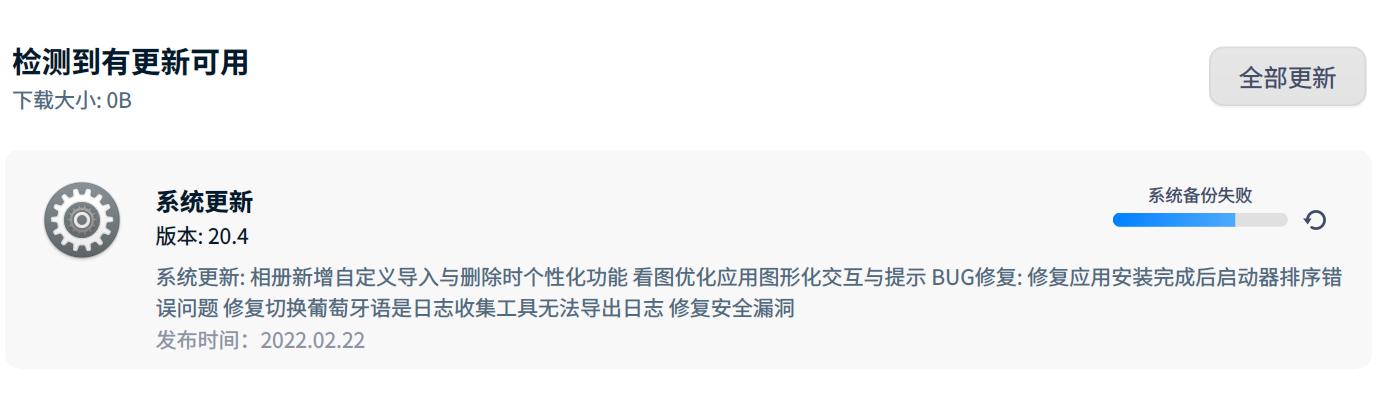
 deepin
 试试终端升级还出现吗
deepin 试试终端升级还出现吗
终端可以正常升级,但是下次再次升级时,从控制中心升还是报“系统备份失败”

 deepin
 解压文件得到 rmCoreFile.sh,右键文件->属性->权限管理,勾选“允许以程序执行”。双击文件,选择“在终端中运行”,需要输入密码。运行结束后看看控制中心能不能正常备份?
文件内容:
#!/bin/bash

#set -x

# Get Rootb partition info
RootbPath=$(blkid | grep Rootb | awk -F ":" {'print $1'})
RootbType=$(blkid | grep Rootb | awk -F " " {'print $4'} | awk -F "\"" {'print $2'})
RootbMountPoint="/mnt/rootb"

# Mount Rootb and remove /core
if [ ! -d "$RootbMountPoint" ] ; then
	sudo mkdir -p $RootbMountPoint
fi

if [ -n "$(grep $RootbMountPoint /proc/mounts)" ] ; then
	sudo umount $RootbMountPoint
fi

if [ -n "$RootbPath" -a -n "$RootbType" ] ; then
	sudo mount -t $RootbType $RootbPath $RootbMountPoint

	if [ -f "${RootbMountPoint}/core" ] ; then
		if [ $(file "${RootbMountPoint}/core" | grep deepin-home-appstore-daemon | wc -l) != 0 ] ; then
			sudo rm ${RootbMountPoint}/core
		fi
	fi

	sudo umount $RootbMountPoint

	if [ -d "$RootbMountPoint" ] ; then
		sudo rm -rf $RootbMountPoint
	fi
fi

# Remove /core
if [ -f "/core" ] ; then
	if [ $(file "/core" | grep deepin-home-appstore-daemon | wc -l) != 0 ] ; then
		sudo rm /core
	fi
fi

#read
 deepin
 解压文件得到 rmCoreFile.sh,右键文件->属性->权限管理,勾选“允许以程序执行”。双击文件,选择“在终端中运行”,需要输入密码。运行结束后看看控制中心能不能正常备份?
文件内容:
#!/bin/bash

#set -x

# Get Rootb partition info
RootbPath=$(blkid | grep Rootb | awk -F ":" {'print $1'})
RootbType=$(blkid | grep Rootb | awk -F " " {'print $4'} | awk -F "\"" {'print $2'})
RootbMountPoint="/mnt/rootb"

# Mount Rootb and remove /core
if [ ! -d "$RootbMountPoint" ] ; then
	sudo mkdir -p $RootbMountPoint
fi

if [ -n "$(grep $RootbMountPoint /proc/mounts)" ] ; then
	sudo umount $RootbMountPoint
fi

if [ -n "$RootbPath" -a -n "$RootbType" ] ; then
	sudo mount -t $RootbType $RootbPath $RootbMountPoint

	if [ -f "${RootbMountPoint}/core" ] ; then
		if [ $(file "${RootbMountPoint}/core" | grep deepin-home-appstore-daemon | wc -l) != 0 ] ; then
			sudo rm ${RootbMountPoint}/core
		fi
	fi

	sudo umount $RootbMountPoint

	if [ -d "$RootbMountPoint" ] ; then
		sudo rm -rf $RootbMountPoint
	fi
fi

# Remove /core
if [ -f "/core" ] ; then
	if [ $(file "/core" | grep deepin-home-appstore-daemon | wc -l) != 0 ] ; then
		sudo rm /core
	fi
fi

#read
怀疑全盘安装后 改Roota Rootb Recovery 分区了fstab 里面有变化 备份不成功
deepin 解压文件得到 rmCoreFile.sh,右键文件->属性->权限管理,勾选“允许以程序执行”。双击文件,选择“在终端中运行”,需要输入密码。运行结束后看看控制中心能不能正常备份?
文件内容:
#!/bin/bash

#set -x

# Get Rootb partition info
RootbPath=$(blkid | grep Rootb | awk -F ":" {'print $1'})
RootbType=$(blkid | grep Rootb | awk -F " " {'print $4'} | awk -F "\"" {'print $2'})
RootbMountPoint="/mnt/rootb"

# Mount Rootb and remove /core
if [ ! -d "$RootbMountPoint" ] ; then
	sudo mkdir -p $RootbMountPoint
fi

if [ -n "$(grep $RootbMountPoint /proc/mounts)" ] ; then
	sudo umount $RootbMountPoint
fi

if [ -n "$RootbPath" -a -n "$RootbType" ] ; then
	sudo mount -t $RootbType $RootbPath $RootbMountPoint

	if [ -f "${RootbMountPoint}/core" ] ; then
		if [ $(file "${RootbMountPoint}/core" | grep deepin-home-appstore-daemon | wc -l) != 0 ] ; then
			sudo rm ${RootbMountPoint}/core
		fi
	fi

	sudo umount $RootbMountPoint

	if [ -d "$RootbMountPoint" ] ; then
		sudo rm -rf $RootbMountPoint
	fi
fi

# Remove /core
if [ -f "/core" ] ; then
	if [ $(file "/core" | grep deepin-home-appstore-daemon | wc -l) != 0 ] ; then
		sudo rm /core
	fi
fi

#read
今天有更新试了一下,还是无法更新
 deepin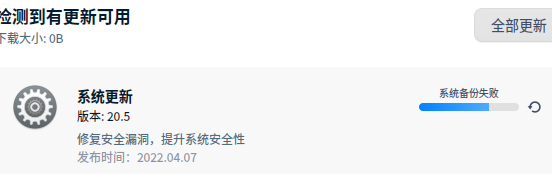
我也遇到了
 deepin
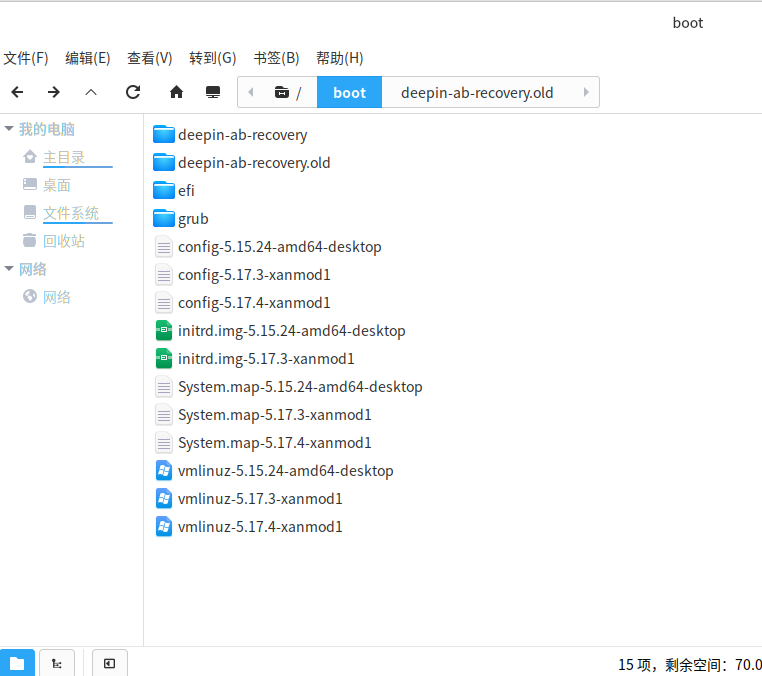
 进去boot目录,删掉一些没用的数据就可以了,我是删了一些文件名为内核旧版本号的文件就可以了
Popular Ranking
ChangePopular Events
More


 A bug with the language select