[Share Experiences] 大幅降低 Wine 微信内存占用(牺牲小程序和公众号)
Tofloor
poster avatar
deepin-superuser
deepin
2022-02-24 18:00
Author

操作步骤

rm -rf ~/.deepinwine/Deepin-WeChat/drive_c/users/$(whoami)/Application\ Data/Tencent/WeChat/XPlugin/Plugins/XWeb/
touch ~/.deepinwine/Deepin-WeChat/drive_c/users/$(whoami)/Application\ Data/Tencent/WeChat/XPlugin/Plugins/XWeb
chmod 000 ~/.deepinwine/Deepin-WeChat/drive_c/users/$(whoami)/Application\ Data/Tencent/WeChat/XPlugin/Plugins/XWeb 

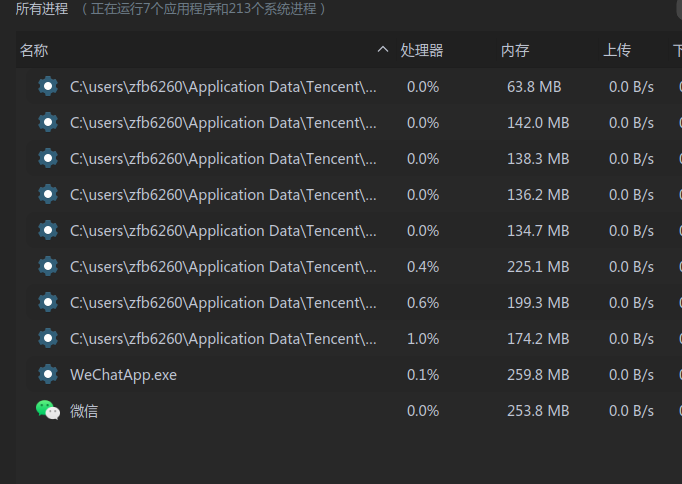
前后对比

截图_deepin-system-monitor_20220224094843.png

截图_deepin-system-monitor_20220224095224.png

不喜欢朋友圈视频自动播放的也可以删除 ThumbPlayer

rm -rf ~/.deepinwine/Deepin-WeChat/drive_c/users/$(whoami)/Application\ Data/Tencent/WeChat/XPlugin/Plugins/ThumbPlayer/
touch ~/.deepinwine/Deepin-WeChat/drive_c/users/$(whoami)/Application\ Data/Tencent/WeChat/XPlugin/Plugins/ThumbPlayer
chmod 000 ~/.deepinwine/Deepin-WeChat/drive_c/users/$(whoami)/Application\ Data/Tencent/WeChat/XPlugin/Plugins/ThumbPlayer

不喜欢更新提醒的可以删除 UpdateNotify、WeChatUpdate(未测试)

rm -rf ~/.deepinwine/Deepin-WeChat/drive_c/users/$(whoami)/Application\ Data/Tencent/WeChat/XPlugin/Plugins/UpdateNotify/
touch ~/.deepinwine/Deepin-WeChat/drive_c/users/$(whoami)/Application\ Data/Tencent/WeChat/XPlugin/Plugins/UpdateNotify
chmod 000 ~/.deepinwine/Deepin-WeChat/drive_c/users/$(whoami)/Application\ Data/Tencent/WeChat/XPlugin/Plugins/UpdateNotify

rm -rf ~/.deepinwine/Deepin-WeChat/drive_c/users/$(whoami)/Application\ Data/Tencent/WeChat/XPlugin/Plugins/WeChatUpdate/
touch ~/.deepinwine/Deepin-WeChat/drive_c/users/$(whoami)/Application\ Data/Tencent/WeChat/XPlugin/Plugins/WeChatUpdate
chmod 000 ~/.deepinwine/Deepin-WeChat/drive_c/users/$(whoami)/Application\ Data/Tencent/WeChat/XPlugin/Plugins/WeChatUpdate
Reply Favorite View the author
All Replies
1 / 2
To page
liwl
deepin
2022-02-24 18:03
#1

好活,可以

老铁能把wine微信,定期提醒更新的问题解决掉不?

已经关闭了更新,或者忽略,还是定期会提醒

Reply View the author
deepin-superuser
deepin
2022-02-24 18:06
#2
liwl

好活,可以

老铁能把wine微信,定期提醒更新的问题解决掉不?

已经关闭了更新,或者忽略,还是定期会提醒

我在 Windows 目录下发现的,理论上干掉就可以
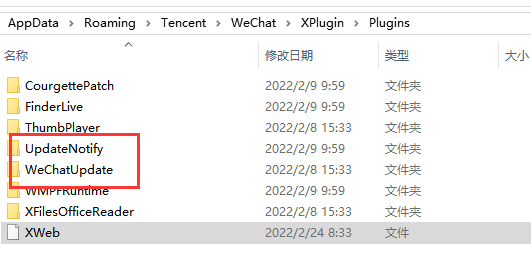
image.png

Reply View the author
andktan
deepin
2022-02-24 18:35
#3

joy agree

Reply View the author
lcw0268
deepin
2022-02-24 19:05
#4
It has been deleted!
deepin-superuser
deepin
2022-02-24 19:08
#5
lcw0268 It has been deleted!

我测试删除后正常,但是我点检查更新还可以检查到 不知道能不能干掉那个定时更新提醒

Reply View the author
red13
deepin
2022-02-24 19:32
#6

学习一下先进经验

Reply View the author
lcw0268
deepin
2022-02-24 20:28
#7
It has been deleted!
心平气和
deepin
2022-02-24 20:38
#8

直接不登陆,需要的时候再登陆,反正微信也不要扫码了

(在host 屏蔽掉dldir1.qq.com ,你们试下)

Reply View the author
Ziggy
deepin
2022-02-24 22:03
#9

这两玩意儿出现在PC本身就不合适

Reply View the author
deepin-superuser
deepin
2022-02-24 22:18
#10
Ziggy

这两玩意儿出现在PC本身就不合适

比较可惜的是 使用系统默认浏览器打开网页 也打不开公众号

不过去掉这个勾 弹出框里可以复制链接

Reply View the author
andktan
deepin
2022-02-25 02:20
#11

试了一遍,似乎没什么用

image.png

Reply View the author
deepin-superuser
deepin
2022-02-25 02:33
#12
andktan

试了一遍,似乎没什么用

image.png

不应该呀 我两台电脑都成功了 那三行命令执行输出啥?

Reply View the author
说书人
deepin
2022-02-25 02:55
#13
deepin-superuser

比较可惜的是 使用系统默认浏览器打开网页 也打不开公众号

不过去掉这个勾 弹出框里可以复制链接

我斗胆说一下想法,只把 WechatBrowser.exe 的权限改掉,让微信无法调用内置浏览器。会不会就能正常调用系统默认浏览器了。这样,看公众号就不受太大影响了。

Reply View the author
说书人
deepin
2022-02-25 04:00
#14

就我的观察来讲,最头疼的是WeChat.exe这个主进程,内存占用会逐渐变大。

Reply View the author
deepin-superuser
deepin
2022-02-25 04:25
#15
说书人

就我的观察来讲,最头疼的是WeChat.exe这个主进程,内存占用会逐渐变大。

微信主进程还好 挂一天也就300M,TIM那个可就离谱了 800多

Reply View the author
灵兮之
deepin
2022-02-26 01:24
#16

就是删除某个功能的文件夹里面文件,再把权限设置成只读?

Reply View the author
deepin-superuser
deepin
2022-02-26 01:27
#17
灵兮之

就是删除某个功能的文件夹里面文件,再把权限设置成只读?

Reply View the author
andktan
deepin
2022-02-27 21:08
#18
deepin-superuser

不应该呀 我两台电脑都成功了 那三行命令执行输出啥?

是不是需要重新启动,我今天重新启动了,发现可用了

目前实现了以下:

1、朋友圈有列表,不能打开内容了,

2、看一看打开空了

3、搜一搜打开空了

4、小程序且列表,不能打开内容

可以说以上都不是我个人在电脑上使用所关心的,电脑上我只需要能与好友沟通即可,其实包括朋友圈和小程序的列表也希望清空,不知有没有办法?

doubt

Reply View the author
deepin-superuser
deepin
2022-02-27 21:12
#19
andktan

是不是需要重新启动,我今天重新启动了,发现可用了

目前实现了以下:

1、朋友圈有列表,不能打开内容了,

2、看一看打开空了

3、搜一搜打开空了

4、小程序且列表,不能打开内容

可以说以上都不是我个人在电脑上使用所关心的,电脑上我只需要能与好友沟通即可,其实包括朋友圈和小程序的列表也希望清空,不知有没有办法?

doubt

重启微信就可以

你说的要去掉估计难度很大

Reply View the author
andktan
deepin
2022-02-27 21:15
#20
deepin-superuser

重启微信就可以

你说的要去掉估计难度很大

我记得当时做完时重启了微信,不行,今天重启电脑才发现可以了

我就想把它去的只余好友沟通😏

Reply View the author
1 / 2
To page