

 中文
中文 
pgxppp deepin
2022-02-16 04:17 deepin 我想想
sudo apt install libvdpau1
Reply Like 0 View the author
 deepin
 我想想
sudo apt install libvdpau1

 deepin
 这个错误不应该影响到播放。你是不是限制了硬解api?
楼上的安装vdpau也是一个方案。建议先apt search vdpau看看有哪些软件包,把不冲突的全部装上。
 deepin
  deepin
 这个错误不应该影响到播放。你是不是限制了硬解api?
楼上的安装vdpau也是一个方案。建议先apt search vdpau看看有哪些软件包,把不冲突的全部装上。
api硬解设置没动过
deepin 我想想
sudo apt install libvdpau1
执行后提示已安装
deepin 这个错误不应该影响到播放。你是不是限制了硬解api?
楼上的安装vdpau也是一个方案。建议先apt search vdpau看看有哪些软件包,把不冲突的全部装上。
nsz@nsz-PC:~$ apt search vdpau
正在排序... 完成
全文搜索... 完成
deepin-gpuinfo/未知 0.0.4 amd64
auto detect the pci information for JJW ,AMD, INTEL ,and,NVIDIA(NVML),This package contains the vainfo and vdpauinfo utility. query the database for more private GPU info.
libgpuinfo/未知,now 0.0.4 amd64 [已安装,自动]
library auto detect the pci information for JJW ,AMD, INTEL ,and,NVIDIA(NVML),This package contains the vainfo and vdpauinfo utility.
libgpuinfo-dev/未知 0.0.4 amd64
library development headers auto detect the pci information for JJW ,AMD, INTEL ,and,NVIDIA(NVML),This package contains the vainfo and vdpauinfo utility..
libvdpau-dev/未知 1.1.1-10 amd64
Video Decode and Presentation API for Unix (development files)
libvdpau-doc/未知,未知 1.1.1-10 all
Video Decode and Presentation API for Unix (documentation)
libvdpau-va-gl1/未知,now 0.4.2.1-1+rebuild amd64 [已安装]
VDPAU driver with OpenGL/VAAPI backend
libvdpau-va-gl1-dbgsym/未知 0.4.2.1-1+rebuild amd64
debug symbols for libvdpau-va-gl1
libvdpau1/未知,now 1.1.1-10 amd64 [已安装]
Video Decode and Presentation API for Unix (libraries)
libvdpau1-dbgsym/未知 1.1.1-10 amd64
debug symbols for libvdpau1
mesa-vdpau-drivers/未知,now 20.3.4.2-1 amd64 [已安装,自动]
Mesa VDPAU video acceleration drivers
mesa-vdpau-drivers-dbgsym/未知 20.3.4.2-1 amd64
debug symbols for mesa-vdpau-drivers
nvidia-legacy-340xx-vdpau-driver/未知 340.107-4 amd64
Video Decode and Presentation API for Unix - NVIDIA driver (340xx legacy)
nvidia-legacy-390xx-vdpau-driver/未知 390.141-2~deb10u1 amd64
Video Decode and Presentation API for Unix - NVIDIA driver (390xx legacy)
nvidia-vdpau-driver/未知 470.86-1 amd64
Video Decode and Presentation API for Unix - NVIDIA driver
vdpau-driver-all/未知,now 1.1.1-10 amd64 [已安装]vdpau-va-driver/未知,now 0.7.4-7 amd64 [已安装]
VDPAU-based backend for VA API
vdpauinfo/未知 1.0-3 amd64
Video Decode and Presentation API for Unix (vdpauinfo utility)
deepin 都安装了也不行 是不是哪里要设置一下?
deepin 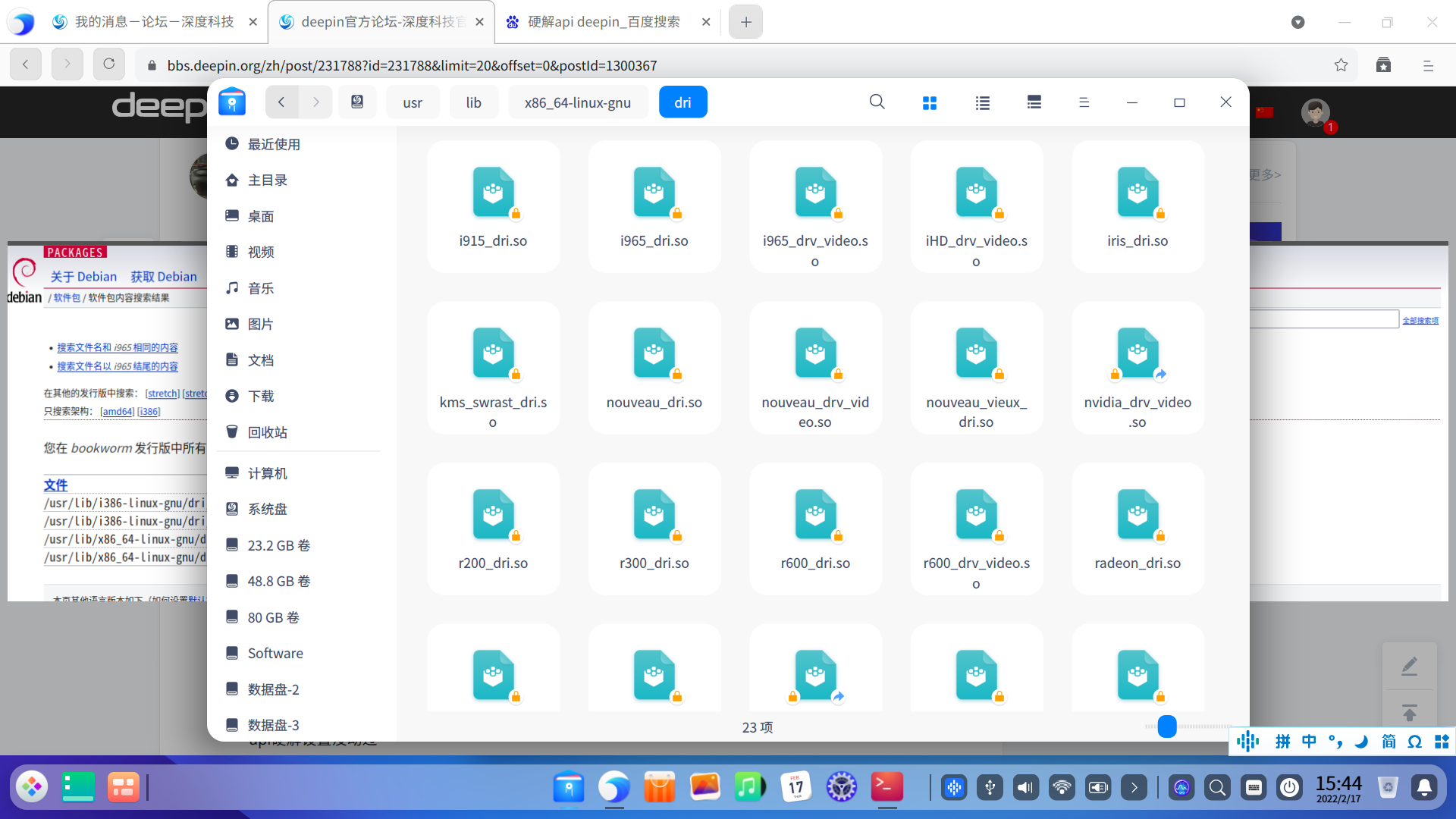
deepin nsz@nsz-PC:~$ sudo apt-get install i965-va-driver
正在读取软件包列表... 完成
正在分析软件包的依赖关系树
正在读取状态信息... 完成
建议安装:
i965-va-driver-shaders
下列软件包将被【卸载】:
i965-va-driver-shaders
下列【新】软件包将被安装:
i965-va-driver
升级了 0 个软件包,新安装了 1 个软件包,要卸载 1 个软件包,有 0 个软件包未被升级。
需要下载 311 kB 的归档。
解压缩后将会空出 6,331 kB 的空间。
您希望继续执行吗? [Y/n] y
获取:1 https://community-packages.deepin.com/deepin apricot/main amd64 i965-va-driver amd64 2.3.0+dfsg1-1 [311 kB]
已下载 311 kB,耗时 1秒 (516 kB/s)
dpkg: i965-va-driver-shaders:amd64:有依赖问题,但是如您所愿,将继续卸载:
va-driver-all:amd64 依赖于 i965-va-driver | i965-va-driver-shaders;然而:
未安装软件包 i965-va-driver。
即将删除 i965-va-driver-shaders:amd64。
deepin deepin 提示一样的, 然后 安装那两个包 安装一个 另一个会被卸载删除掉
deepin 执行后提示已安装
建议关闭硬件加速
deepin deepin nsz@nsz-PC:~$ sudo apt-get install i965-va-driver
正在读取软件包列表... 完成
正在分析软件包的依赖关系树
正在读取状态信息... 完成
建议安装:
i965-va-driver-shaders
下列软件包将被【卸载】:
i965-va-driver-shaders
下列【新】软件包将被安装:
i965-va-driver
升级了 0 个软件包,新安装了 1 个软件包,要卸载 1 个软件包,有 0 个软件包未被升级。
需要下载 311 kB 的归档。
解压缩后将会空出 6,331 kB 的空间。
您希望继续执行吗? [Y/n] y
获取:1 https://community-packages.deepin.com/deepin apricot/main amd64 i965-va-driver amd64 2.3.0+dfsg1-1 [311 kB]
已下载 311 kB,耗时 1秒 (516 kB/s)
dpkg: i965-va-driver-shaders:amd64:有依赖问题,但是如您所愿,将继续卸载:
va-driver-all:amd64 依赖于 i965-va-driver | i965-va-driver-shaders;然而:
未安装软件包 i965-va-driver。
即将删除 i965-va-driver-shaders:amd64。
这两个一个是闭源的一个是开源的。但一般不影响。
播放视频的时候执行nvidia-smi看看结果。
另外安装那个vdpauinfo,运行看看结果。
deepin 这两个一个是闭源的一个是开源的。但一般不影响。
播放视频的时候执行nvidia-smi看看结果。
另外安装那个vdpauinfo,运行看看结果。
nvidia 没安装,只使用了
集成显卡
deepin 建议关闭硬件加速
怎么关闭?是影院设置软解么?
deepin nvidia 没安装,只使用了
集成显卡
那你根本不需要安装vdpau。
集成显卡那这就简单了,安装vainfo,把vainfo命令的输出结果贴出来看看。
deepin 那你根本不需要安装vdpau。
集成显卡那这就简单了,安装vainfo,把vainfo命令的输出结果贴出来看看。
nsz@nsz-PC:~$ vainfo
libva info: VA-API version 1.4.0
libva info: va_getDriverName() returns 0
libva info: Trying to open /usr/lib/x86_64-linux-gnu/dri/i965_drv_video.so
libva info: Found init function __vaDriverInit_1_4
libva info: va_openDriver() returns 0
vainfo: VA-API version: 1.4 (libva 2.4.0)
vainfo: Driver version: Intel i965 driver for Intel(R) Skylake - 2.3.0
vainfo: Supported profile and entrypoints
VAProfileMPEG2Simple : VAEntrypointVLD
VAProfileMPEG2Simple : VAEntrypointEncSlice
VAProfileMPEG2Main : VAEntrypointVLD
VAProfileMPEG2Main : VAEntrypointEncSlice
VAProfileH264ConstrainedBaseline: VAEntrypointVLD
VAProfileH264ConstrainedBaseline: VAEntrypointEncSlice
VAProfileH264ConstrainedBaseline: VAEntrypointEncSliceLP
VAProfileH264ConstrainedBaseline: VAEntrypointFEI
VAProfileH264ConstrainedBaseline: VAEntrypointStats
VAProfileH264Main : VAEntrypointVLD
VAProfileH264Main : VAEntrypointEncSlice
VAProfileH264Main : VAEntrypointEncSliceLP
VAProfileH264Main : VAEntrypointFEI
VAProfileH264Main : VAEntrypointStats
VAProfileH264High : VAEntrypointVLD
VAProfileH264High : VAEntrypointEncSlice
VAProfileH264High : VAEntrypointEncSliceLP
VAProfileH264High : VAEntrypointFEI
VAProfileH264High : VAEntrypointStats
VAProfileH264MultiviewHigh : VAEntrypointVLD
VAProfileH264MultiviewHigh : VAEntrypointEncSlice
VAProfileH264StereoHigh : VAEntrypointVLD
VAProfileH264StereoHigh : VAEntrypointEncSlice
VAProfileVC1Simple : VAEntrypointVLD
VAProfileVC1Main : VAEntrypointVLD
VAProfileVC1Advanced : VAEntrypointVLD
VAProfileNone : VAEntrypointVideoProc
VAProfileJPEGBaseline : VAEntrypointVLD
VAProfileJPEGBaseline : VAEntrypointEncPicture
VAProfileVP8Version0_3 : VAEntrypointVLD
VAProfileVP8Version0_3 : VAEntrypointEncSlice
VAProfileHEVCMain : VAEntrypointVLD
VAProfileHEVCMain : VAEntrypointEncSlice
deepin nsz@nsz-PC:~$ vainfo
libva info: VA-API version 1.4.0
libva info: va_getDriverName() returns 0
libva info: Trying to open /usr/lib/x86_64-linux-gnu/dri/i965_drv_video.so
libva info: Found init function __vaDriverInit_1_4
libva info: va_openDriver() returns 0
vainfo: VA-API version: 1.4 (libva 2.4.0)
vainfo: Driver version: Intel i965 driver for Intel(R) Skylake - 2.3.0
vainfo: Supported profile and entrypoints
VAProfileMPEG2Simple : VAEntrypointVLD
VAProfileMPEG2Simple : VAEntrypointEncSlice
VAProfileMPEG2Main : VAEntrypointVLD
VAProfileMPEG2Main : VAEntrypointEncSlice
VAProfileH264ConstrainedBaseline: VAEntrypointVLD
VAProfileH264ConstrainedBaseline: VAEntrypointEncSlice
VAProfileH264ConstrainedBaseline: VAEntrypointEncSliceLP
VAProfileH264ConstrainedBaseline: VAEntrypointFEI
VAProfileH264ConstrainedBaseline: VAEntrypointStats
VAProfileH264Main : VAEntrypointVLD
VAProfileH264Main : VAEntrypointEncSlice
VAProfileH264Main : VAEntrypointEncSliceLP
VAProfileH264Main : VAEntrypointFEI
VAProfileH264Main : VAEntrypointStats
VAProfileH264High : VAEntrypointVLD
VAProfileH264High : VAEntrypointEncSlice
VAProfileH264High : VAEntrypointEncSliceLP
VAProfileH264High : VAEntrypointFEI
VAProfileH264High : VAEntrypointStats
VAProfileH264MultiviewHigh : VAEntrypointVLD
VAProfileH264MultiviewHigh : VAEntrypointEncSlice
VAProfileH264StereoHigh : VAEntrypointVLD
VAProfileH264StereoHigh : VAEntrypointEncSlice
VAProfileVC1Simple : VAEntrypointVLD
VAProfileVC1Main : VAEntrypointVLD
VAProfileVC1Advanced : VAEntrypointVLD
VAProfileNone : VAEntrypointVideoProc
VAProfileJPEGBaseline : VAEntrypointVLD
VAProfileJPEGBaseline : VAEntrypointEncPicture
VAProfileVP8Version0_3 : VAEntrypointVLD
VAProfileVP8Version0_3 : VAEntrypointEncSlice
VAProfileHEVCMain : VAEntrypointVLD
VAProfileHEVCMain : VAEntrypointEncSlice
你的硬解一点问题都没有。这个无法播放的问题和你贴上来这条错误并没有关联。
请问这个视频使用别的播放器能播放成功吗?特别是mpv?(因为影院就是mpv的一个图形界面而已)
deepin nsz@nsz-PC:~$ mpv https://www.bilibili.com/video/BV1nW411o78J
Playing: https://www.bilibili.com/video/BV1nW411o78J
[ytdl_hook] ERROR: Unsupported URL: https://www.bilibili.com/bangumi/play/ep362521?theme=movie
[ytdl_hook] youtube-dl failed: unexpected error ocurred
Failed to recognize file format.
Exiting... (Errors when loading file)
mpv提示这样,,上面楼层看不到了
Popular Ranking
ChangePopular Events
More


 A bug with the language select
nsz@nsz-PC:~$ deepin-movie https://www.bilibili.com/video/BV1nW411o78J
log path: "/home/nsz/.cache/deepin/deepin-movie/deepin-movie.log"
Failed to open VDPAU backend libvdpau_i965.so: 无法打开共享对象文件: 没有那个文件或目录