

 中文
中文 
壳 deepin
2022-02-14 19:53 deepin 快捷键super+L
Reply Like 2 View the author
deepin 快捷键super+L

 deepin
 快捷键super+L
正解

 deepin

 deepin deepin
  deepin
 快捷键super+L
2个键不耽误学习

楼上的这些快捷键是不是比软件更好用😄
deepin 快速熄屏呢?有没有什么特别的姿势?😯

 deepin
 快速熄屏呢?有没有什么特别的姿势?😯
系统设置 电源管理里 把按电源按钮设置成关闭显示器
deepin 看来还是用super+L吧,主要咱是用惯鼠标的手,不是大佬们的键盘手
 deepin
 super+L是进入屏锁,可以增加快捷键,命令填入 sh -c "sleep 0.5 && xset dpms force off" ,以后就可以用快捷键黑屏
 deepin
 super+L是进入屏锁,可以增加快捷键,命令填入 sh -c "sleep 0.5 && xset dpms force off" ,以后就可以用快捷键黑屏
如果非要桌面图标就搞个.desktop就好了
deepin super+L是进入屏锁,可以增加快捷键,命令填入 sh -c "sleep 0.5 && xset dpms force off" ,以后就可以用快捷键黑屏
谢谢
deepin 如果非要桌面图标就搞个.desktop就好了
这又是怎么了,输入到终端没有反应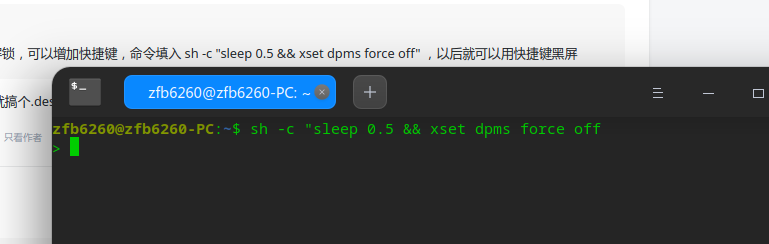
 deepin
 这又是怎么了,输入到终端没有反应
最后少个引号
deepin 最后少个引号
不好意思,是我粗心了

 deepin
 一键息屏那个是我投的
快捷方式发送到桌面,右键编辑器打开,修改Exec后面的指令为你后来收到的息屏指令
想要全局修改,就在/opt/apps/store.spark-app.one-key-shut-screen/entries中找到快捷方式文件,右键编辑器打开修改
deepin 一键息屏那个是我投的
快捷方式发送到桌面,右键编辑器打开,修改Exec后面的指令为你后来收到的息屏指令
想要全局修改,就在/opt/apps/store.spark-app.one-key-shut-screen/entries中找到快捷方式文件,右键编辑器打开修改
ok,明白了,谢谢
deepin 最后少个引号
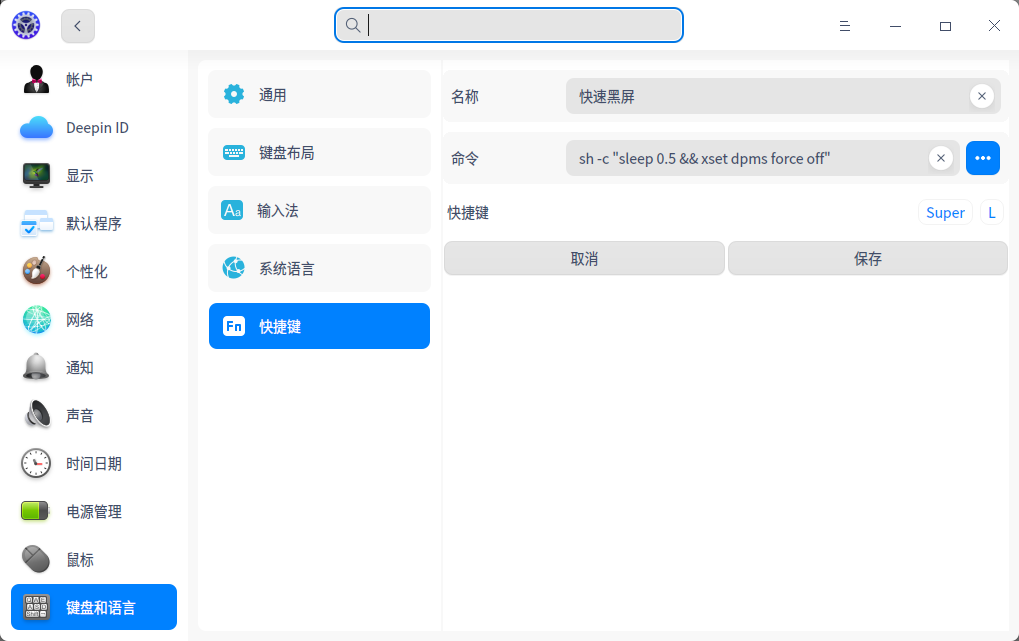
这里添加快捷键
deepin 一键息屏那个是我投的
快捷方式发送到桌面,右键编辑器打开,修改Exec后面的指令为你后来收到的息屏指令
想要全局修改,就在/opt/apps/store.spark-app.one-key-shut-screen/entries中找到快捷方式文件,右键编辑器打开修改
能否烦请给发个锁屏的命令,我想把黑屏改成锁屏,最好一个命令既能锁屏同时也黑屏。
Popular Ranking
ChangePopular Events
More


 A bug with the language select
商店时找一下锁屏,其中锁屏大全和一键汽暖是安卓的,不想用,快速熄屏和一键息屏只是息屏不锁屏,
哪位大佬推荐一个linux版的一键锁屏,谢谢。