

 中文
中文 
灵兮之 deepin
2022-02-14 17:41 deepin 删了系统标题栏到时就没有最大、最小、关闭的这三个位置了
我之前有删除过一个plastik的文件夹,然后标题栏都不见了,导致窗口没有按钮关闭,只能任务栏右键关闭
Reply Like 0 View the author
 deepin
 删了系统标题栏到时就没有最大、最小、关闭的这三个位置了
我之前有删除过一个plastik的文件夹,然后标题栏都不见了,导致窗口没有按钮关闭,只能任务栏右键关闭

 deepin
 删了系统标题栏到时就没有最大、最小、关闭的这三个位置了
我之前有删除过一个plastik的文件夹,然后标题栏都不见了,导致窗口没有按钮关闭,只能任务栏右键关闭
这个自带有最大最小化,关闭按钮的

 deepin
 https://bbs.deepin.org/phone/zh/post/195603
跑个题,才发现星火都这么长时间了
deepin https://bbs.deepin.org/phone/zh/post/195603
跑个题,才发现星火都这么长时间了
大佬帮忙,整一个呗。我套用微信的,感觉挺好的,但是有个闪退的问题,不知道怎么修复
deepin 大佬帮忙,整一个呗。我套用微信的,感觉挺好的,但是有个闪退的问题,不知道怎么修复
专业不对口,真不知道
 deepin
 删了系统标题栏到时就没有最大、最小、关闭的这三个位置了
我之前有删除过一个plastik的文件夹,然后标题栏都不见了,导致窗口没有按钮关闭,只能任务栏右键关闭
你好,系统标题栏怎么删除?
deepin 你好,系统标题栏怎么删除?
系统有标题栏你是不是用kde的那个设置软件进去设置了主题?
我之前是在plastik里面修改过一个配置文件,里面有定义标题栏大小,我改成0
后面又删除掉文件夹之类的,就出现标题栏完全消失的情况,右上角那最大最小关闭的按钮都不见了
deepin 套用微信的容器解决了这个问题。
甚至可以直接和微信公用了一个容器
[Desktop Entry]
Categories=InstantMessaging;
Comment=Hbuilderx Client on Deepin Wine6
Encoding=UTF-8
Exec=env WINEPREFIX="/home/jay/.deepinwine/Spark-weixin" deepin-wine6-stable Z:\\\\home\\\\jay\\\\.deepinwine\\\\Spark-weixin\\\\drive_c\\\\Program\ Files\\\\HBuilderX\\\\HBuilderX.exe
Icon=45A2_HBuilderX.0
MimeType=
Name=hbuilderx
Name[zh_CN]=HbuilderX
StartupWMClass=hbuilderx.exe
Type=Application
X-Created-By=sgb76
X-Deepin-CreatedBy=com.deepin.dde.daemon.Launcher
X-Deepin-Vendor=user-custom
X-Deepin-AppID=wine/hbuilderx
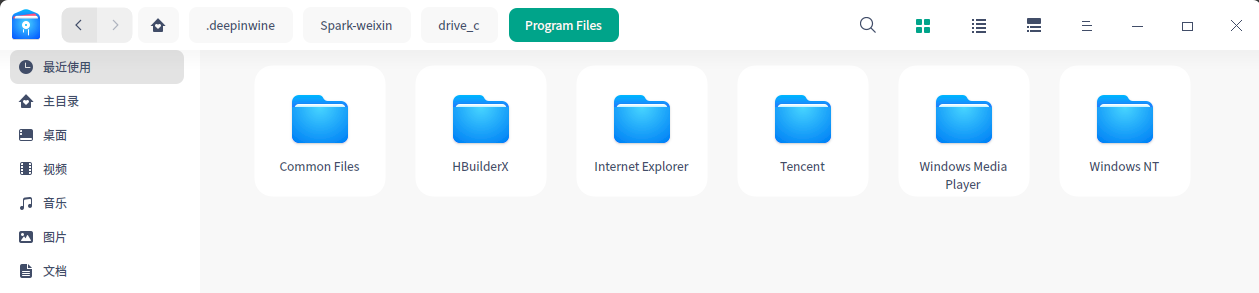
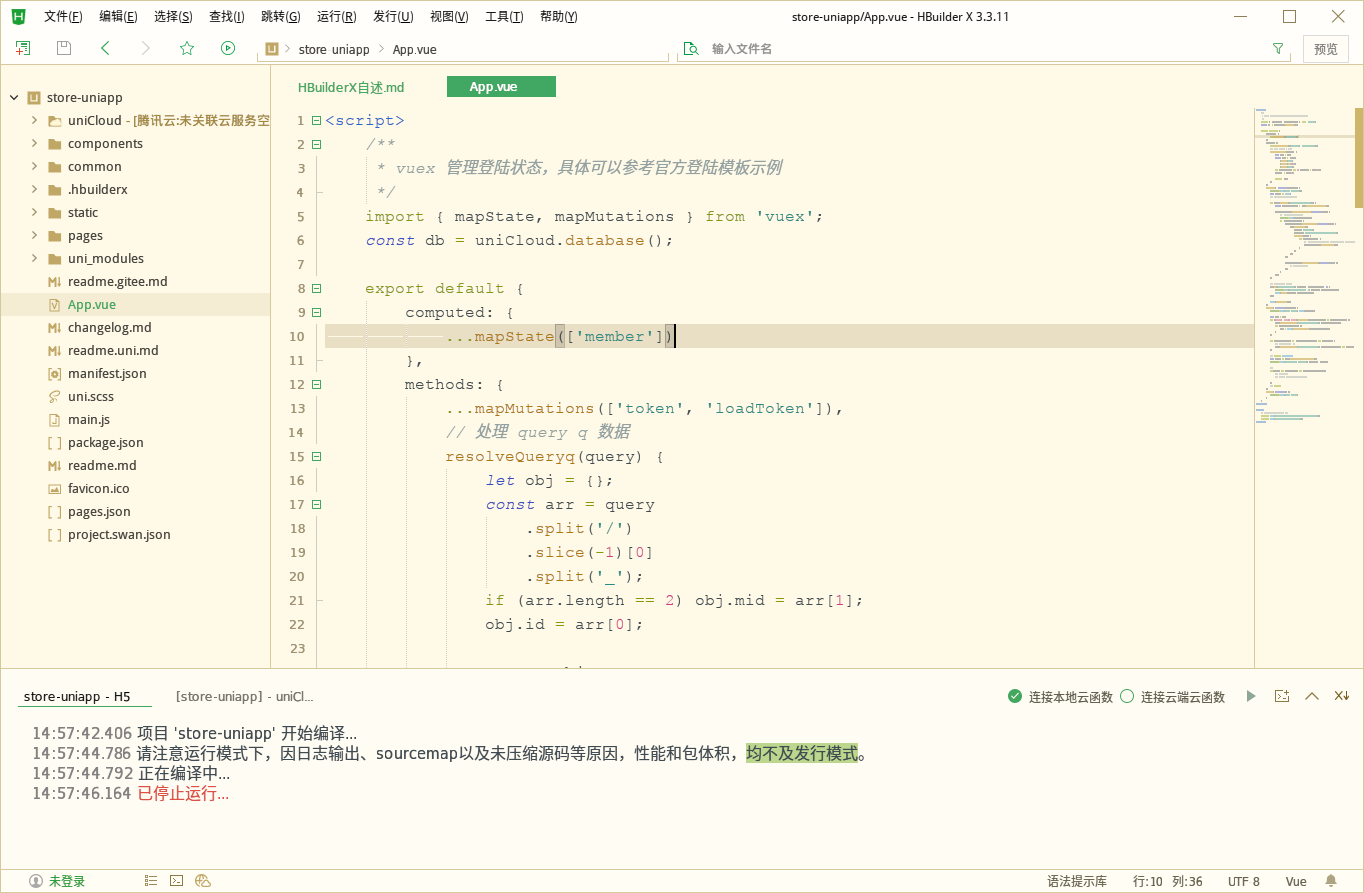
效果完美得不行:

 deepin
 楼主,这个怎么做的,给个教程呗
deepin 楼主,还有app怎么直连
deepin 楼主,这个怎么做的,给个教程呗
链接: https://pan.baidu.com/s/1JeYXZ9-KdCjV4zI9U7-8Tw 提取码: f367
我上传了

 deepin
 套用微信的容器解决了这个问题。
甚至可以直接和微信公用了一个容器
[Desktop Entry]
Categories=InstantMessaging;
Comment=Hbuilderx Client on Deepin Wine6
Encoding=UTF-8
Exec=env WINEPREFIX="/home/jay/.deepinwine/Spark-weixin" deepin-wine6-stable Z:\\\\home\\\\jay\\\\.deepinwine\\\\Spark-weixin\\\\drive_c\\\\Program\ Files\\\\HBuilderX\\\\HBuilderX.exe
Icon=45A2_HBuilderX.0
MimeType=
Name=hbuilderx
Name[zh_CN]=HbuilderX
StartupWMClass=hbuilderx.exe
Type=Application
X-Created-By=sgb76
X-Deepin-CreatedBy=com.deepin.dde.daemon.Launcher
X-Deepin-Vendor=user-custom
X-Deepin-AppID=wine/hbuilderx
效果完美得不行:
你好,你这个安装教程还在吗?
deepin 你好,请教一下,你这个怎么解决设置谷歌、火狐浏览器设置、微信开发工具设置呢?
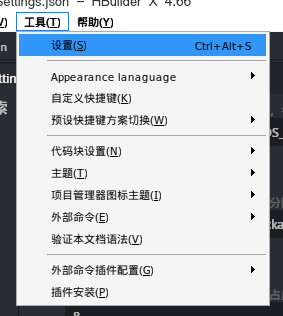
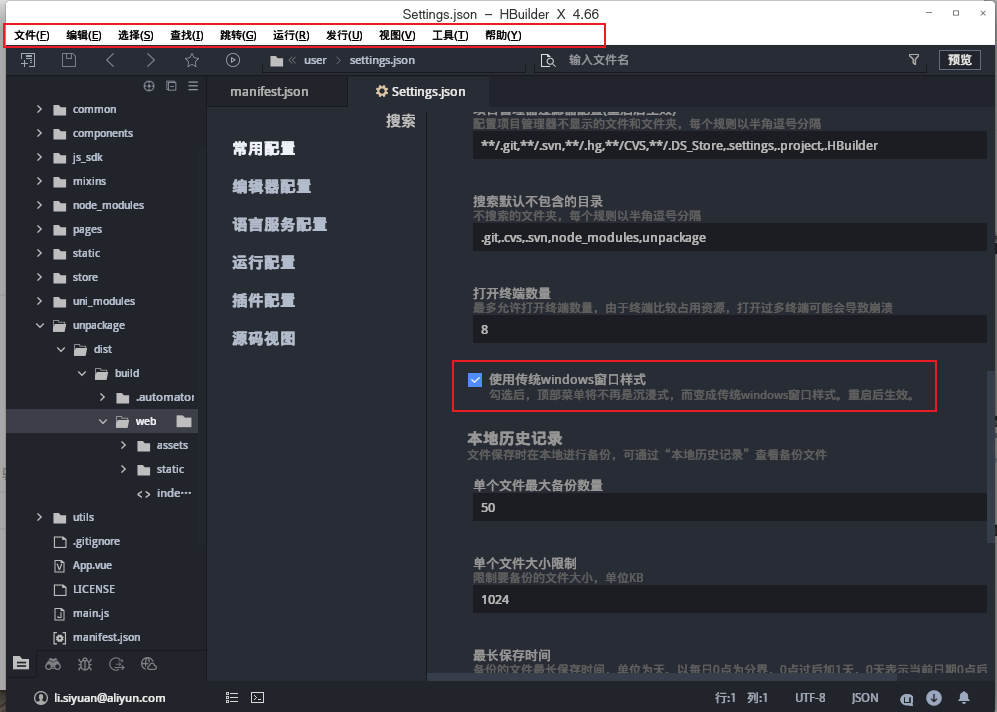
deepin 使用快捷键 ctrl + alt + , 打开设置的常用设置
找到 使用传统window窗口样式 勾上保存, 关闭重新打开 就完美解决了
deepin 快捷键 ALT + T
或者 快捷键:CTRL + ALT + S
Popular Ranking
ChangePopular Events
More


 A bug with the language select
如图,应用的菜单栏和标题栏,被系统标题栏遮住了。