

 中文
中文 
kirin2020 deepin
2022-02-11 07:14 deepin 墙裂支持楼主的原创佳作,终于坐一回沙发了,马上安装体验。哈哈,谢谢啦
3、应用图标色系调整,下载desktop文件后,替换/app/share/applications下同名文件可看到新版应用图标
应该是 /usr/share/applications 😁
Reply Like 0 View the author
 deepin
 3、应用图标色系调整,下载desktop文件后,替换/app/share/applications下同名文件可看到新版应用图标

 deepin
 P.S. 由于系统图标有缓存机制,如果在安装过旧版本后发现新版本图标没有正常显示出来,可以把 ~/.cache/deepin/icons 文件夹里面的图标都删了
deepin 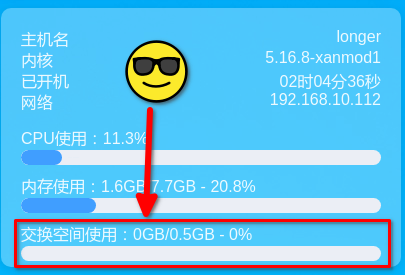
还是显示交换空间
 deepin
 老大,能不能自动记住上次的摆放位置?现在每次启动都在屏幕右半边。
 deepin
 好东西,收下了
deepin 老大,能不能自动记住上次的摆放位置?现在每次启动都在屏幕右半边。

 deepin
 支持原创,点赞!
 deepin
 deepin
 支持,点赞

 deepin
deepin
 deepin
 太赞了!提个建议:小部件能不能给个个性化设置,让用户自己选择哪些显示,哪些不显示,做到自由组合
 deepin
 感谢大佬!希望官方收录到软件商店
deepin 3、应用图标色系调整,下载desktop文件后,替换/app/share/applications下同名文件可看到新版应用图标
感谢指正,蒙圈啦
deepin P.S. 由于系统图标有缓存机制,如果在安装过旧版本后发现新版本图标没有正常显示出来,可以把 ~/.cache/deepin/icons 文件夹里面的图标都删了
现在情况是自己指定的图标不生效,显示的不知道哪儿来的图标😂
deepin
还是显示交换空间
因为你系统有交换空间分区啊,500MB左右😂
deepin 调整位置这个我想想怎么弄,突然发现我也需要
deepin 老大,能不能自动记住上次的摆放位置?现在每次启动都在屏幕右半边。
咱们先实现便捷调整位置哈,一步一步来
deepin 太赞了!提个建议:小部件能不能给个个性化设置,让用户自己选择哪些显示,哪些不显示,做到自由组合
目前部分小部件设计了动画效果,如果允许自定义显示的话,动画效果会受影响,我随后研究研究做下取舍
deepin 感谢大佬!希望官方收录到软件商店
在进行中了,敬请期待!


新版本更新如下:
资源监控小部件:
1、已开机时间不准确修正
2、对于没有交换空间分区的系统,不再显示交换空间使用情况
股票小部件:
1、新增自选股支持自动保存
2、新增行情数据图片模式下支持定时刷新
全局: )
)
1、去除系统托盘(既然打不过你,俺就废了你
2、新增右键功能,全局刷新(快捷键:点击小部件任意位置后,按ctrl + shift + R亦可实现刷新)、关闭小部件。如因网络问题,小部件没有正常显示数据,点击刷新即可
3、应用图标色系调整,下载desktop文件后,替换/usr/share/applications下同名文件可看到新版应用图标
下载链接:
地址:https://gitee.com/miaoys/desktop-dashboard/releases/v1.0.1
如果没有改过字体,推荐安装默认字体版本(未来鸿蒙字体版本可能会去掉)
创作不易,尤其这大晚上来更新的😂 ,希望喜欢这款应用的小伙伴,可以在项目首页点击Star支持一下