

 中文
中文 
andktan deepin
2022-02-06 17:37 deepin 类似的问题,浏览器的标题和logo我都想关了,期待中
Reply Like 0 View the author
 deepin
 类似的问题,浏览器的标题和logo我都想关了,期待中
 deepin
 你是新人吧,这个问题已经反应两年了
 deepin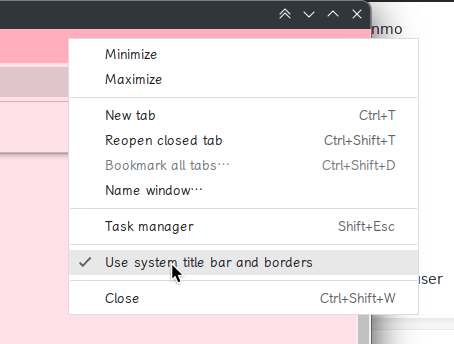
Chromium based 的话就取消选择这个
 deepin
Chromium based 的话就取消选择这个
没有这个选项。
deepin 你是新人吧,这个问题已经反应两年了
深度设计师表示:你们的审美不行,这种大额头才好看。。。
deepin 更改第三方应用标题栏高度:
白色主题: mkdir -p ~/.local/share/deepin/themes/deepin/light

黑色主题: mkdir -p ~/.local/share/deepin/themes/deepin/dark

创建配置文件:

cd ~/.local/share/deepin/themes/deepin/light

cd ~/.local/share/deepin/themes/deepin/dark

配置文件: sudo deepin-editor titlebar.ini

加入内容:

[Active]

height=28

[Inactive]

height=28

保存,重启
更改第三方应用标题栏高度:
白色主题: mkdir -p ~/.local/share/deepin/themes/deepin/light

黑色主题: mkdir -p ~/.local/share/deepin/themes/deepin/dark

创建配置文件:

cd ~/.local/share/deepin/themes/deepin/light

cd ~/.local/share/deepin/themes/deepin/dark

配置文件: sudo deepin-editor titlebar.ini

加入内容:

[Active]

height=28

[Inactive]

height=28

保存,重启
可改变第三方应用自己的标题栏高度,系统的通用标题栏不能关闭,还在那儿。

 deepin
 你是新人吧,这个问题已经反应两年了
真是丑出新高度
Popular Ranking
ChangePopular Events
More


 A bug with the language select
经常使用flash,就安装了“方德浏览器”,但上面的标题太碍眼了,怎么关闭它?