

 中文
中文 
andktan deepin
2022-01-29 17:11 deepin 1、当前用户的桌面
2、用户名为user的桌面
3、我这里用着没有问题
4、我这里没有user这个用户,显示都是空的
Reply Like 0 View the author
 deepin
 1、当前用户的桌面
2、用户名为user的桌面
3、我这里用着没有问题
4、我这里没有user这个用户,显示都是空的
 deepin
 1、当前用户的桌面
2、用户名为user的桌面
3、我这里用着没有问题
4、我这里没有user这个用户,显示都是空的
并不是 User用户 $User 取得是当前用户.
deepin $USER 是个变量
/home/$USER/Desktop 这个语句我理解在你使用时候,系统没有把变量解析出来,导致无法进入你的桌面。
deepin 并不是 User用户 $User 取得是当前用户.

 deepin
 ~ 就表示 $HOME 也就是 /home/$USER
在双引号里面,可以用 $ 来引用变量,但不能用 ~

 deepin
 据我所知,~只能在终端命令行里用,sh脚本里不行
 deepin
 ~ 就表示 $HOME 也就是 /home/$USER
在双引号里面,可以用 $ 来引用变量,但不能用 ~
嗯,在弄脚本的时候绝的奇怪,就发上来
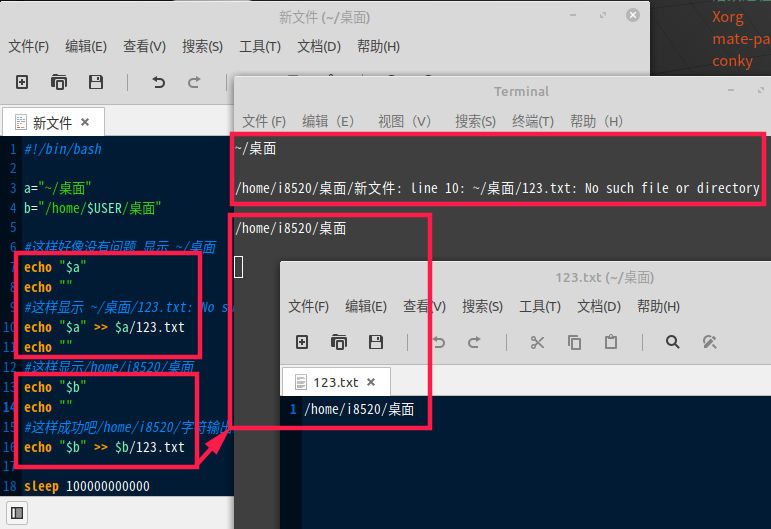
deepin 大致这么理解吧:
$HOME 是个变量,可以通过(双引号)进行赋值,赋值结果是解析出来的实际路径~ 是个指向用户主目录的(软?)链接,在赋值的时候如果在引号之内是不会被解析展开的,但可以通过路径赋值
/home/$USER/Desktop , 可以执行命令 cd $dir_2 deepin #!/bin/bash
dir=~/Desktop
echo $dir
cd $dir
pwd
输出
/home/mark/Desktop
/home/mark/Desktop


Desktop_dir_1="~/Desktop"
Desktop_dir_2="/home/$USER/Desktop"
$Desktop_dir_1 这样不能用,但是直接使用~/Desktop却又可以很疑惑
$Desktop_dir_2 这样可以用