Please input the detailed title of your suggestion or problem
Context menu in Performance Mode menu not fully visible
Please input the detailed description of your suggestion or problem
If you set Deepin 20.4 to performance mode, open the application loader and right click on an application entry, the context menu that you see is not complete if the application entry is towards the bottom of the screen.
In this case I've clicked on "Libre Office Draw", which is the last entry that you can see. The context menu continues outside the screen area.
Problem reproduce frequency
Always
Reply Like 1 Favorite View the author
All Replies
Rubbish
deepin
2022-01-22 08:51
#1
Reproducible in Chinese ver.
Reply Like 0 View the author
Hibanaw
deepin
2022-01-22 15:55
#2
You'd better send the issue here: https://github.com/linuxdeepin/dde-dock


 中文
中文 
 deepin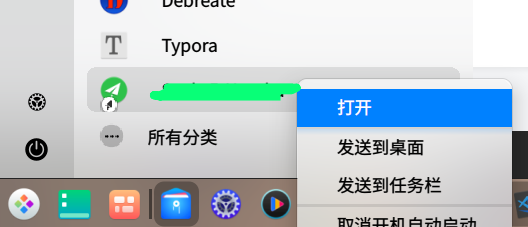





User Feedback
Please input the detailed title of your suggestion or problem
Context menu in Performance Mode menu not fully visible
Please input the detailed description of your suggestion or problem
If you set Deepin 20.4 to performance mode, open the application loader and right click on an application entry, the context menu that you see is not complete if the application entry is towards the bottom of the screen.
In this case I've clicked on "Libre Office Draw", which is the last entry that you can see. The context menu continues outside the screen area.
Problem reproduce frequency
Always