

 中文
中文 
babyfengfjx
2022-01-20 01:22 Super Moderator
CQA
秀儿,这个确实挺好用~
Reply Like 0 View the author

秀儿,这个确实挺好用~

 deepin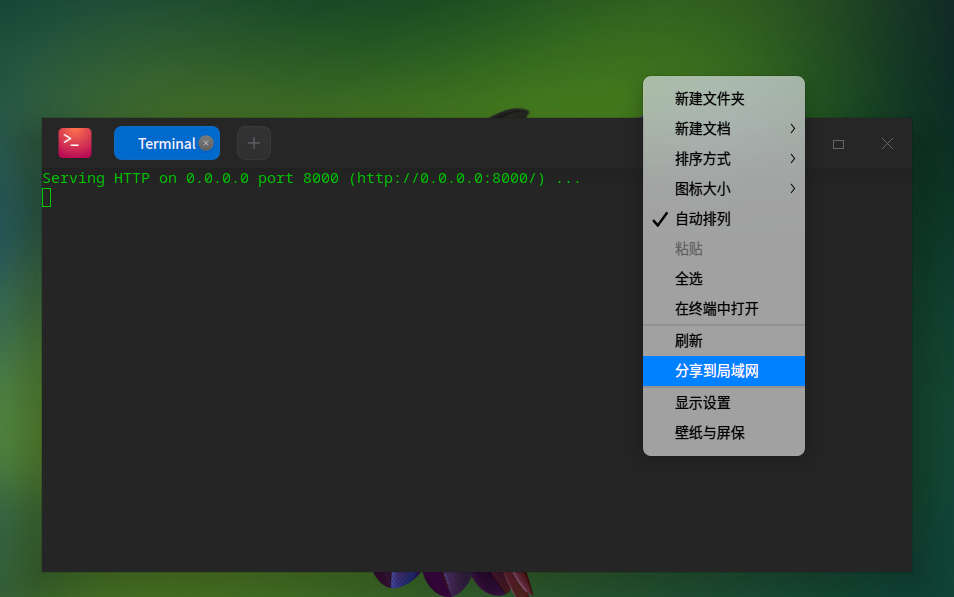

 deepin
 我这也有一个 share:https://bbs.deepin.org/post/229827
比 python 自带的更好用,有兴趣的可以试试。

 deepin
 maicss做了个可以二维码共享的
spk://store/tools/sendbylan
deepin 


python3可以一条命令搭建一个简易http服务器,从而实现简单共享。
phthon3 -m http.server
默认端口是8000,在其他电脑浏览器输入:http://IP:8000进行访问。
可以将这条命令添加右键菜单中,随时随地实现。
方法如下:
先在/usr/bin中新建一个脚本,内容如下:
#!/bin/bash
deepin-terminal -e “python3 -m http.server” -w $1
保存文件名为share,赋予该文件执行权限。
然后在/usr/share/deepin/dde-file-manager/oem-menuextensions目录中新建share.desktop文件,内容如下
[Desktop Entry]
Exec=share %U
GenericName=share
GenericName[zh_CN]=分享到局域网
MimeType=inode/directory;
Name=share
Name[zh_CN]=分享到局域网
Type=Application
X-Deepin-Vendor=user-custom
重启后就可以用了。
WIN系统如果安装了python3,也可以用这条命令搭建http服务器。