

 中文
中文 
忘记、过去 deepin
2022-01-10 22:20 deepin zenity 只能在用户权限下运行和显示。
如果定时任务是 root 权限,请加上 su 用户名 -c "zenity xxxxxxxx" 这样子指定用户运行。
Reply Like 0 View the author
 deepin
 zenity 只能在用户权限下运行和显示。
如果定时任务是 root 权限,请加上 su 用户名 -c "zenity xxxxxxxx" 这样子指定用户运行。

 deepin
 zenity 只能在用户权限下运行和显示。
如果定时任务是 root 权限,请加上 su 用户名 -c "zenity xxxxxxxx" 这样子指定用户运行。
感谢回复!不过刚刚在普通账户下和root账户下试了,不起效果。
deepin 感谢回复!不过刚刚在普通账户下和root账户下试了,不起效果。
试下 env DISPLAY=:0 su 用户名 -c "zenity --info --text=a" 这样子,我这里可以在 tty2 用 root 给 tty1 用户发 zenity 窗口。
非图形界面下调用要手动指定屏幕 $DISPLAY

 deepin
 可以用crontab来实现你的要求。这里做一个例子,每隔一分钟弹出一个窗口。窗口的内容是当前时间和用户。
步骤:
1.ctrl+alt+t打开终端
2.输入crontab -e
输入如下内容,然后保存(我使用的是vim用:wq来退出,如果是nano用ctrl+x来保存退出)
* * * * * /bin/bash -c "DISPLAY=:0 zenity --info --text='$(whoami;date)'"
使用crontab -l来检查是否生效
$ crontab -l
# Edit this file to introduce tasks to be run by cron.
#
# Each task to run has to be defined through a single line
# indicating with different fields when the task will be run
# and what command to run for the task
#
# To define the time you can provide concrete values for
# minute (m), hour (h), day of month (dom), month (mon),
# and day of week (dow) or use '*' in these fields (for 'any').
#
# Notice that tasks will be started based on the cron's system
# daemon's notion of time and timezones.
#
# Output of the crontab jobs (including errors) is sent through
# email to the user the crontab file belongs to (unless redirected).
#
# For example, you can run a backup of all your user accounts
# at 5 a.m every week with:
# 0 5 * * 1 tar -zcf /var/backups/home.tgz /home/
#
# For more information see the manual pages of crontab(5) and cron(8)
#
# m h  dom mon dow   command
* * * * *  /bin/bash -c "DISPLAY=:0  zenity --info --text='$(whoami;date)'"
最后效果
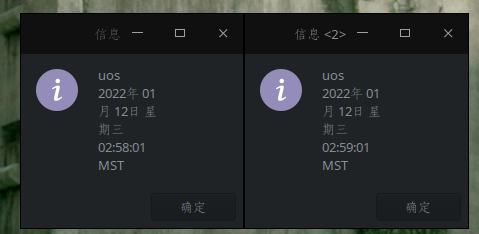
deepin 可以用crontab来实现你的要求。这里做一个例子,每隔一分钟弹出一个窗口。窗口的内容是当前时间和用户。
步骤:
1.ctrl+alt+t打开终端
2.输入crontab -e
输入如下内容,然后保存(我使用的是vim用:wq来退出,如果是nano用ctrl+x来保存退出)
* * * * * /bin/bash -c "DISPLAY=:0 zenity --info --text='$(whoami;date)'"
使用crontab -l来检查是否生效
$ crontab -l
# Edit this file to introduce tasks to be run by cron.
#
# Each task to run has to be defined through a single line
# indicating with different fields when the task will be run
# and what command to run for the task
#
# To define the time you can provide concrete values for
# minute (m), hour (h), day of month (dom), month (mon),
# and day of week (dow) or use '*' in these fields (for 'any').
#
# Notice that tasks will be started based on the cron's system
# daemon's notion of time and timezones.
#
# Output of the crontab jobs (including errors) is sent through
# email to the user the crontab file belongs to (unless redirected).
#
# For example, you can run a backup of all your user accounts
# at 5 a.m every week with:
# 0 5 * * 1 tar -zcf /var/backups/home.tgz /home/
#
# For more information see the manual pages of crontab(5) and cron(8)
#
# m h  dom mon dow   command
* * * * *  /bin/bash -c "DISPLAY=:0  zenity --info --text='$(whoami;date)'"
最后效果
测试确实是可行,非常感谢!
deepin 试下 env DISPLAY=:0 su 用户名 -c "zenity --info --text=a" 这样子,我这里可以在 tty2 用 root 给 tty1 用户发 zenity 窗口。
非图形界面下调用要手动指定屏幕 $DISPLAY
看了后面的回答发现你的思路是对的,不过不需要指定用户直接bash -c 指定DISPLAY和弹窗也可以


在deepin20.3中怎样才能通过crontab定时任务弹出我想要的提示框?
我发现在控制台直接运行zenity --info --text "提示内容"是可以的,但是用定时任务弹窗不会出现,调试的时候写日志任务是正常执行的。添加环境变量或者尝试在root下执行依旧不会弹出提示框。哪位大佬知道原因呢?