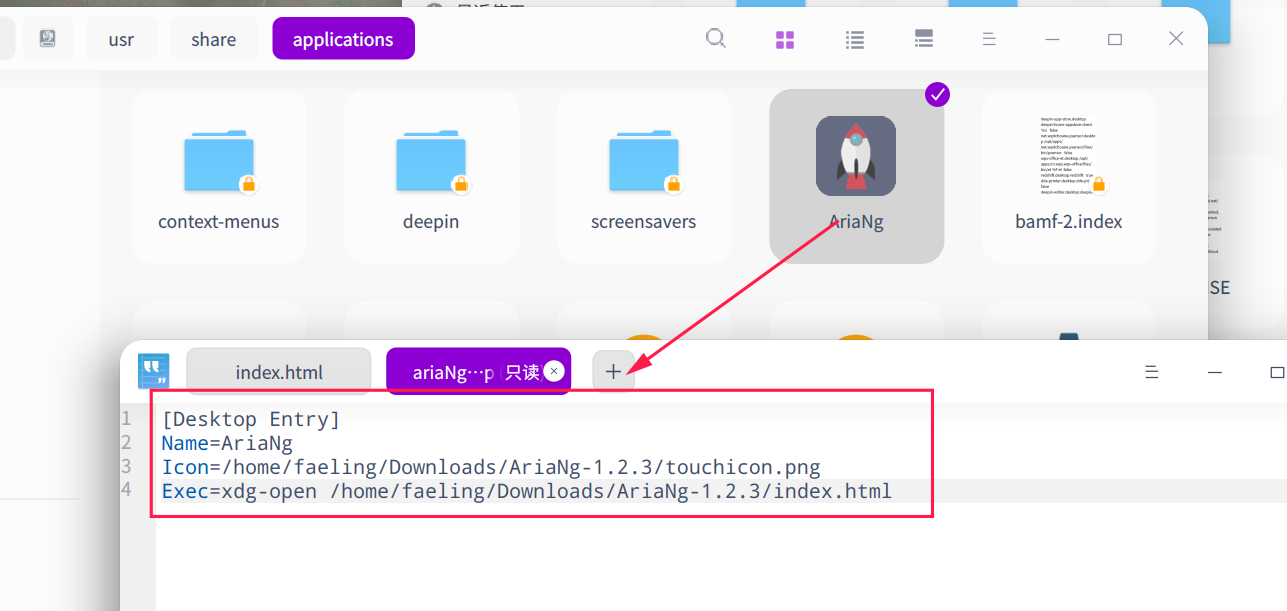
写一个desktop
exec的部分就写xdg-open+空格+你的index文件路径
例如ariang.desktop
[Desktop Entry]
Name=AriaNg
Icon=/home/maicss/AriaNg/touchicon.png
Exec=xdg-open /home/maicss/AriaNg/index.html
放在/usr/share/applications或者~/.local/share/applications/里边
按理说应该就行了
写一个desktop
exec的部分就写xdg-open+空格+你的index文件路径
例如ariang.desktop
[Desktop Entry]
Name=AriaNg
Icon=/home/maicss/AriaNg/touchicon.png
Exec=xdg-open /home/maicss/AriaNg/index.html
放在/usr/share/applications或者~/.local/share/applications/里边
按理说应该就行了
我一直都用的在线的那个网页,从来都不知道还可以这么用
弄个快捷方式方便
这是什么软件?能否分享下?
这是什么软件?能否分享下?
大神,这是aria2的网页前端,叫ariaNg,github上有的;
我是在B站弄来的,网址,【5分钟学会如何在Linux部署使用下载神器--Aria2-哔哩哔哩】 https://b23.tv/zRimzxt
写一个desktop
exec的部分就写xdg-open+空格+你的index文件路径
例如ariang.desktop
[Desktop Entry]
Name=AriaNg
Icon=/home/maicss/AriaNg/touchicon.png
Exec=xdg-open /home/maicss/AriaNg/index.html
放在/usr/share/applications或者~/.local/share/applications/里边
按理说应该就行了
如下图,双击图标打不开

如下图,双击图标打不开

直接在命令行运行exec里边的内容可以吗?
如果可以那就在里边加一行
Type=Application
试试
如果你想在双击时直接显示,右键属性--->权限管理--->取消勾选允许以程序执行
直接在命令行运行exec里边的内容可以吗?
如果可以那就在里边加一行
Type=Application
试试
加上 Type=Application后可以了。
然后,还能不能更进阶一点,打开这个快捷方式,自动启动aria2😂
加上 Type=Application后可以了。
然后,还能不能更进阶一点,打开这个快捷方式,自动启动aria2😂
可以,要执行多条命令可以用&&连接起来
Exec=xdg-open /home/maicss/AriaNg/index.html && /path/to/aria2
可以,要执行多条命令可以用&&连接起来
Exec=xdg-open /home/maicss/AriaNg/index.html && /path/to/aria2
1、我的desktop这样写的,aria2无法启动,网页前端也打不开,把&&后的删掉就可以打开前端
[Desktop Entry] Name=AriaNg Icon=/home/faeling/Downloads/AriaNg-1.2.3/touchicon.png Exec=xdg-open /home/faeling/Downloads/AriaNg-1.2.3/index.html && aria2c --conf-path=/home/faeling/Downloads/aria2/aria2.conf Type=Application
2、然后在终端中运行这个,也无法启动aria2,得先cd到配置的目录,就能启动
aria2c --conf-path=/home/faeling/Downloads/aria2/aria2.conf 捕捉到异常 Exception: [download_helper.cc:563] errorCode=1 打开文件 aria2.session 失败,原因:File not found or it is a directory

Popular Ranking
ChangePopular Events
More
目前的打开方式:双击index.html,然后再点击一下显示,
能直接弄一个快捷方式的吗,点一下就好的那种?