

 中文
中文 
deepin-mq deepin
2022-01-08 04:53 deepin 感谢分享
Reply Like 0 View the author
 deepin
 感谢分享
 deepin
 live系统在哪下载,谢谢
 deepin
 live系统在哪下载,谢谢
官网
https://www.deepin.org/zh/download/
最下面
 deepin
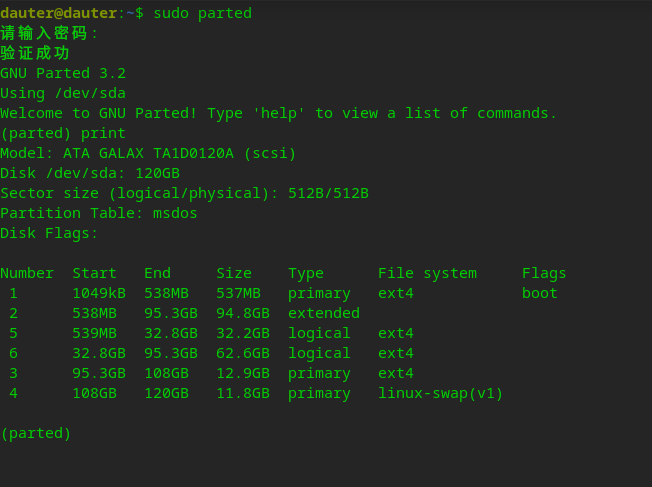
 还可以用parted命令直接就可以删除掉rootb
1.切换到管理员
2.输入命令parted
3.print
4.rm number(rootb的number)
5.这个时候有一个警告,输入i,然后回车
6.退出
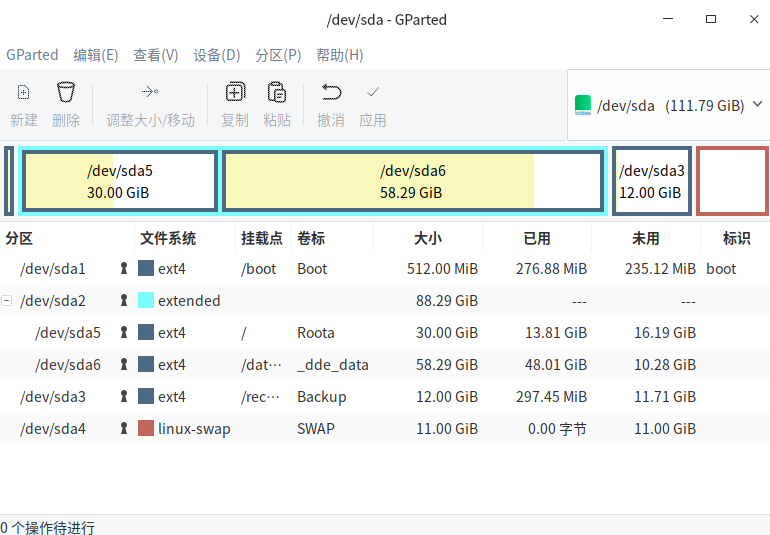
7.输入sudo gparted
8.点扩展roota,
9.调到最大,就可以了
10.有什么不懂联系我,
(数据重要,请误操作)
deepin 还可以用parted命令直接就可以删除掉rootb
1.切换到管理员
2.输入命令parted
3.print
4.rm number(rootb的number)
5.这个时候有一个警告,输入i,然后回车
6.退出
7.输入sudo gparted
8.点扩展roota,
9.调到最大,就可以了
10.有什么不懂联系我,
(数据重要,请误操作)
 deepin
空间焦虑感消失,神清气爽😄


我也被这个问题困扰了很久,也在这里发过贴,没有人给出确定的答案。
前天看到有人又在问这个问题,特意在虚拟机操作试了一下,顺利将Roota、Rootb两个分区合并,目前看还没有什么问题。
磁盘操作有危险,请谨慎操作。
操作其实比较简单,但涉及磁盘资料,请谨慎操作:
用live系统启动电脑,打开GParted磁盘工具,把Roota开始的分区全部卸载,删除Rootb分区,调整Roota分区大小到最大,应用,重启。