

 中文
中文 
ashin_520 deepin
2022-01-07 22:50 deepin 测试
Reply Like 0 View the author
 deepin
 测试
 deepin
 方法一(亲测可用)
dconf 系统配置编辑器搜了一下,有好几个
/org/gnome/desktop/interface/cursor-size
/com/deepin/wrap/gnome/desktop/interface/cursor-size
/com/deepin/xsettings/gtk-cursor-theme-size
更改为64
方法二:
直接 gsettings set org.gnome.desktop.interface cursor-size 64 (不是这个属性),不知道对应的是什么key,可以用命令 gsettings list-keys org.gnome.desktop.interface找找;
注意:注销以后生效
deepin 但是最好还是系统支持调整,类似ubuntu那样。
deepin 解决办法,终端执行:
gsettings get com.deepin.xsettings gtk-cursor-theme-size
gsettings set com.deepin.xsettings gtk-cursor-theme-size 50

 deepin
 解决办法,终端执行:
gsettings get com.deepin.xsettings gtk-cursor-theme-size
gsettings set com.deepin.xsettings gtk-cursor-theme-size 50
这些命令是在哪里的,官方文档吗?给个链接
deepin 这些命令是在哪里的,官方文档吗?给个链接
没有找到官方文档,我也是自己琢磨的。
只需要gsettings set com.deepin.xsettings gtk-cursor-theme-size 56就可以;
可以安装个Stacer设置开机启动,如图:
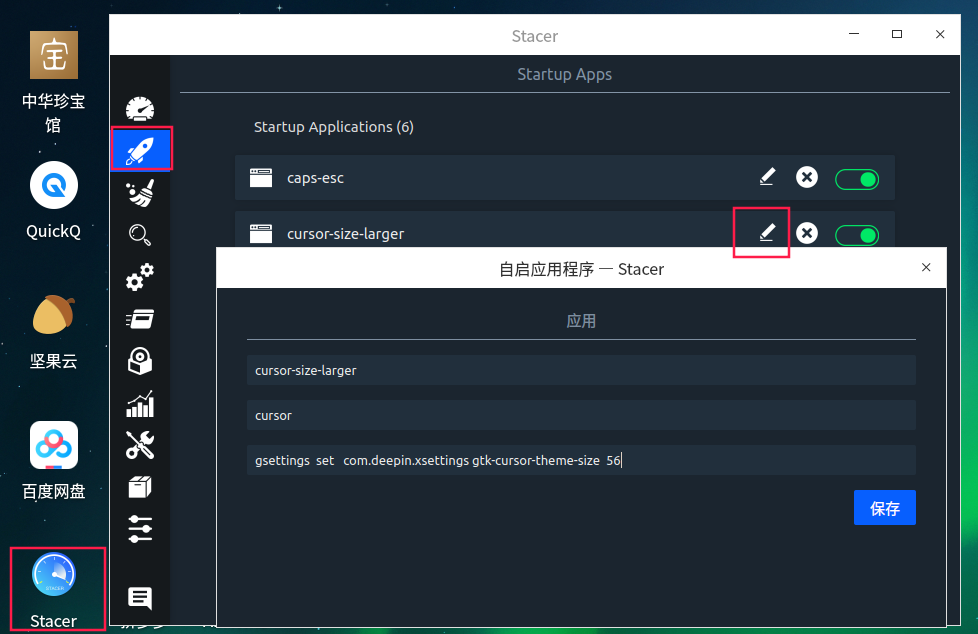
deepin 没有找到官方文档,我也是自己琢磨的。
只需要gsettings set com.deepin.xsettings gtk-cursor-theme-size 56就可以;
可以安装个Stacer设置开机启动,如图:
这个工具又是哪里的😳
 deepin
 没有找到官方文档,我也是自己琢磨的。
只需要gsettings set com.deepin.xsettings gtk-cursor-theme-size 56就可以;
可以安装个Stacer设置开机启动,如图:
可行 谢谢老哥


希望加入设置项---设置鼠标大小。光调整屏幕缩放比例达不到功能的要求。