

 中文
中文 
U_Apple_QAQ_U deepin
2022-01-05 05:07 deepin deepin-wine6-stable "exe路径"
Reply Like 0 View the author
 deepin
 deepin-wine6-stable "exe路径"

 deepin
 应该不是自带 wine 吧?只是仓库里有 deepin 自己维护的 deepin-wine、deepin-wine5、deepin-wine6,wine 的应用依赖这些,所以安装 wine 应用时会安装上 wine。

 deepin
 全新安装的话是没有的 可以 sudo apt-get install deepin-wine6-stable 手动安装,或者在应用商店里安装 windows版微信,会自动安装
使用方法见沙发

 deepin
 在商店安装程序时会自动安装依赖,不装是没有的

 deepin
 系统不带wine
安装微信后会自动安装deepin-wine6-stable
也可以自己手动安装。
在/usr/share/applications目录创建一个desktop文件,比如wine.desktop,就可以双击exe文件打开运行了。
内容如下:
[Desktop Entry]
Name=Wine
Name[zh_CN]=Wine
GenericName=Launch by Wine
GenericName[zh_CN]=使用Wine运行
Comment=Launch by Wine
Comment[zh_CN]=使用Wine运行
MimeType=application/octet-stream
Keywords=exe;scr;
Exec=deepin-wine6-stable start /unix %f
Icon=wine
Terminal=false
Type=Application
NoDisplay=false
Categories=System;Utility;
StartupNotify=true
deepin 系统不带wine
安装微信后会自动安装deepin-wine6-stable
也可以自己手动安装。
在/usr/share/applications目录创建一个desktop文件,比如wine.desktop,就可以双击exe文件打开运行了。
内容如下:
[Desktop Entry]
Name=Wine
Name[zh_CN]=Wine
GenericName=Launch by Wine
GenericName[zh_CN]=使用Wine运行
Comment=Launch by Wine
Comment[zh_CN]=使用Wine运行
MimeType=application/octet-stream
Keywords=exe;scr;
Exec=deepin-wine6-stable start /unix %f
Icon=wine
Terminal=false
Type=Application
NoDisplay=false
Categories=System;Utility;
StartupNotify=true
收藏了,果然可以!
 deepin
 全新安装的话是没有的 可以 sudo apt-get install deepin-wine6-stable 手动安装,或者在应用商店里安装 windows版微信,会自动安装
使用方法见沙发
谢谢!我这个样子是应该是以前就装好的吧?
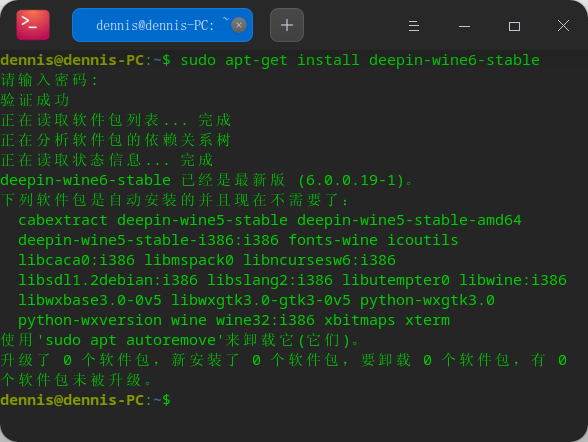
deepin 系统不带wine
安装微信后会自动安装deepin-wine6-stable
也可以自己手动安装。
在/usr/share/applications目录创建一个desktop文件,比如wine.desktop,就可以双击exe文件打开运行了。
内容如下:
[Desktop Entry]
Name=Wine
Name[zh_CN]=Wine
GenericName=Launch by Wine
GenericName[zh_CN]=使用Wine运行
Comment=Launch by Wine
Comment[zh_CN]=使用Wine运行
MimeType=application/octet-stream
Keywords=exe;scr;
Exec=deepin-wine6-stable start /unix %f
Icon=wine
Terminal=false
Type=Application
NoDisplay=false
Categories=System;Utility;
StartupNotify=true
谢谢,搞定了!


我是从20.1版本升级过来的,目前的系统版本是20.3。
我发现自20.1版本起,应用商店里有好多APP是wine版本的,那么我是否可以理解为,从20.1起到现在的20.3,系统都自带wine的?
如果系统确实是自带wine的,那么我的问题来了?如何在20.3下,运行windows的程序呢?谢谢!