[Tutorials] v4l2loopback
Tofloor
poster avatar
we******ly@chen.my03.com
deepin
2022-01-01 17:03
Author

I want to get virtualcam for obs, and cant get the v4l2loopback installed. This is my error log

DKMS make.log for v4l2loopback-0.12.1 for kernel 5.10.60-amd64-desktop (x86_64)
Fri 31 Dec 2021 07:51:32 PM EST
Building v4l2-loopback driver...
make -C /lib/modules/5.10.60-amd64-desktop/build M=/var/lib/dkms/v4l2loopback/0.12.1/build modules
make[1]: Entering directory '/usr/src/linux-headers-5.10.60-amd64-desktop'
CC [M] /var/lib/dkms/v4l2loopback/0.12.1/build/v4l2loopback.o
/var/lib/dkms/v4l2loopback/0.12.1/build/v4l2loopback.c: In function ‘vidioc_qbuf’:
/var/lib/dkms/v4l2loopback/0.12.1/build/v4l2loopback.c:1509:4: error: implicit declaration of function ‘v4l2_get_timestamp’; did you mean ‘v4l2_buffer_get_timestamp’? [-Werror=implicit-function-declaration]
v4l2_get_timestamp(&b->buffer.timestamp);
^~~~~~~~~~~~~~~~~~
v4l2_buffer_get_timestamp
/var/lib/dkms/v4l2loopback/0.12.1/build/v4l2loopback.c: In function ‘init_vdev’:
/var/lib/dkms/v4l2loopback/0.12.1/build/v4l2loopback.c:2072:23: error: ‘VFL_TYPE_GRABBER’ undeclared (first use in this function); did you mean ‘VFL_TYPE_SUBDEV’?
vdev->vfl_type = VFL_TYPE_GRABBER;
^~~~~~~~~~~~~~~~
VFL_TYPE_SUBDEV
/var/lib/dkms/v4l2loopback/0.12.1/build/v4l2loopback.c:2072:23: note: each undeclared identifier is reported only once for each function it appears in
/var/lib/dkms/v4l2loopback/0.12.1/build/v4l2loopback.c: In function ‘v4l2loopback_init_module’:
/var/lib/dkms/v4l2loopback/0.12.1/build/v4l2loopback.c:2412:44: error: ‘VFL_TYPE_GRABBER’ undeclared (first use in this function); did you mean ‘VFL_TYPE_SUBDEV’?
if (video_register_device(devs[i]->vdev, VFL_TYPE_GRABBER, video_nr[i]) < 0) {
^~~~~~~~~~~~~~~~
VFL_TYPE_SUBDEV
cc1: some warnings being treated as errors
make[2]: *** [scripts/Makefile.build:280: /var/lib/dkms/v4l2loopback/0.12.1/build/v4l2loopback.o] Error 1
make[1]: *** [Makefile:1822: /var/lib/dkms/v4l2loopback/0.12.1/build] Error 2
make[1]: Leaving directory '/usr/src/linux-headers-5.10.60-amd64-desktop'
make: *** [Makefile:43: v4l2loopback.ko] Error 2

Reply Favorite View the author
All Replies
神末shenmo
deepin
Spark-App
Q&A Team
2022-01-01 17:33
#1

Here is a blog in Chinese, hope can help you. I choose this one because the blogger was an UOS(a commercial version of deepin) user so your situations maybe similar. You can use Google Translate to read it. Good Luck

https://blog.csdn.net/weixin_43348615/article/details/120591381

The blog says the VCAM function was embegged in OBS latter than V26.1. Maybe upgrade your OBS is a solution.

Reply View the author
we******ly@chen.my03.com
deepin
2022-01-01 18:01
#2

thanks 哥们

Reply View the author
we******ly@chen.my03.com
deepin
2022-01-01 18:02
#3

im on obs 27 and virtualcam doesnt come with it. i installed it from the deepin store

Reply View the author
we******ly@chen.my03.com
deepin
2022-01-01 18:06
#4

i followed the instructions on the chinese blog, and got this error as i got before

sudo apt-get install ffmpeg
Reading package lists... Done
Building dependency tree
Reading state information... Done
ffmpeg is already the newest version (7:4.1.8.1-1+dde).
The following packages were automatically installed and are no longer required:
debhelper dh-autoreconf dh-strip-nondeterminism dwz intltool-debian libarchive-cpio-perl
libarchive-zip-perl libfile-stripnondeterminism-perl liblinear3 liblua5.3-0 libmail-sendmail-perl
libsys-hostname-long-perl module-assistant nmap nmap-common po-debconf
Use 'sudo apt autoremove' to remove them.
0 upgraded, 0 newly installed, 0 to remove and 0 not upgraded.
1 not fully installed or removed.
After this operation, 0 B of additional disk space will be used.
Do you want to continue? [Y/n] y
Setting up v4l2loopback-dkms (0.12.1-1) ...
Removing old v4l2loopback-0.12.1 DKMS files...


Deleting module version: 0.12.1
completely from the DKMS tree.

Done.
Loading new v4l2loopback-0.12.1 DKMS files...
Building for 5.10.60-amd64-desktop
Building initial module for 5.10.60-amd64-desktop
Error! Bad return status for module build on kernel: 5.10.60-amd64-desktop (x86_64)
Consult /var/lib/dkms/v4l2loopback/0.12.1/build/make.log for more information.
dpkg: error processing package v4l2loopback-dkms (--configure):
installed v4l2loopback-dkms package post-installation script subprocess returned error exit status 10
Errors were encountered while processing:
v4l2loopback-dkms
E: Sub-process /usr/bin/dpkg returned an error code (1)

Reply View the author
神末shenmo
deepin
Spark-App
Q&A Team
2022-01-01 23:05
#5
we******ly@chen.my03.com

i followed the instructions on the chinese blog, and got this error as i got before

sudo apt-get install ffmpeg
Reading package lists... Done
Building dependency tree
Reading state information... Done
ffmpeg is already the newest version (7:4.1.8.1-1+dde).
The following packages were automatically installed and are no longer required:
debhelper dh-autoreconf dh-strip-nondeterminism dwz intltool-debian libarchive-cpio-perl
libarchive-zip-perl libfile-stripnondeterminism-perl liblinear3 liblua5.3-0 libmail-sendmail-perl
libsys-hostname-long-perl module-assistant nmap nmap-common po-debconf
Use 'sudo apt autoremove' to remove them.
0 upgraded, 0 newly installed, 0 to remove and 0 not upgraded.
1 not fully installed or removed.
After this operation, 0 B of additional disk space will be used.
Do you want to continue? [Y/n] y
Setting up v4l2loopback-dkms (0.12.1-1) ...
Removing old v4l2loopback-0.12.1 DKMS files...


Deleting module version: 0.12.1
completely from the DKMS tree.

Done.
Loading new v4l2loopback-0.12.1 DKMS files...
Building for 5.10.60-amd64-desktop
Building initial module for 5.10.60-amd64-desktop
Error! Bad return status for module build on kernel: 5.10.60-amd64-desktop (x86_64)
Consult /var/lib/dkms/v4l2loopback/0.12.1/build/make.log for more information.
dpkg: error processing package v4l2loopback-dkms (--configure):
installed v4l2loopback-dkms package post-installation script subprocess returned error exit status 10
Errors were encountered while processing:
v4l2loopback-dkms
E: Sub-process /usr/bin/dpkg returned an error code (1)

You should click the reply buttom so I can get notification.applaud

It seems that you are trying to use nginx+ffmpeg as the alternative solution but the remained v4l2 config stopped dpkg from working....

Maybe you can try using dpkg --force all -r .... to unsintall the package forcely.

I'm not sure if it can help

BTW,sometimes apps in deepin-store is not reliable. Some of them maybe not the same as official version. I've heard that some app in the store is not complete

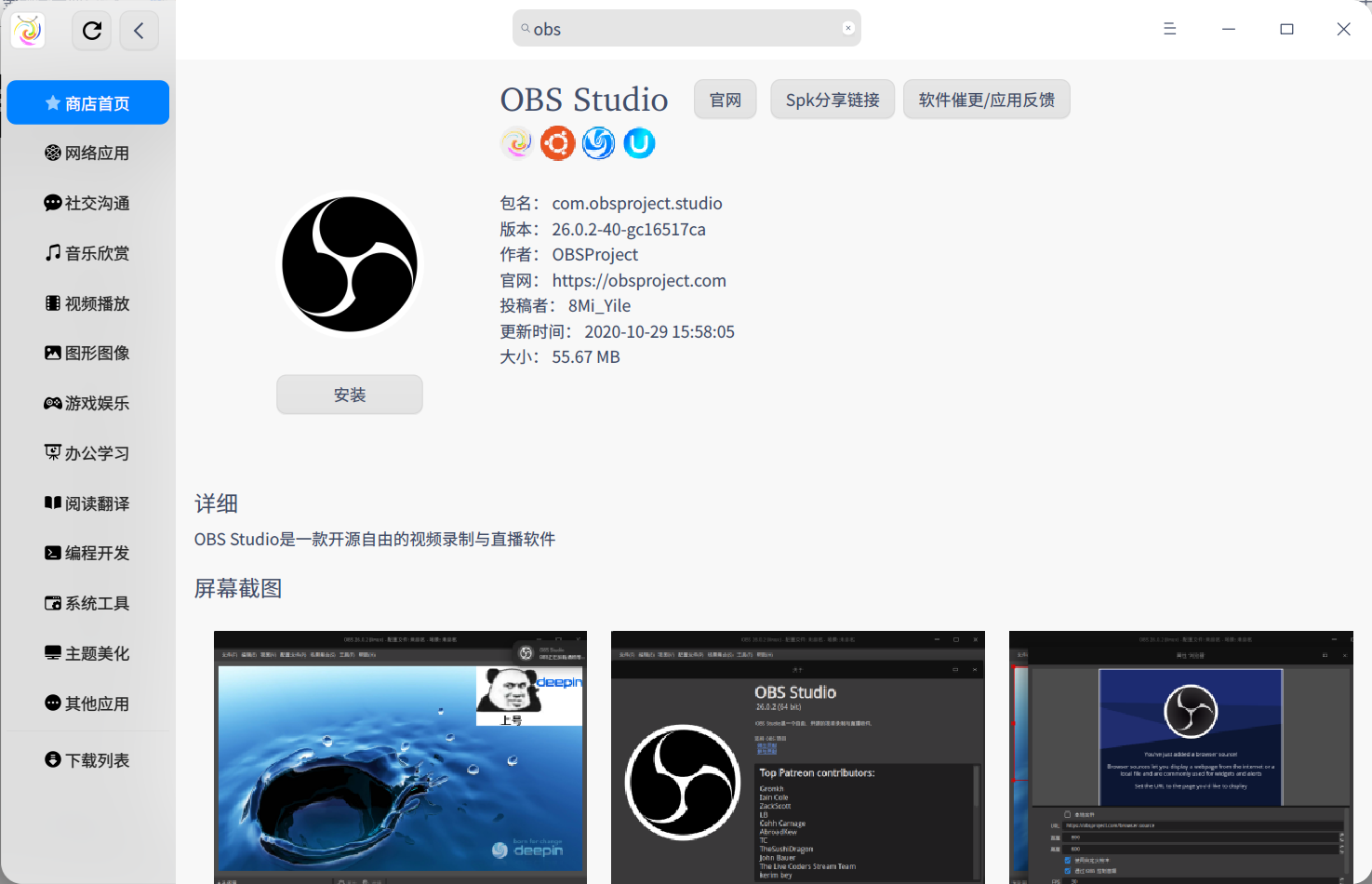
There is a OBS build (26.0.2-40-gc16517ca) in spark store(A Chinese Community appstore for deepin/debian)

图片.png

The app is not completely Translated to English(As I know they abandoned the international plan...) but I think it's enough for you to use since the buttoms are translated.

I 'll give you the download link of spark store, you can try it.

https://gitee.com/deepin-community-store/spark-store/attach_files/915704/download/spark-store_3.0.3-7_amd64.deb

Not sure if it can help..... I don't live on Linux so I haven't used OBS on linux before

Reply View the author
神末shenmo
deepin
Spark-App
Q&A Team
2022-01-01 23:09
#6

Wait a minute, I can download the .deb from the source of spark store

https://shenmo.lanzoul.com/iWrzyy7w4na

Here is the .deb

Reply View the author
we******ly@chen.my03.com
deepin
2022-01-02 07:55
#7
神末shenmo

You should click the reply buttom so I can get notification.applaud

It seems that you are trying to use nginx+ffmpeg as the alternative solution but the remained v4l2 config stopped dpkg from working....

Maybe you can try using dpkg --force all -r .... to unsintall the package forcely.

I'm not sure if it can help

BTW,sometimes apps in deepin-store is not reliable. Some of them maybe not the same as official version. I've heard that some app in the store is not complete

There is a OBS build (26.0.2-40-gc16517ca) in spark store(A Chinese Community appstore for deepin/debian)

图片.png

The app is not completely Translated to English(As I know they abandoned the international plan...) but I think it's enough for you to use since the buttoms are translated.

I 'll give you the download link of spark store, you can try it.

https://gitee.com/deepin-community-store/spark-store/attach_files/915704/download/spark-store_3.0.3-7_amd64.deb

Not sure if it can help..... I don't live on Linux so I haven't used OBS on linux before

Thank you so much. I will try it

Reply View the author
we******ly@chen.my03.com
deepin
2022-01-02 07:57
#8
神末shenmo

You should click the reply buttom so I can get notification.applaud

It seems that you are trying to use nginx+ffmpeg as the alternative solution but the remained v4l2 config stopped dpkg from working....

Maybe you can try using dpkg --force all -r .... to unsintall the package forcely.

I'm not sure if it can help

BTW,sometimes apps in deepin-store is not reliable. Some of them maybe not the same as official version. I've heard that some app in the store is not complete

There is a OBS build (26.0.2-40-gc16517ca) in spark store(A Chinese Community appstore for deepin/debian)

图片.png

The app is not completely Translated to English(As I know they abandoned the international plan...) but I think it's enough for you to use since the buttoms are translated.

I 'll give you the download link of spark store, you can try it.

https://gitee.com/deepin-community-store/spark-store/attach_files/915704/download/spark-store_3.0.3-7_amd64.deb

Not sure if it can help..... I don't live on Linux so I haven't used OBS on linux before

This is great. I love to try Chinese apps. I can read some Chinese

Reply View the author
we******ly@chen.my03.com
deepin
2022-01-02 07:58
#9
神末shenmo

Wait a minute, I can download the .deb from the source of spark store

https://shenmo.lanzoul.com/iWrzyy7w4na

Here is the .deb

You have a qq?

Reply View the author
we******ly@chen.my03.com
deepin
2022-01-02 08:16
#10
神末shenmo

Wait a minute, I can download the .deb from the source of spark store

https://shenmo.lanzoul.com/iWrzyy7w4na

Here is the .deb

When I open obs, it says正在加载,请稍等。 Any reason?

Reply View the author
神末shenmo
deepin
Spark-App
Q&A Team
2022-01-02 19:36
#11
we******ly@chen.my03.com

You have a qq?

Yes

Reply View the author
神末shenmo
deepin
Spark-App
Q&A Team
2022-01-02 19:38
#12
we******ly@chen.my03.com

When I open obs, it says正在加载,请稍等。 Any reason?

Not sure

Any screenshot?

@八蓝米科技丶以勒

He's the uploader of OBS, I'll contact him

Reply View the author
we******ly@chen.my03.com
deepin
2022-01-03 18:01
#13

Thank you. I am going to try to reinstall deepin and install obs from spark store. Thanks.

Reply View the author