[Share Experiences] 原来nodejs官方的加源脚本里面可以识别deepin就是有点小问题
Tofloor
poster avatar
orzorc
deepin
2022-01-01 08:59
Author

拿16.x举例

https://github.com/nodesource/distributions/blob/e37049cd09f0b52831b67164daada01fd7df46b7/deb/setup_16.x#L283

这里是检查当前发行版可以使用的源,deepin stable对应的是buster,这个理论上来说应该是没有的。但是20.3版本如果直接使用的话会报错,类似这样的:

## Confirming "n/a" is supported...

+ curl -sLf -o /dev/null 'https://deb.nodesource.com/node_16.x/dists/n/a/Release'

## Your distribution, identified as "n/a", is not currently supported

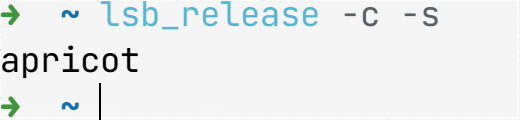
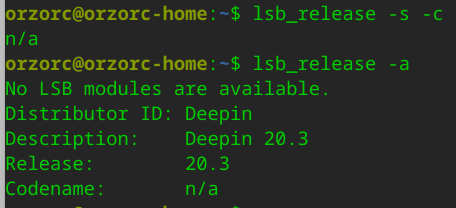
原因是获取发行版时用的是 lsb_release -c -s,而这个获取到的是codename,20.3这个返回就是n/a

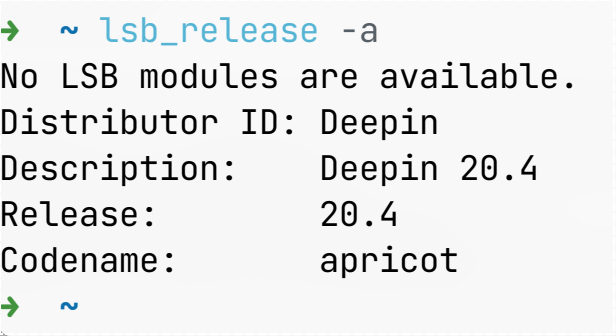
这个有点奇怪,因为我看到的 /etc/lsb-release里面的codename是 apricot,同时 lsb_release -a会有 No LSB modules are available的问题,网上搜索到的方法是安装lsb-core但是deepin里面并没有,不知道是不是这个原因不能获取到正确的codename。

仔细看了一下历史记录,这个估计是从之前版本的脚本copy过来的,所以应该需要首先把这个输出修正为正确的codename,然后给那个库提pr,把正确的codename更新上去。

所以目前的workaround就是找到上面的 DISTRO=$(lsb_release -c -s)然后注释掉,换成 DISTRO="stable"再次运行,原来错误的地方就会变成类似这样的输出:

## You seem to be using Deepin version stable.
## This maps to Debian "buster"... Adjusting for you...

## Confirming "buster" is supported...

+ curl -sLf -o /dev/null 'https://deb.nodesource.com/node_16.x/dists/buster/Release'

## Adding the NodeSource signing key to your keyring...

然后就可以正常安装了

Reply Favorite View the author
All Replies
deepin-superuser
deepin
2022-01-01 17:13
#1

我都是直接添加的

#添加nodejs源到source.list.d
wget -q -O - https://deb.nodesource.com/gpgkey/nodesource.gpg.key | sudo apt-key add -
sudo sh -c 'echo "deb https://deb.nodesource.com/node_16.x buster main" > /etc/apt/sources.list.d/nodesource.list'
Reply View the author
orzorc
deepin
2022-01-01 18:59
#2
deepin-superuser

我都是直接添加的

#添加nodejs源到source.list.d
wget -q -O - https://deb.nodesource.com/gpgkey/nodesource.gpg.key | sudo apt-key add -
sudo sh -c 'echo "deb https://deb.nodesource.com/node_16.x buster main" > /etc/apt/sources.list.d/nodesource.list'

对于我们来说这没有问题,但是对于刚接触的人来说可能从官方渠道获取到的可能更容易接受一点。

既然官方都已经把deepin写进去了,感觉还是最好维护会更好点

Reply View the author
要讲武德
deepin
2022-01-01 20:58
#3

1.0a.png.png

Reply View the author
orzorc
deepin
2022-01-01 23:03
#4
要讲武德

1.0a.png.png

scream啊这。。。

image.png

Reply View the author
要讲武德
deepin
2022-01-01 23:33
#5

1.0.a.png.png

Reply View the author
sudo_free
deepin
2022-01-01 23:59
#6

https://github.com/linuxdeepin/developer-center/issues/1931

前两天刚处理了,20.4内测就直接推送了,效率确实提高了

Reply View the author
Feng Yu
deepin
2022-01-02 01:33
#7

这种开发工具的部署我还是喜欢选择使用各种version manager。

比如python --> conda

node --> nvm

Java --> sdkman

Reply View the author
orzorc
deepin
2022-01-02 05:29
#8
要讲武德

1.0.a.png.png

原来是20.4修复了,我还是20.3

Reply View the author
orzorc
deepin
2022-01-02 05:31
#9
sudo_free

https://github.com/linuxdeepin/developer-center/issues/1931

前两天刚处理了,20.4内测就直接推送了,效率确实提高了

proud 那以后就可以提个PR给nodesource把distro alias加上了

Reply View the author
deepin-superuser
deepin
2022-03-02 19:04
#10
orzorc

proud 那以后就可以提个PR给nodesource把distro alias加上了

PR已提交

https://github.com/nodesource/distributions/pull/1351/files

Reply View the author