[Seek Help] NVIDIA显卡驱动安装失败问题
Tofloor
poster avatar
triste
deepin
2021-12-29 01:58
Author

在发帖求助之前,我也在社区里找过类似的帖子,但是没有一个能解决我的问题的。

简单描述一下我的问题:# 卸载了系统自带的Nvidia驱动

sudo apt autoremove nvidia-*

# 禁用了自带的nouveau
sudo vim /etc/modprobe.d/blacklist.conf

blacklist nouveau
blacklist lbm-nouveau
options nouveau modeset=0
alias nouveau off
alias lbm-nouveau off

# Ctrl + Alt + F2 进入tty2 然后关掉界面
sudo service lightdm stop

# 给官方驱动添加可执行权限
sudo chmod +x NVIDIA-Linux-x86_64-470.94.run

# 执行
./NVIDIA-Linux-x86_64-470.94.run


然后就报错了

Reply Favorite View the author
All Replies
triste
deepin
2021-12-29 01:58
#1

这是安装报错日志

nvidia-installer log file '/var/log/nvidia-installer.log'
creation time: Tue Dec 28 16:47:07 2021
installer version: 470.94

PATH: /usr/local/sbin:/usr/local/bin:/usr/sbin:/usr/bin:/sbin:/bin

nvidia-installer command line:
    ./nvidia-installer

Using: nvidia-installer ncurses v6 user interface
-> Detected 12 CPUs online; setting concurrency level to 12.
-> Installing NVIDIA driver version 470.94.
-> Would you like to register the kernel module sources with DKMS? This will allow DKMS to automatically build a new module, if you install a different kernel later. (Answer: Yes)
-> Install NVIDIA's 32-bit compatibility libraries? (Answer: No)
Looking for install checker script at ./libglvnd_install_checker/check-libglvnd-install.sh
   executing: '/bin/sh ./libglvnd_install_checker/check-libglvnd-install.sh'...
   Found libglvnd libraries: libGLESv2.so.2 libEGL.so.1 libGLX.so.0 libGL.so.1
   Found non-libglvnd libraries:
   Missing libraries: libGLESv1_CM.so.1 libOpenGL.so.0
   libglvnd appears to be installed.
Will not install libglvnd libraries.
-> Skipping GLVND file: "libOpenGL.so.0"
-> Skipping GLVND file: "libOpenGL.so"
-> Skipping GLVND file: "libGLESv1_CM.so.1.2.0"
-> Skipping GLVND file: "libGLESv1_CM.so.1"
-> Skipping GLVND file: "libGLESv1_CM.so"
-> Skipping GLVND file: "libGLESv2.so.2.1.0"
-> Skipping GLVND file: "libGLESv2.so.2"
-> Skipping GLVND file: "libGLESv2.so"
-> Skipping GLVND file: "libGLdispatch.so.0"
-> Skipping GLVND file: "libGLX.so.0"
-> Skipping GLVND file: "libGLX.so"
-> Skipping GLVND file: "libGL.so.1.7.0"
-> Skipping GLVND file: "libGL.so.1"
-> Skipping GLVND file: "libGL.so"
-> Skipping GLVND file: "libEGL.so.1.1.0"
-> Skipping GLVND file: "libEGL.so.1"
-> Skipping GLVND file: "libEGL.so"
WARNING: Unable to determine the path to install the libglvnd EGL vendor library config files. Check that you have pkg-config and the libglvnd development libraries installed, or specify a path with --glvnd-egl-config-path.
Will install libEGL vendor library config file to /usr/share/glvnd/egl_vendor.d
-> Searching for conflicting files:
-> done.
-> Installing 'NVIDIA Accelerated Graphics Driver for Linux-x86_64' (470.94):
   executing: '/usr/sbin/ldconfig'...
   executing: '/usr/bin/systemctl daemon-reload'...
-> done.
-> Driver file installation is complete.
-> Installing DKMS kernel module:
ERROR: Failed to run `/usr/sbin/dkms build -m nvidia -v 470.94 -k 5.10.60-amd64-desktop`: 
Kernel preparation unnecessary for this kernel.  Skipping...

Building module:
cleaning build area...
'make' -j12 NV_EXCLUDE_BUILD_MODULES='' KERNEL_UNAME=5.10.60-amd64-desktop IGNORE_CC_MISMATCH='' modules...(bad exit status: 2)
Error! Bad return status for module build on kernel: 5.10.60-amd64-desktop (x86_64)
Consult /var/lib/dkms/nvidia/470.94/build/make.log for more information.
-> error.
ERROR: Failed to install the kernel module through DKMS. No kernel module was installed; please try installing again without DKMS, or check the DKMS logs for more information.
ERROR: Installation has failed.  Please see the file '/var/log/nvidia-installer.log' for details.  You may find suggestions on fixing installation problems in the README available on the Linux driver download page at www.nvidia.com.

Reply View the author
triste
deepin
2021-12-29 01:59
#2

这是dkms的make日志

DKMS make.log for nvidia-470.94 for kernel 5.10.60-amd64-desktop (x86_64)
2021年 12月 28日 星期二 17:16:09 CST
make[1]: 进入目录“/usr/src/linux-headers-5.10.60-amd64-desktop”

  ERROR: Kernel configuration is invalid.
         include/generated/autoconf.h or include/config/auto.conf are missing.
         Run 'make oldconfig && make prepare' on kernel src to fix it.

make[1]: *** [Makefile:720:include/config/auto.conf] 错误 1
make[1]: 离开目录“/usr/src/linux-headers-5.10.60-amd64-desktop”
make: *** [Makefile:80:modules] 错误 2

Reply View the author
triste
deepin
2021-12-29 02:01
#3
triste

这是dkms的make日志

DKMS make.log for nvidia-470.94 for kernel 5.10.60-amd64-desktop (x86_64)
2021年 12月 28日 星期二 17:16:09 CST
make[1]: 进入目录“/usr/src/linux-headers-5.10.60-amd64-desktop”

  ERROR: Kernel configuration is invalid.
         include/generated/autoconf.h or include/config/auto.conf are missing.
         Run 'make oldconfig && make prepare' on kernel src to fix it.

make[1]: *** [Makefile:720:include/config/auto.conf] 错误 1
make[1]: 离开目录“/usr/src/linux-headers-5.10.60-amd64-desktop”
make: *** [Makefile:80:modules] 错误 2

进入到上面说的/usr/src/对应内核的目录执行了 make oldconfig && make prepare

然后报错找不到Kconfig文件

Reply View the author
北冥夜未央
deepin
Ecological co-builder
2021-12-29 02:26
#4

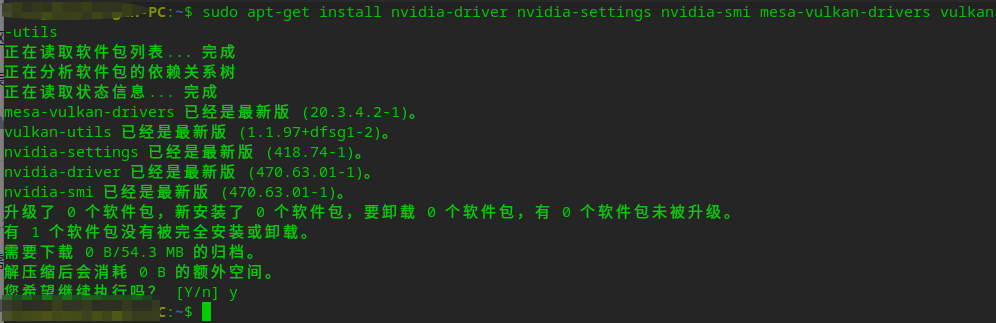
安装源内驱动:sudo apt-get install nvidia-driver nvidia-settings nvidia-smi mesa-vulkan-drivers vulkan-utils

下载并安装驱动切换插件:https://github.com/zty199/dde-dock-switch_graphics_card/releases/

Reply View the author
北冥夜未央
deepin
Ecological co-builder
2021-12-29 02:27
#5

官网驱动需要在编译驱动的内核下才能用

Reply View the author
triste
deepin
2021-12-29 17:23
#6
北冥夜未央

安装源内驱动:sudo apt-get install nvidia-driver nvidia-settings nvidia-smi mesa-vulkan-drivers vulkan-utils

下载并安装驱动切换插件:https://github.com/zty199/dde-dock-switch_graphics_card/releases/

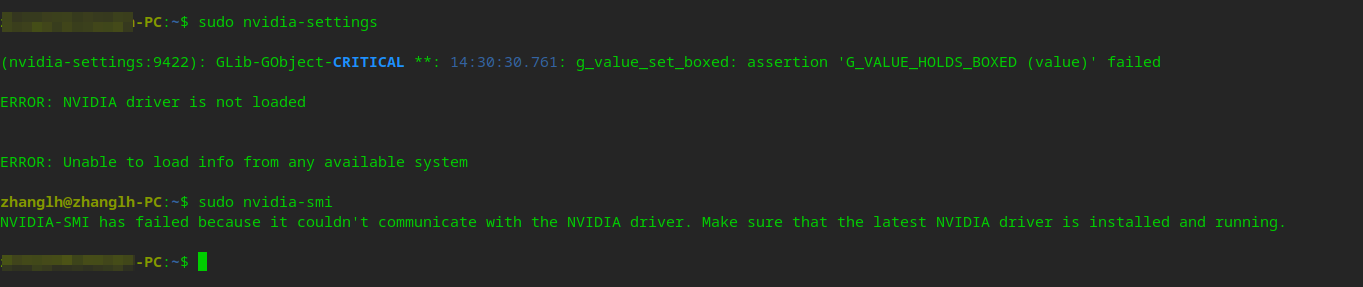
感谢大佬愿意帮助,但是这个也不行,安装完之后,也重启过系统image.png

image.png

Reply View the author
enforcee
deepin
2021-12-29 18:43
#7

楼主有安装过内核源码包吗

dpkg -l | grep linux-headers

Reply View the author
triste
deepin
2021-12-29 19:40
#8
enforcee

楼主有安装过内核源码包吗

dpkg -l | grep linux-headers

有安装过

image.png

Reply View the author
enforcee
deepin
2021-12-29 21:51
#9
triste

有安装过

image.png

楼主,我刚才装了这个内核编译成功了,你尝试 apt reinstall linux-headers-5.10.60-amd64-desktop 重装一下源码包,看看有没有文件没装好

/usr/src/linux-headers-5.10.60-amd64-desktop/include/config/auto.conf

这个文件在不在?

Reply View the author
triste
deepin
2021-12-29 22:30
#10
enforcee

楼主,我刚才装了这个内核编译成功了,你尝试 apt reinstall linux-headers-5.10.60-amd64-desktop 重装一下源码包,看看有没有文件没装好

/usr/src/linux-headers-5.10.60-amd64-desktop/include/config/auto.conf

这个文件在不在?

image.png

文件存在,然后我也重装内核以及NVIDIA驱动,驱动安装成功,但是并没有被加载

Reply View the author
triste
deepin
2021-12-29 22:31
#11

image.png

Reply View the author
enforcee
deepin
2021-12-30 00:31
#12
triste

image.png

文件存在,然后我也重装内核以及NVIDIA驱动,驱动安装成功,但是并没有被加载

楼主不要着急,这种情况我见过多了,你要一步一步来,我用过的所有GNU/Linux里面只有deepin很麻烦

先看看nvidia等内核模块有没有运行

lsmod | grep nvidia

如果没有运行的话就试试

sudo modprobe nvidia

看看有什么提示

顺便看看nouveau有没有运行

lsmod | grep nouveau

Reply View the author
131******29
deepin
2021-12-30 00:32
#13

linux劝退普通人的实例啊

Reply View the author