

 中文
中文 
deepin-superuser deepin
2021-12-14 17:29 deepin 启动时报什么错吗?启动界面按 Ctrl + Alt + F1 进入tty。输入 sudo apt-get update && sudo apt-get dist-upgrade
输出的信息拍照给我
Reply Like 0 View the author
 deepin
 启动时报什么错吗?启动界面按 Ctrl + Alt + F1 进入tty。输入 sudo apt-get update && sudo apt-get dist-upgrade
输出的信息拍照给我

 deepin
 启动时报什么错吗?启动界面按 Ctrl + Alt + F1 进入tty。输入 sudo apt-get update && sudo apt-get dist-upgrade
输出的信息拍照给我
上传报错,上传不了了
deepin 启动时报什么错吗?启动界面按 Ctrl + Alt + F1 进入tty。输入 sudo apt-get update && sudo apt-get dist-upgrade
输出的信息拍照给我
见压缩包,第一启动报错,第二是执行你的命令,第三是执行apt --fix-broken
deepin 见压缩包,第一启动报错,第二是执行你的命令,第三是执行apt --fix-broken
不好意思,刚才有事
看这个情况像是你好久没有更新过了
你执行一下 cat /etc/apt/source.list
看一下输出结果里是不是
deb [by-hash=force] https://community-packages.deepin.com/deepin/ apricot main contrib non-free
如果不是,备份好原来的
sudo vim /etc/apt/source.list 改成这上边个,
然后再执行 sudo apt-get clean && sudo apt-get update && sudo apt-get dist-upgrade
deepin 不好意思,刚才有事
看这个情况像是你好久没有更新过了
你执行一下 cat /etc/apt/source.list
看一下输出结果里是不是
deb [by-hash=force] https://community-packages.deepin.com/deepin/ apricot main contrib non-free
如果不是,备份好原来的
sudo vim /etc/apt/source.list 改成这上边个,
然后再执行 sudo apt-get clean && sudo apt-get update && sudo apt-get dist-upgrade
更新提示成功了,没有任何报错,重启后界面仍是启动失败,而且tty终端界面无法登录了,输入用户名后,没有输出密码的地方,自动验证失败
deepin 更新提示成功了,没有任何报错,重启后界面仍是启动失败,而且tty终端界面无法登录了,输入用户名后,没有输出密码的地方,自动验证失败
1.你再把启动时报错哪个发给我
2.试试别的tty
F1 ~ F12 一共12个 看哪个能进去,
deepin 1.你再把启动时报错哪个发给我
2.试试别的tty
F1 ~ F12 一共12个 看哪个能进去,
报错信息好像没有变就是ldm报错。
ttf终端我试了2-3个都是一样的问题,输入完用户名后,不回馈密码输入提示,过几秒报错
deepin 1.你再把启动时报错哪个发给我
2.试试别的tty
F1 ~ F12 一共12个 看哪个能进去,
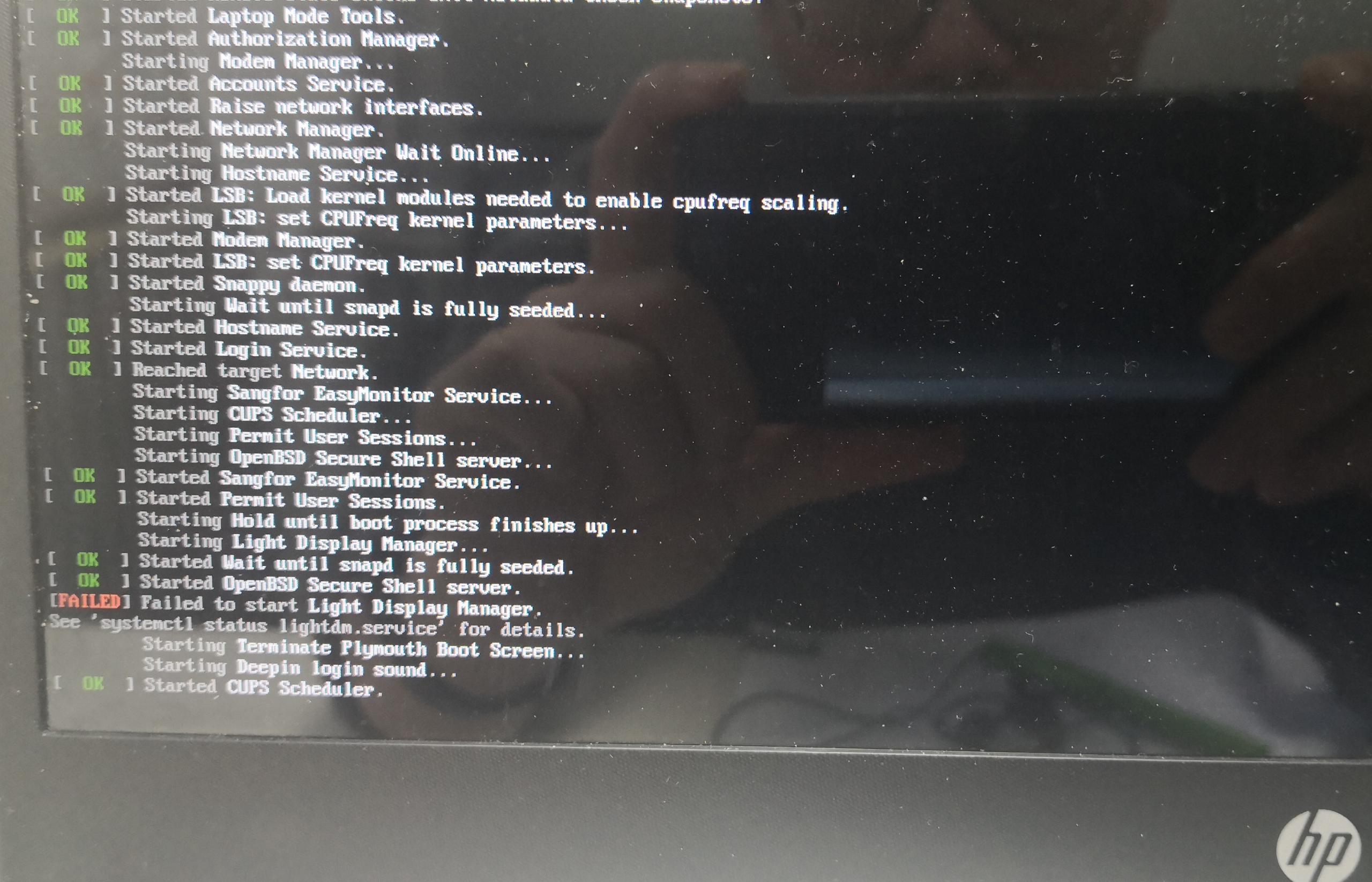
deepin
还有个错误没有拍到,就是文件系统驱动找不到ef..,好像是本地新增的东东
deepin 报错信息好像没有变就是ldm报错。
ttf终端我试了2-3个都是一样的问题,输入完用户名后,不回馈密码输入提示,过几秒报错
tty 一定要全部尝试,说不定就有一个能进去
我搜了一下 好像是显卡驱动的问题,要是还能进tty尝试卸载显卡驱动,要是都不行的话我就无能为了了
deepin tty 一定要全部尝试,说不定就有一个能进去
我搜了一下 好像是显卡驱动的问题,要是还能进tty尝试卸载显卡驱动,要是都不行的话我就无能为了了
如果是显卡问题,我记得有个启动选项 nomodeset 之类管用不?具体怎么设置来的
deepin tty 一定要全部尝试,说不定就有一个能进去
我搜了一下 好像是显卡驱动的问题,要是还能进tty尝试卸载显卡驱动,要是都不行的话我就无能为了了
加了行不行我不知道。你要想试的话可以
sudo vim /etc/default/grub
内容加在 quiet splash 后边
sudo update-grub2
加了行不行我不知道。你要想试的话可以
sudo vim /etc/default/grub
内容加在 quiet splash 后边
sudo update-grub2
没搞定,已经重装了
deepin 没搞定,已经重装了
好吧😂
deepin 好吧😂
都是心酸泪~~~
Popular Ranking
ChangePopular Events
More


 Fantastic experience on Deepin
昨天按提示更新,系统更新失败,然后重启后系统找不到另外一块硬盘。之后执行 apt dist-upgrade,过程提示安装失败好像qt5,之后通过apt --fix-broken还是报这个错,系统桌面无法启动,求拯救,无法工作了