[Document Viewer] 搜索 - 打开文件夹却打开Azure Data Studio
Tofloor
poster avatar
deepbox
deepin
2021-12-10 00:20
Author

Screenshot_select-area_20211209160027.png

image.png

  • 因为用太多工具了。 可能迷惑了。
Reply Favorite View the author
All Replies
learner
deepin
2021-12-10 01:38
#1

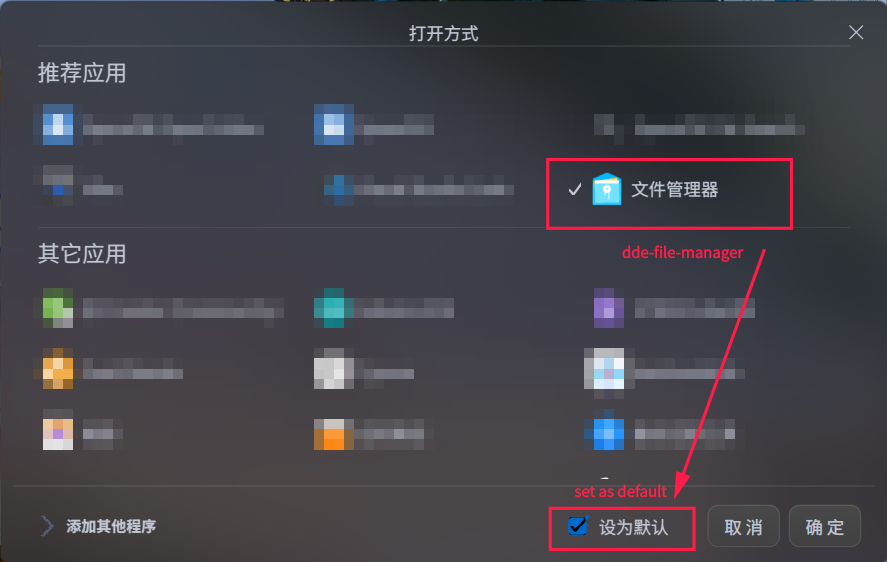
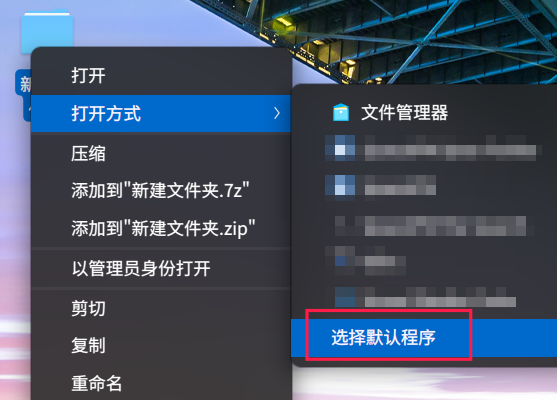
I guess that's because the default application to open a directory has been set to Azure. Maybe you can try setting it back to dde-file-manager by right clicking on an arbitrary folder and choose "select default application" and set the default application to dde-file-manager.

我猜测是因为打开一个目录的默认程序被设置成了 Azure 而不是 deepin 的文件管理器,可以尝试用右键菜单把默认程序设置成文件管理器。
截图_选择区域_20211209172705.png

截图_dde-desktop_20211209173209.png

Reply View the author
deepbox
deepin
2021-12-10 01:42
#2

Yes. thanks for help. This issue resolved. Why allow Azure Data studio simply change the environment setting. Deepin should disallow such behaviour.

是的。感谢帮助。这个问题解决了。为什么允许 Azure Data Studio 简单地更改环境设置。 Deepin 应该禁止这种行

Reply View the author
learner
deepin
2021-12-10 08:25
#3
deepbox

Yes. thanks for help. This issue resolved. Why allow Azure Data studio simply change the environment setting. Deepin should disallow such behaviour.

是的。感谢帮助。这个问题解决了。为什么允许 Azure Data Studio 简单地更改环境设置。 Deepin 应该禁止这种行

My understanding of this question is that the operating system cannot distinguish between an operation performed "manually" by users and an operation performed "automatically" by an application (as long as the application is launched by the user). That's because these operations use the same system call.

For example, the default application settings for the current user is saved in the file ~/.config/mimeapps.list, and when you try to open a file, this mimeapps.list file will be scanned to determine the default application used to open that file. (P.S. The default application settings for the whole system is located in /usr/share/applications/mimeapps.list but the current user's settings have higher priority.)
I guess the operating system cannot distinguish between, e.g. your manually editing mimeapps.list (by text editors such as deepin-editor), your manually modifying the default application by right-click menus (which will result in changes in that mimeapps.list file), and automatic modification of the mimeapps.list file by applications that you launched (such as Azure), because these actions are performed through the same interface. In other words, these actions are equivalent from the operating system's perspective.

(This is only my understanding, I'm not sure whether it is correct ......)

我的理解是,操作系统无法区分用户“手动”进行的操作和用户启动的程序执行的操作,因为这些操作使用的是相同的系统调用。

例如,~/.config/mimeapps.list文件中存储了当前用户的默认程序的设置,当用户要打开一个文件时,系统会读取这个 mimeapps.list文件来判断应该用什么软件来打开用户要打开的文件。(对整个系统的默认程序的设置放在了 /usr/share/applications/mimeapps.list文件中,但是当前用户的设置的优先级更高)
我觉得操作系统应该无法区分以下这些情况:用户手动修改 mimeapps.list文件(例如用deepin文本编辑器来编辑该文件),用户通过右键菜单手动调整默认程序(也会导致 mimeapps.list文件被修改),用户启动的程序“自动”地修改了 mimeapps.list文件的内容 —— 因为这些操作都调用了相同的接口,或者说从操作系统的角度来看,这些操作是“等价”的。

(我不确定我的理解对不对。。。或许有没有大佬能来指点一下?)

Reply View the author
deepbox
deepin
2021-12-10 21:44
#4

Great explantion. Thanks for your detail explanation. Perhaps we try to look into the matter from daily user perspctive. It is to hard for normal to understand the technical setting and we hope not to even let them rectify or debug the issue like this. Everything should be in order must be in order. Like opening a folder, the action is only open the folder. No other action can supersede this action other than open it. Great operationg system not only having great UI, but great UX , UX is deep and taking a lot time and efforts. Which why we point out the issue here to let Deepin team to improve. I think they should have the idea on the issue.

Reply View the author