

 中文
中文 
deepin-superuser deepin
2021-12-09 16:25 deepin 这个问题由来已久,一直没有修复,试试中间那个模式
Reply Like 0 View the author
 deepin
 这个问题由来已久,一直没有修复,试试中间那个模式

 deepin
 这个问题由来已久,一直没有修复,试试中间那个模式
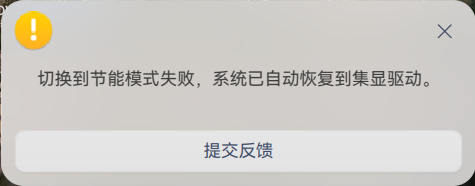
中间这个模式也不能切换。
这是我的独显被禁用了吗?
deepin 是 nvidia 显卡吗?如果是的话可以试试, 注意替换 nvidia-legacy-390xx-driver 为 第二步中输出的那个
1.sudo apt-get install nvidia-detect
2.nvidia-detect
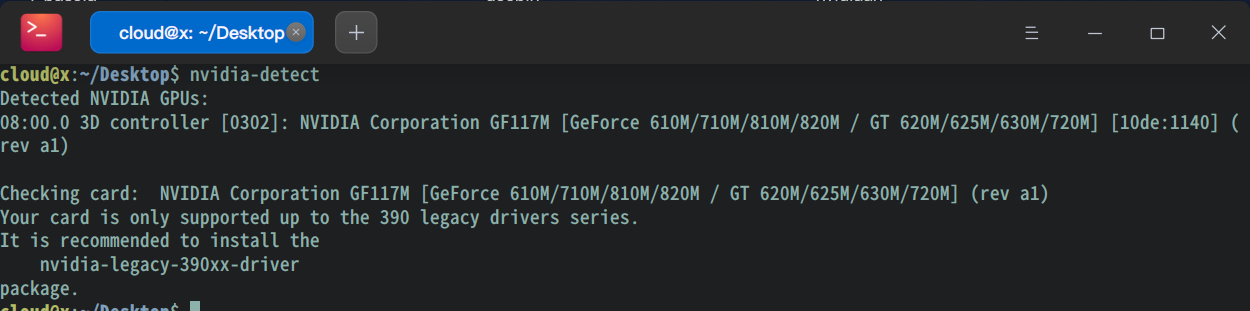
3.sudo apt-get purge nvidia-*
4.sudo apt-get autoremove --purge
5.wget https://file.winegame.net/packages/deepin/mgpu/mgpu-prime_0.2.0_amd64.deb
6.sudo apt-get install nvidia-legacy-390xx-driver ./mgpu-prime_0.2.0_amd64.deb
Popular Ranking
ChangePopular Events
More


 Fantastic experience on Deepin
安装了STEAM,使用STEAM PLAY。打不开游戏,显示游戏正在运行了,但是等一下又自动关闭了,游戏压根没有打开
我想是不是我的独显被禁用了。装了显卡驱动管理器,切换成性能模式后无法切换。