

 中文
中文 
deepin-superuser deepin
2021-12-02 04:36 deepin systemd-analyze blame
执行一下这条命令看看哪个服务启动慢
Reply Like 0 View the author
 deepin
 systemd-analyze blame
执行一下这条命令看看哪个服务启动慢

 deepin
 systemd-analyze blame
执行一下这条命令看看哪个服务启动慢
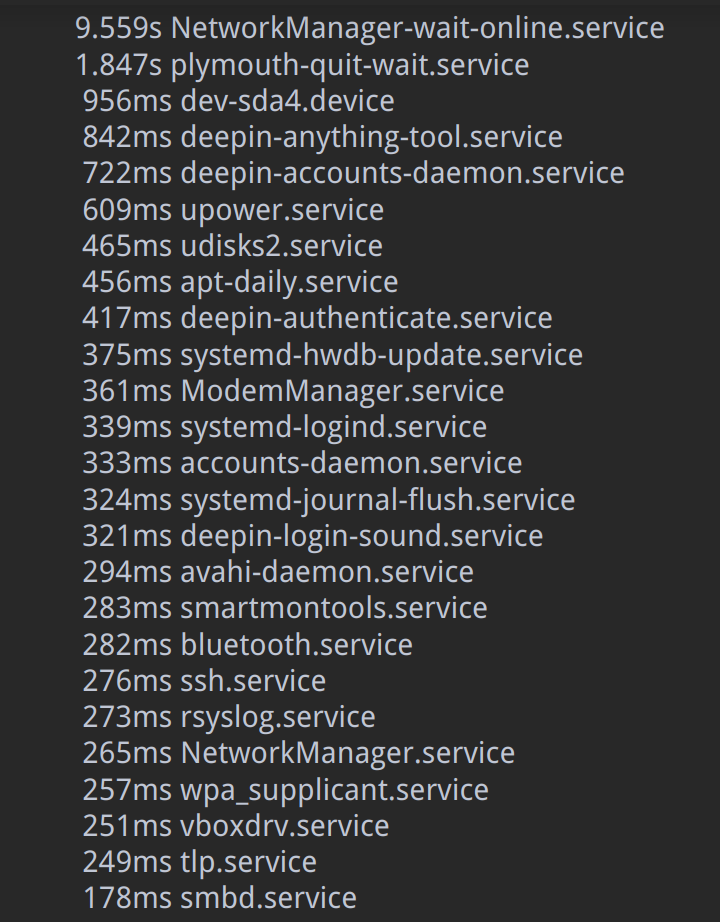
deepin systemd-analyze blame
执行一下这条命令看看哪个服务启动慢
把耗时长的几条禁用了,没有改善
感觉不像是服务启动速度造成的
进入桌面后,再马上运行这条程序,会提示服务启动尚未完成,似乎说明进入桌面不需要等服务全部启动
 deepin
  deepin
 用fsck检查一下分区,或者gparted分区右键检查
分区正在使用的话就用live系统
Popular Ranking
ChangePopular Events
More


 Fantastic experience on Deepin
以前正常,不知道是那个版本开始出现的问题,因为很少关机
最近一次关机和开机的日志如下---
https://nas.transart.ltd:1105/sharing/T9xNVeRFl
直接贴上来没有换行,非常乱
求大神帮忙解决
前几天用gparted的ISO文件启动修改过分区大小,只动了数据分区和swap分区; 估计跟这个有关系
逐个分区还原以前的备份文件(不全盘还原),保留硬盘目前的分区大小,完成后秒进系统
细节比较多,但是问题没有普遍性,就不详细描述