

 中文
中文 
liwl deepin
2021-11-25 23:43 deepin 不存在这样的问题,请问是几个指头滑动?
Reply Like 0 View the author
 deepin
 不存在这样的问题,请问是几个指头滑动?

 deepin
 是说触摸屏幕上左侧右侧滑动吧?先在 dconf 里边翻一下有没有吧

 deepin
 一根手指滑动;
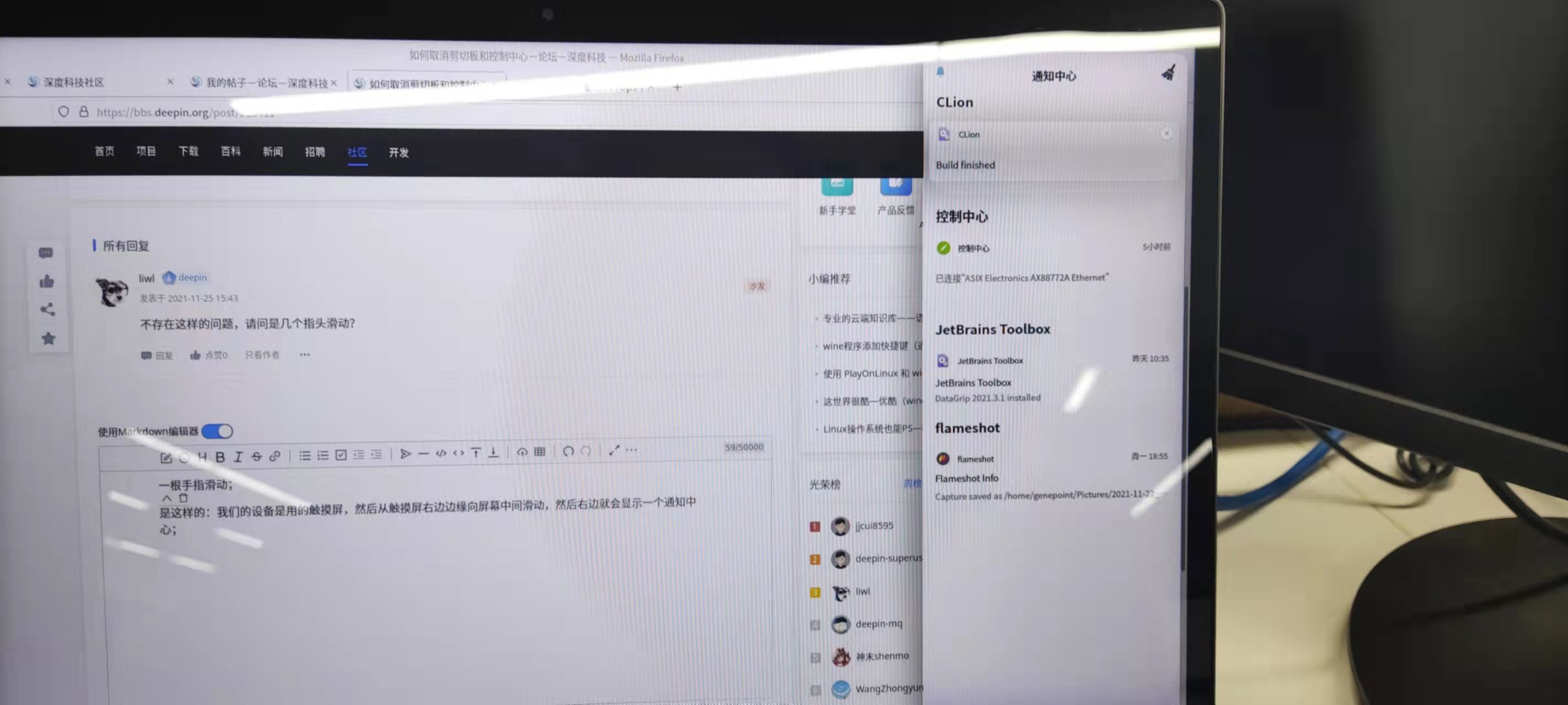
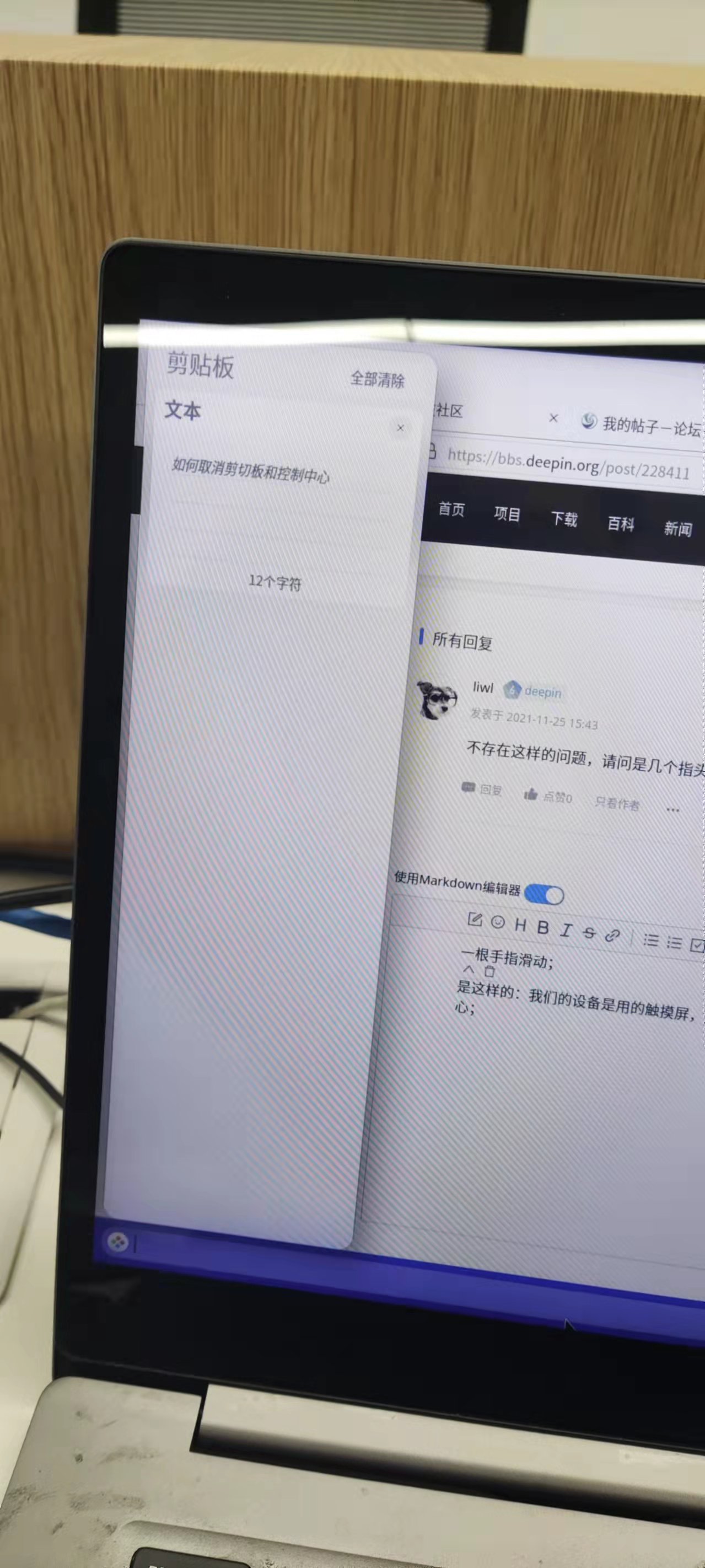
是这样的:我们的设备是用的触摸屏,从触摸屏右边边缘向屏幕中间滑动,然后右边就会显示一个通知中心窗口;从触摸屏左边边缘向中间滑动,然后左边就会显示一个剪切板的窗口。并且会显示任务栏。但是我们的设备要求不能显示这俩个窗口,我们自己的软件独占屏幕就行。
所以想问下怎么取消这两个窗口的显示。
deepin 不存在这样的问题,请问是几个指头滑动?
一根手指滑动;
是这样的:我们的设备是用的触摸屏,从触摸屏右边边缘向屏幕中间滑动,然后右边就会显示一个通知中心窗口;从触摸屏左边边缘向中间滑动,然后左边就会显示一个剪切板的窗口。并且会显示任务栏。但是我们的设备要求不能显示这俩个窗口,我们自己的软件独占屏幕就行。
所以想问下怎么取消这两个窗口的显示。
deepin 是说触摸屏幕上左侧右侧滑动吧?先在 dconf 里边翻一下有没有吧
我在系统设置中没有找到关于这两个窗口的设置
deepin 我在系统设置中没有找到关于这两个窗口的设置
不能,而且我去仓库里翻了下,感觉是写死的
https://github.com/linuxdeepin/dde-daemon/commit/6276d99dee75e24bf28be86d7ac949fe85db9aa0
deepin 不能,而且我去仓库里翻了下,感觉是写死的
https://github.com/linuxdeepin/dde-daemon/commit/6276d99dee75e24bf28be86d7ac949fe85db9aa0
那就尴尬了
deepin 不能,而且我去仓库里翻了下,感觉是写死的
https://github.com/linuxdeepin/dde-daemon/commit/6276d99dee75e24bf28be86d7ac949fe85db9aa0
能不能把这个在系统设置中添加相应的设置选项呢?设置可选的,在制造业中,一般都要求公司自己的软件独占屏幕就行,不能让用户看到系统相关的东西
deepin 能不能把这个在系统设置中添加相应的设置选项呢?设置可选的,在制造业中,一般都要求公司自己的软件独占屏幕就行,不能让用户看到系统相关的东西
我不是开发者,
@deepin-mq 请反馈一下这个需求
deepin 我不是开发者,
@deepin-mq 请反馈一下这个需求
噢噢,感谢回复解答
deepin 二指头,三指头,四指头,五指头,都试试
deepin 二指头,三指头,四指头,五指头,都试试
这个跟几根手指关系不大吧,关键是要可以取消这个手指滑动事件
deepin 这个跟几根手指关系不大吧,关键是要可以取消这个手指滑动事件
不知道你解决了没,今天我翻了下,发现在dconf下可以禁用掉;
路径是 “/com/deepin/dde/gesture/touch-screen-enabled”,置为false就可以了,亲测可行
deepin 不知道你解决了没,今天我翻了下,发现在dconf下可以禁用掉;
路径是 “/com/deepin/dde/gesture/touch-screen-enabled”,置为false就可以了,亲测可行
噢噢,好的,我试下,感谢!
deepin deepin 不知道你解决了没,今天我翻了下,发现在dconf下可以禁用掉;
路径是 “/com/deepin/dde/gesture/touch-screen-enabled”,置为false就可以了,亲测可行
我的系统里没有 /com...这个路径

deepin 在 dconf-edtior 里面找这个路径,可能要先安装它
sudo apt install dconf-editor
在 dconf-edtior 里面找这个路径,可能要先安装它
sudo apt install dconf-editor
请问在哪可以下载这个包的离线安装包呢,我们设备是不能连网的,需要下载离线安装包拷贝过去安装。
Popular Ranking
ChangePopular Events
More


 Fantastic experience on Deepin
如何取消右滑显示剪切板和左滑显示通知中心