

 中文
中文 
安洛 deepin
2021-11-14 18:18 deepin 命令行执行
sudo apt update
把结果贴出来
Reply Like 0 View the author
 deepin
 命令行执行
sudo apt update
把结果贴出来
 deepin
 命令行执行
sudo apt update
把结果贴出来
存新手,怎么运行?

 deepin
 存新手,怎么运行?
打开终端,把这条命令输入进去
deepin 桌面右键打开终端,输入以上代码,回车,然后密码就OK了
deepin 楼上讲得很清楚了。
补充一句,密码就是你在安装系统的时候设置的帐号密码。
deepin 无法输入密码,我重装系统试试,另外一台笔记本电脑正常

 deepin
 我就错误了一次,然后重新安装就好使了。
在发生就桌面右键打开终端,输入以上代码,回车,然后密码就木有问题了。
deepin deepin 不能输入密码,这能重新装系统吗?
deepin 命令行执行
sudo apt update
把结果贴出来
我的笔记本今天更新3个文件后,也无法安装软件了,运行命令后无法录入密码

 deepin
 我的笔记本今天更新3个文件后,也无法安装软件了,运行命令后无法录入密码
linux 输入用户密码是不显示的
deepin 无法输入密码,我重装系统试试,另外一台笔记本电脑正常
输入了没显示而已,其实已经输入进去了。
deepin 大神帮忙看看,为什么升级后不能安装软件?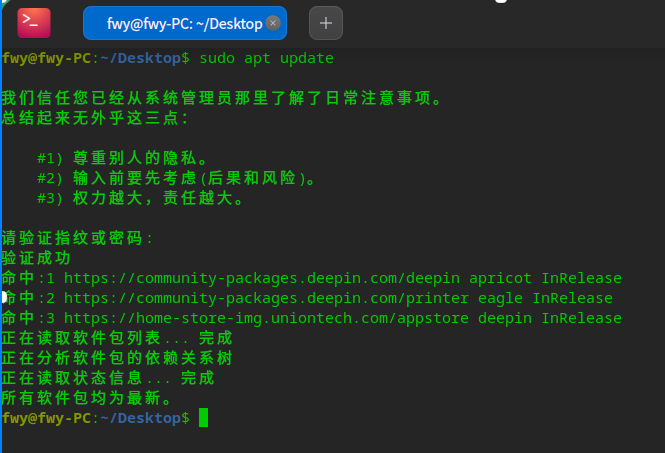
Popular Ranking
ChangePopular Events
More


 Fantastic experience on Deepin
最近根据教程安装win10和深度双系统,深度系统无法安装软件,全部提示安装失败。