

 中文
中文 
正直笔尖 deepin
2021-11-14 01:50 deepin It has been deleted!
 deepin deepin
 到官网下载Linux版.bundle的虚拟机文件包。
然后到下载文件夹,右键“在终端中打开”
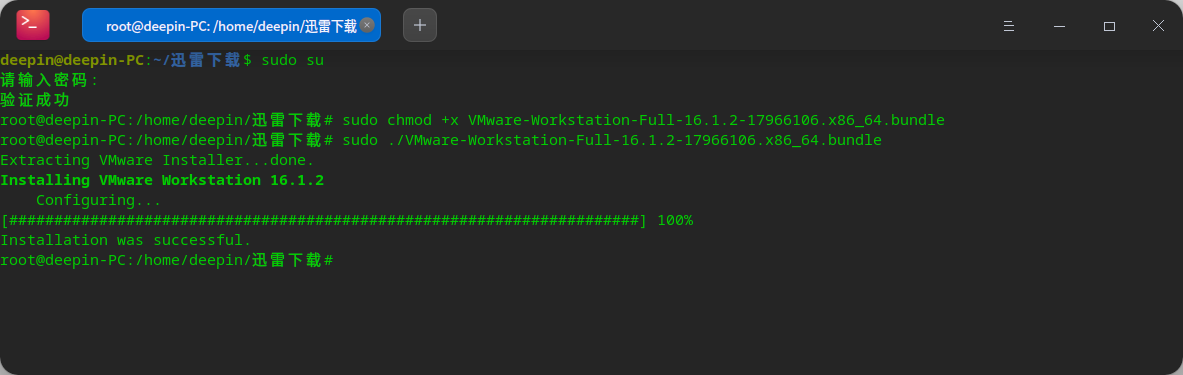
先root :sudo su
依次输入两行命令:sudo chmod +x VMware-Workstation-Full-16.1.2-17966106.x86_64.bundle
sudo ./VMware-Workstation-Full-16.1.2-17966106.x86_64.bundle
等它慢慢安装完毕
以上命令行中是老的包名,实际命令行中安装中你要修改使用你下载的包名一致,不然无法安装

 deepin
 一般这种时候我都会建议使用virtualbox,在linux上可能要比vmware好用。
 deepin
 到官网下载Linux版.bundle的虚拟机文件包。
然后到下载文件夹,右键“在终端中打开”
先root :sudo su
依次输入两行命令:sudo chmod +x VMware-Workstation-Full-16.1.2-17966106.x86_64.bundle
sudo ./VMware-Workstation-Full-16.1.2-17966106.x86_64.bundle
等它慢慢安装完毕
以上命令行中是老的包名,实际命令行中安装中你要修改使用你下载的包名一致,不然无法安装
安装成功,谢谢分享!
Popular Ranking
ChangePopular Events
More


 Fantastic experience on Deepin
想下一个vmware,应用商店没有,在官网找来了VMware-Workstation-Full-15.1.0-13591040.x86_64,在终端试了好久,还没搞好,有没有大神教教我