[Share Experiences] fcitx5 真好用
Tofloor
poster avatar
uvz
deepin
2021-11-10 02:17
Author

打字整个感觉都顺滑了不少。

参考链接 https://deepin.wiki/index.php?title=Fcitx5

Reply Favorite View the author
All Replies
1 / 2
To page
神末shenmo
deepin
Spark-App
Q&A Team
2021-11-10 03:17
#1

我用的deepin to go,之前用讯飞,经常突然卡死,连着整个fcitx一起卡

现在用 fcitx5一点也不卡了,而且输入体验没有很大落差,甚至界面更好看了

可以看看这个帖子来美化

https://bbs.deepin.org/zh/post/224852

附我自己用的一个拼音输入法图标

哎呀,是纯白的,可能你在这里看不见,居然和背景融为一体了

选中就能看见了

org.fcitx.Fcitx5.fcitx-pinyin.png

Reply View the author
dolphin_roy
deepin
2021-11-10 03:31
#2

我现在用的是fctix4的sunpinyin 响应速度也很快了,fcitx5具体有什么优势能分享一下么?

Reply View the author
liwl
deepin
2021-11-10 03:31
#3

一切都好,就是在文本编辑器或者文本编辑软件下,单行模式的拼音无法预览

楼主可以试试看。比如在deepin文本编辑器里面输入拼音时,单行模式下无拼音预览,wps也是

Reply View the author
与风长舞的叶
deepin
2021-11-10 04:05
#4

下次更新直接改好,给用户直接用就更好了

Reply View the author
deltacatxx
deepin
2021-11-10 04:16
#5
神末shenmo

我用的deepin to go,之前用讯飞,经常突然卡死,连着整个fcitx一起卡

现在用 fcitx5一点也不卡了,而且输入体验没有很大落差,甚至界面更好看了

可以看看这个帖子来美化

https://bbs.deepin.org/zh/post/224852

附我自己用的一个拼音输入法图标

哎呀,是纯白的,可能你在这里看不见,居然和背景融为一体了

选中就能看见了

org.fcitx.Fcitx5.fcitx-pinyin.png

image.png

问一下……未激活输入法时的图标怎么修改

Reply View the author
liwl
deepin
2021-11-10 04:26
#6
与风长舞的叶

下次更新直接改好,给用户直接用就更好了

我觉得你这话,很对

Reply View the author
安洛
deepin
2021-11-10 06:16
#7
dolphin_roy

我现在用的是fctix4的sunpinyin 响应速度也很快了,fcitx5具体有什么优势能分享一下么?

sunpinyin是单一词库,一旦尝试导入其它词库很容易导致词库文件过大索引变慢。

fcitx5可以随便导入搜狗等输入法的词库,依然很流畅。

Reply View the author
派了个萌
deepin
2021-11-10 08:34
#8

真的爽
截图_选择区域_20211110003352.png

Reply View the author
mardou
deepin
2021-11-10 19:15
#9
派了个萌

真的爽
截图_选择区域_20211110003352.png

我习惯使用五笔输入,偶尔使用拼音.不知道这个输入法有五笔输入吗?

Reply View the author
uvz
deepin
2021-11-10 20:15
#10
mardou

我习惯使用五笔输入,偶尔使用拼音.不知道这个输入法有五笔输入吗?

有的。

安装完成之后安装这个包, 啥都有, 什么五笔 二笔 仓颉 统统都有

sudo apt install fcitx5-chinese-addons

Reply View the author
uvz
deepin
2021-11-10 20:22
#11
dolphin_roy

我现在用的是fctix4的sunpinyin 响应速度也很快了,fcitx5具体有什么优势能分享一下么?

比较稳, 不会出现各种问题, 卡顿,崩溃等小问题, 想给 Felix Yan 打钱。

本人一直奉行着能不折腾就不折腾的原则, 之前一直犹豫着。 昨天终于忍不住安装了。

😃😃😃

Reply View the author
uvz
deepin
2021-11-10 20:24
#12
liwl

我觉得你这话,很对

改变用户使用习惯, 官方应该怕被骂。 想一下,deepin不一直就是小白鼠吗

Reply View the author
deltacatxx
deepin
2021-11-10 20:38
#13
uvz

改变用户使用习惯, 官方应该怕被骂。 想一下,deepin不一直就是小白鼠吗

可以新镜像预装,已经安装的不变

Reply View the author
派了个萌
deepin
2021-11-10 21:08
#14
liwl

一切都好,就是在文本编辑器或者文本编辑软件下,单行模式的拼音无法预览

楼主可以试试看。比如在deepin文本编辑器里面输入拼音时,单行模式下无拼音预览,wps也是

这个有啥解决办法吗,有点难受sad

Reply View the author
liwl
deepin
2021-11-10 21:26
#15
派了个萌

这个有啥解决办法吗,有点难受sad

目前没找到解决办法,只能等官方解决了。我已经反馈给deepin官方和wps官方了,不知道是否有后续。

deepin-edit和wps使用频率不是很高,忍忍了

Reply View the author
派了个萌
deepin
2021-11-10 23:52
#16
liwl

目前没找到解决办法,只能等官方解决了。我已经反馈给deepin官方和wps官方了,不知道是否有后续。

deepin-edit和wps使用频率不是很高,忍忍了

我使用频率很高sad 希望能解决吧。

Reply View the author
WangZhongyun
deepin
2021-11-11 03:00
#17

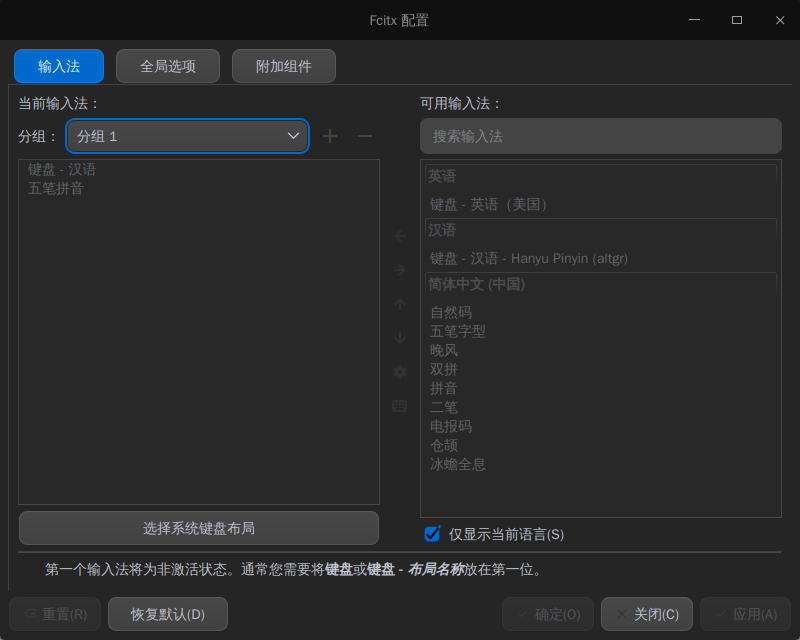
截图_fcitx5-config-qt_20211110185944.png
我用着fictx5很好用

Reply View the author
mardou
deepin
2021-11-11 05:33
#18
uvz

有的。

安装完成之后安装这个包, 啥都有, 什么五笔 二笔 仓颉 统统都有

sudo apt install fcitx5-chinese-addons

好的。谢谢

Reply View the author
神末shenmo
deepin
Spark-App
Q&A Team
2021-11-11 08:49
#19
deltacatxx

image.png

问一下……未激活输入法时的图标怎么修改

这个我也不知道。。。

Reply View the author
jiutian123
deepin
2021-11-11 23:17
#20
uvz

有的。

安装完成之后安装这个包, 啥都有, 什么五笔 二笔 仓颉 统统都有

sudo apt install fcitx5-chinese-addons

nsz@nsz:~$ sudo apt install fcitx5-chinese-addons
正在读取软件包列表... 完成
正在分析软件包的依赖关系树
正在读取状态信息... 完成
E: 无法定位软件包 fcitx5-chinese-addons

Reply View the author
1 / 2
To page