

 中文
中文 
WENWEN deepin
2021-11-09 01:38 deepin sudo apt update 看看
Reply Like 0 View the author

 deepin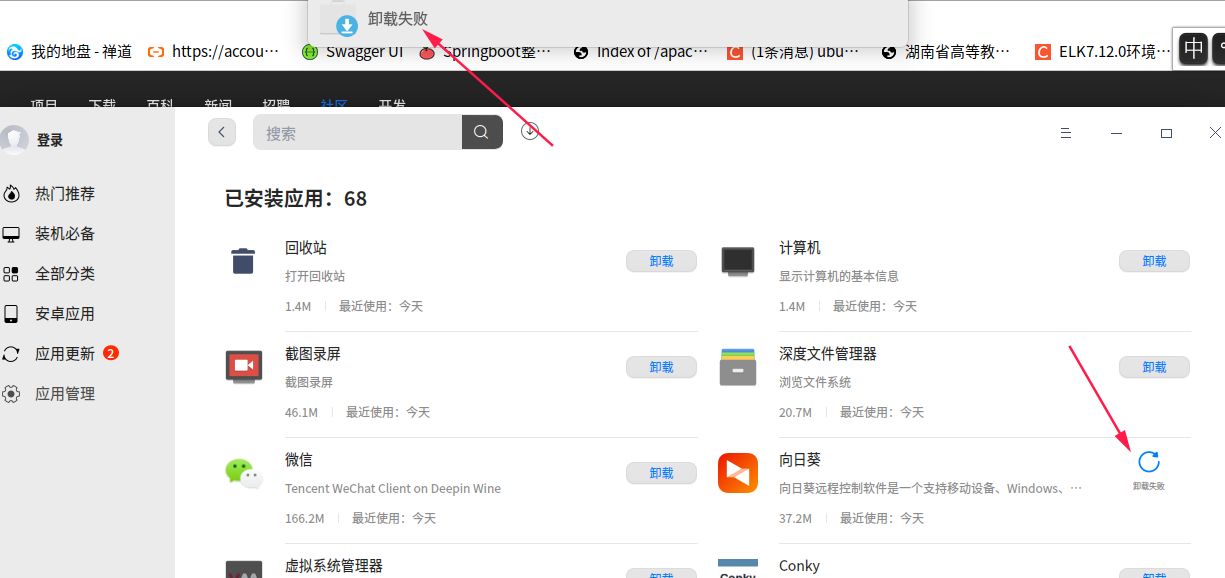
 deepin
 sudo apt update 看看
deepin sudo apt update 看看
我就是要更新系统,发现系统盘不足了,要删掉一些app
deepin sudo apt update 看看

 deepin
你怎么把其它的源加进去的?把源还原看看

 deepin
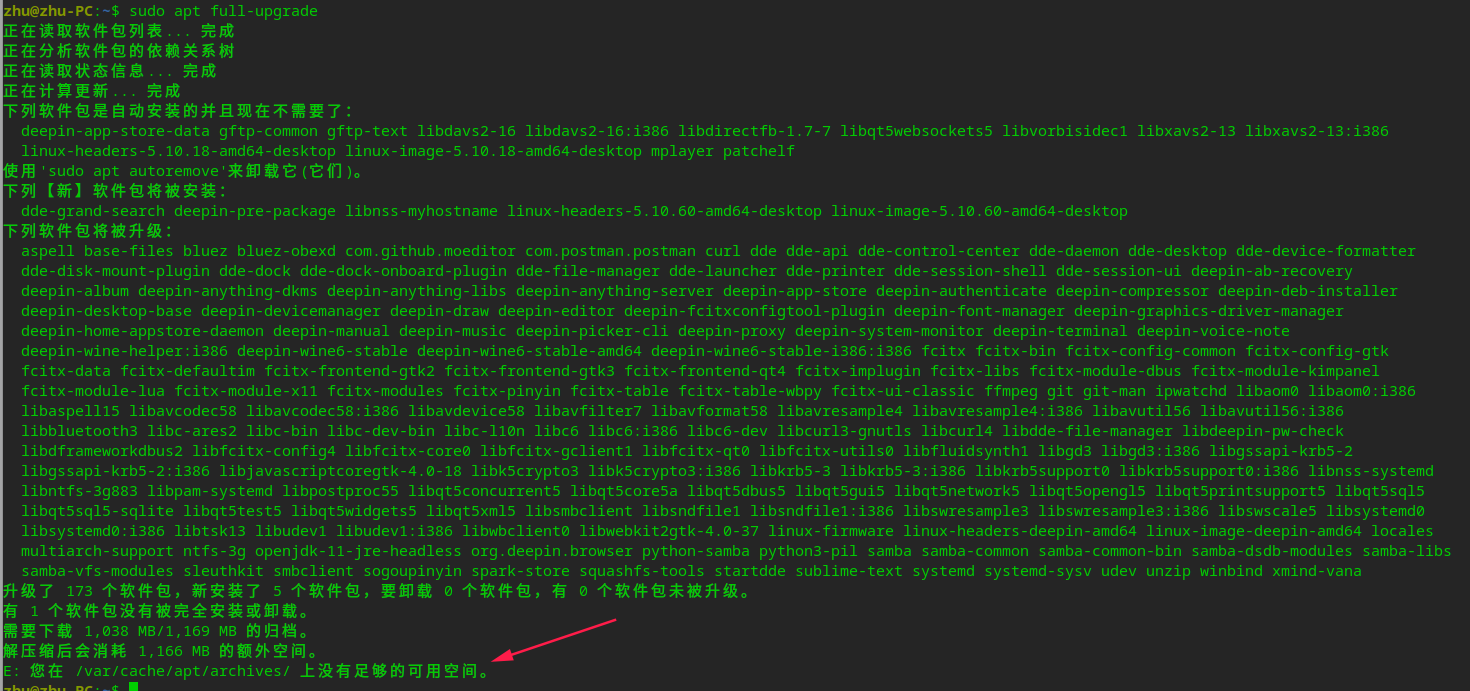
 apt full-upgrade看看是不是依赖坏了,apt进程中严禁重启断电
 deepin
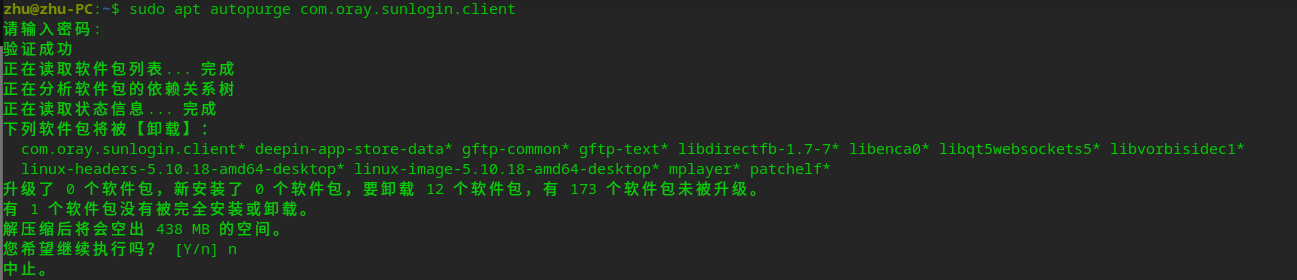
 sudo apt autopurge com.oray.sunlogin.client
贴下报错信息
deepin sudo apt autopurge com.oray.sunlogin.client
贴下报错信息
不止向日葵卸载不了,是所有都卸载不了
deepin 你怎么把其它的源加进去的?把源还原看看
原来的原有哪个?
deepin 不止向日葵卸载不了,是所有都卸载不了
deepin apt full-upgrade看看是不是依赖坏了,apt进程中严禁重启断电
所以才说,要卸载掉一些软件,不然没得弄
deepin
你为啥要终止卸载操作呢?
deepin 你为啥要终止卸载操作呢?
验证成功
正在读取软件包列表... 完成
正在分析软件包的依赖关系树
正在读取状态信息... 完成
下列软件包将被【卸载】:
com.oray.sunlogin.client* deepin-app-store-data* gftp-common* gftp-text* libdirectfb-1.7-7* libenca0* libqt5websockets5* libvorbisidec1*
linux-headers-5.10.18-amd64-desktop* linux-image-5.10.18-amd64-desktop* mplayer* patchelf*
升级了 0 个软件包,新安装了 0 个软件包,要卸载 12 个软件包,有 173 个软件包未被升级。
有 1 个软件包没有被完全安装或卸载。
解压缩后将会空出 438 MB 的空间。
您希望继续执行吗? [Y/n] y
(正在读取数据库 ... 系统当前共安装有 345724 个文件和目录。)
正在卸载 deepin-app-store-data (6.2.0.22-1) ...
正在卸载 gftp-text (2.0.19-5) ...
正在卸载 gftp-common (2.0.19-5) ...
正在卸载 mplayer (2:1.3.0.1-1+rebuild) ...
正在卸载 libdirectfb-1.7-7:amd64 (1.7.7-9) ...
正在卸载 libenca0:amd64 (1.19.1-1+rebuild) ...
正在卸载 libqt5websockets5:amd64 (5.15.1.2+dde-1+eagle) ...
正在卸载 libvorbisidec1 (1.2.1+git20180316-3) ...
正在卸载 linux-headers-5.10.18-amd64-desktop (5.10.18-amd64-desktop-1) ...
正在卸载 linux-image-5.10.18-amd64-desktop (5.10.18-amd64-desktop-1) ...
dkms: removing: bcmwl 6.30.223.272+bdcom (5.10.18-amd64-desktop) (x86_64)
Status: Before uninstall, this module version was ACTIVE on this kernel.
wl.ko:
depmod....
DKMS: uninstall completed.
dkms: removing: deepin-anything 0.0 (5.10.18-amd64-desktop) (x86_64)
Status: Before uninstall, this module version was ACTIVE on this kernel.
vfs_monitor.ko:
depmod...
DKMS: uninstall completed.
dkms: removing: huawei-wmi 1.0 (5.10.18-amd64-desktop) (x86_64)
Status: Before uninstall, this module version was ACTIVE on this kernel.
huawei-wmi.ko:
Removing original_module from DKMS tree for kernel 5.10.18-amd64-desktop (x86_64)
DKMS: uninstall completed.
update-initramfs: Deleting /boot/initrd.img-5.10.18-amd64-desktop
正在生成 grub 配置文件 ...
找到主题:/boot/grub/themes/deepin/theme.txt
Found background image: /boot/grub/themes/deepin/background.jpg
找到 Linux 镜像:/boot/vmlinuz-5.10.50-amd64-desktop
找到 initrd 镜像:/boot/initrd.img-5.10.50-amd64-desktop
找到 Linux 镜像:/boot/vmlinuz-5.10.29-amd64-desktop
找到 initrd 镜像:/boot/initrd.img-5.10.29-amd64-desktop
找到 Linux 镜像:/boot/vmlinuz-4.19.0-10-amd64
找到 initrd 镜像:/boot/initrd.img-4.19.0-10-amd64
完成
正在卸载 patchelf (0.9+52.20201026) ...
正在设置 libvirt-daemon-system (5.0.0.7-1) ...
touch: 无法创建 '/var/log/libvirt/uml/.placeholder': 没有那个文件或目录
dpkg: 处理软件包 libvirt-daemon-system (--configure)时出错:
已安装 libvirt-daemon-system 软件包 post-installation 脚本 子进程返回错误状态 1
正在处理用于 libc-bin (2.28.16-1+dde) 的触发器 ...
正在处理用于 man-db (2.8.5-2) 的触发器 ...
正在处理用于 mime-support (3.62) 的触发器 ...
在处理时有错误发生:
libvirt-daemon-system
E: Sub-process /usr/bin/dpkg returned an error code (1)
deepin 验证成功
正在读取软件包列表... 完成
正在分析软件包的依赖关系树
正在读取状态信息... 完成
下列软件包将被【卸载】:
com.oray.sunlogin.client* deepin-app-store-data* gftp-common* gftp-text* libdirectfb-1.7-7* libenca0* libqt5websockets5* libvorbisidec1*
linux-headers-5.10.18-amd64-desktop* linux-image-5.10.18-amd64-desktop* mplayer* patchelf*
升级了 0 个软件包,新安装了 0 个软件包,要卸载 12 个软件包,有 173 个软件包未被升级。
有 1 个软件包没有被完全安装或卸载。
解压缩后将会空出 438 MB 的空间。
您希望继续执行吗? [Y/n] y
(正在读取数据库 ... 系统当前共安装有 345724 个文件和目录。)
正在卸载 deepin-app-store-data (6.2.0.22-1) ...
正在卸载 gftp-text (2.0.19-5) ...
正在卸载 gftp-common (2.0.19-5) ...
正在卸载 mplayer (2:1.3.0.1-1+rebuild) ...
正在卸载 libdirectfb-1.7-7:amd64 (1.7.7-9) ...
正在卸载 libenca0:amd64 (1.19.1-1+rebuild) ...
正在卸载 libqt5websockets5:amd64 (5.15.1.2+dde-1+eagle) ...
正在卸载 libvorbisidec1 (1.2.1+git20180316-3) ...
正在卸载 linux-headers-5.10.18-amd64-desktop (5.10.18-amd64-desktop-1) ...
正在卸载 linux-image-5.10.18-amd64-desktop (5.10.18-amd64-desktop-1) ...
dkms: removing: bcmwl 6.30.223.272+bdcom (5.10.18-amd64-desktop) (x86_64)
Status: Before uninstall, this module version was ACTIVE on this kernel.
wl.ko:
depmod....
DKMS: uninstall completed.
dkms: removing: deepin-anything 0.0 (5.10.18-amd64-desktop) (x86_64)
Status: Before uninstall, this module version was ACTIVE on this kernel.
vfs_monitor.ko:
depmod...
DKMS: uninstall completed.
dkms: removing: huawei-wmi 1.0 (5.10.18-amd64-desktop) (x86_64)
Status: Before uninstall, this module version was ACTIVE on this kernel.
huawei-wmi.ko:
Removing original_module from DKMS tree for kernel 5.10.18-amd64-desktop (x86_64)
DKMS: uninstall completed.
update-initramfs: Deleting /boot/initrd.img-5.10.18-amd64-desktop
正在生成 grub 配置文件 ...
找到主题:/boot/grub/themes/deepin/theme.txt
Found background image: /boot/grub/themes/deepin/background.jpg
找到 Linux 镜像:/boot/vmlinuz-5.10.50-amd64-desktop
找到 initrd 镜像:/boot/initrd.img-5.10.50-amd64-desktop
找到 Linux 镜像:/boot/vmlinuz-5.10.29-amd64-desktop
找到 initrd 镜像:/boot/initrd.img-5.10.29-amd64-desktop
找到 Linux 镜像:/boot/vmlinuz-4.19.0-10-amd64
找到 initrd 镜像:/boot/initrd.img-4.19.0-10-amd64
完成
正在卸载 patchelf (0.9+52.20201026) ...
正在设置 libvirt-daemon-system (5.0.0.7-1) ...
touch: 无法创建 '/var/log/libvirt/uml/.placeholder': 没有那个文件或目录
dpkg: 处理软件包 libvirt-daemon-system (--configure)时出错:
已安装 libvirt-daemon-system 软件包 post-installation 脚本 子进程返回错误状态 1
正在处理用于 libc-bin (2.28.16-1+dde) 的触发器 ...
正在处理用于 man-db (2.8.5-2) 的触发器 ...
正在处理用于 mime-support (3.62) 的触发器 ...
在处理时有错误发生:
libvirt-daemon-system
E: Sub-process /usr/bin/dpkg returned an error code (1)
sudo apt autopurge libvirt-daemon-system
deepin 原来的原有哪个?
把你系统控制中心的系统信息截图看看
Popular Ranking
ChangePopular Events
More


 Fantastic experience on Deepin