

 中文
中文 
dolphin_roy deepin
2021-11-09 02:22 deepin 真是出人意料的想法。但这么整咋搜索和打开网址
Reply Like 0 View the author
 deepin
 真是出人意料的想法。但这么整咋搜索和打开网址

推荐隔壁vivaldi,既能极简也能极繁

 deepin
 I always recommend and used Chrome for browsing .... Also have lots of extra advantages.
deepin 真是出人意料的想法。但这么整咋搜索和打开网址
用快捷键操作,挺方便的
 deepin
 真是出人意料的想法。但这么整咋搜索和打开网址
地址栏自动隐藏的
鼠标移到那地址栏就出来了
deepin 感谢分享!!
刚用vivaldi觉着隐藏地址栏挺好,又在这发现firefox也可以,正好用上!

deepin 顺便给你分享一个键盘映射工具xkeysnail
xkeysnail 是一个键盘工具, 它不仅能重映射键位、按键功能, 还能重映射快捷键, 甚至能在不同的程序下使用不同的映射!
比如:
deepin 顺便给你分享一个键盘映射工具xkeysnail
xkeysnail 是一个键盘工具, 它不仅能重映射键位、按键功能, 还能重映射快捷键, 甚至能在不同的程序下使用不同的映射!
比如:
感谢分享!看起来挺实用的
 deepin
 #nav-bar{
max-height: 0px !important;
min-height: 0px !important;
}
#urlbar{
position: relative !important;
bottom: 0px;
}
#urlbar-container{
width: 100%;
}
#nav-bar-customization-target{
position: fixed !important;
display: inline-flex;
justify-content:center;
align-items:flex-start;
z-index: -1;
width: calc(100% - 80px);
}
#nav-bar toolbarbutton[open=true],
#nav-bar toolbaritem[open=true],
#nav-bar:focus-within{
z-index: 1;
}
#nav-bar[customizing=true],
#nav-bar-customization-target[customizing=true]{
max-height: unset !important;
min-height: unset !important;
z-index: 1;
}
我也发一个,这个是弹出式的,不会侵占网页,使用快捷键ctrl+k,ctrl+l聚焦到地址栏调用。
使用默认主页的话,放到搜索框也会调用。
不过在使用定制工具栏页面的时候不正常,希望有大佬能帮忙完善一下。
deepin  deepin deepin
 #nav-bar{
max-height: 0px !important;
min-height: 0px !important;
}
#urlbar{
position: relative !important;
bottom: 0px;
}
#urlbar-container{
width: 100%;
}
#nav-bar-customization-target{
position: fixed !important;
display: inline-flex;
justify-content:center;
align-items:flex-start;
z-index: -1;
width: calc(100% - 80px);
}
#nav-bar toolbarbutton[open=true],
#nav-bar toolbaritem[open=true],
#nav-bar:focus-within{
z-index: 1;
}
#nav-bar[customizing=true],
#nav-bar-customization-target[customizing=true]{
max-height: unset !important;
min-height: unset !important;
z-index: 1;
}
我也发一个,这个是弹出式的,不会侵占网页,使用快捷键ctrl+k,ctrl+l聚焦到地址栏调用。
使用默认主页的话,放到搜索框也会调用。
不过在使用定制工具栏页面的时候不正常,希望有大佬能帮忙完善一下。
又修改了一下,解决了一些小问题
#nav-bar:not([customizing]){
  max-height: 0px !important;
  min-height: 0px !important;
  z-index: 1;
}
#urlbar{
  position: relative !important;
}
#urlbar-container{
  width: 100%;
}
#nav-bar:not([customizing]) > #nav-bar-customization-target:hover,
#nav-bar:not([customizing]) > #nav-bar-customization-target:focus-within{
  position: fixed !important;
  display: inline-flex;
  justify-content:center;
  align-items:flex-start;
  width: calc(100% - 80px);
}
Popular Ranking
ChangePopular Events
More


 Fantastic experience on Deepin
一直以来都想自动隐藏地址栏,今天偶然找到了解决方法,亲测对firefox 94.0.1 有效,当鼠标移到顶部,地址栏会自动出现:

步骤:
在 about:config 里将 toolkit.legacyUserProfileCustomizations.stylesheets 设置为 true
打开当前配置文件夹下创建 chrome 文件夹:在about:profiles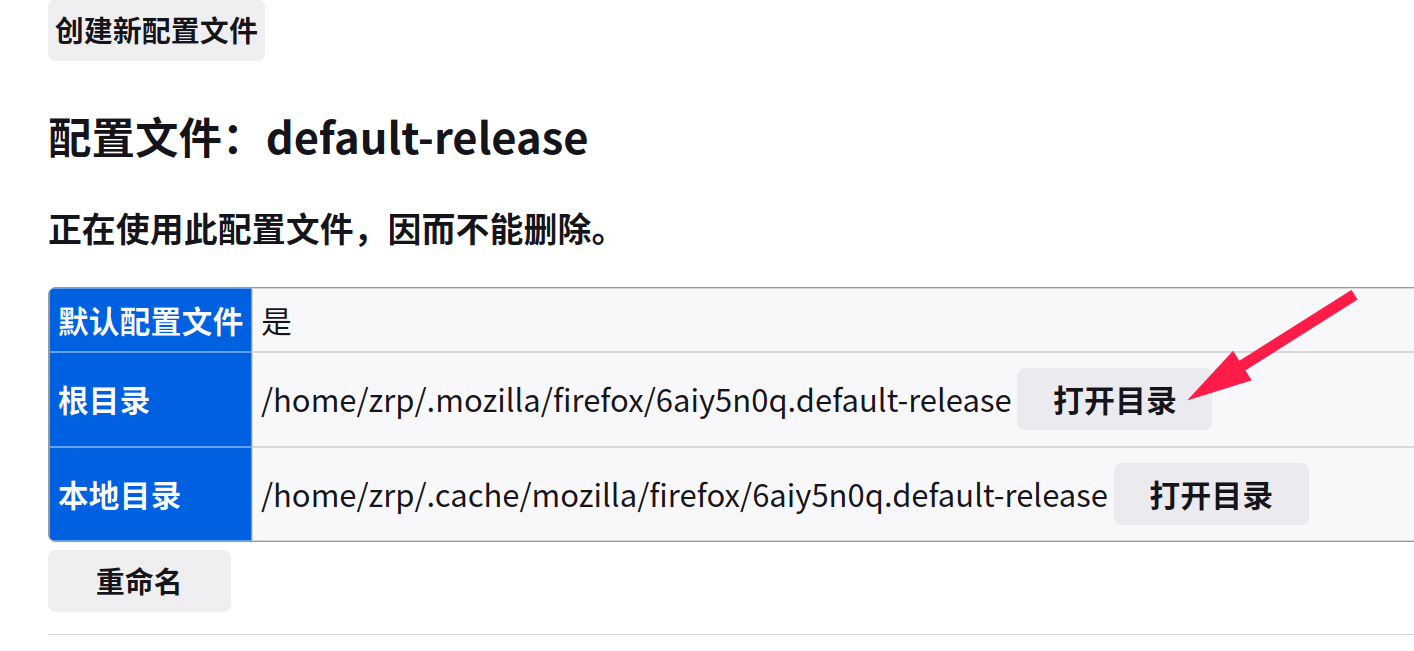
创建目录 chrome ,在chrome中创建文件 userChrome.css
重启浏览器
效果: