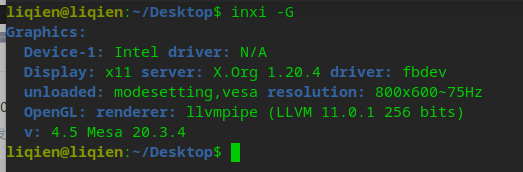
中文
中文 
jjcui8595 deepin
2021-10-30 03:17 deepin 应该是11代酷睿太新了,建议升级内核试试
Reply Like 0 View the author
 deepin
 应该是11代酷睿太新了,建议升级内核试试
 deepin
 应该是11代酷睿太新了,建议升级内核试试
怎么升级啊 有教程没
deepin 推荐安装时选择5.13,官方镜像里就包括了。如果系统已安装,从网上查询下载新内核,不推荐

 deepin
 1)首先在终端敲
uname -a
看一下你现在使用的内核版本
如果是5.10开头的就在终端敲
sudo apt install linux-image- 然后用tab补全,选版本最大的那一个内核安装
装好了重启,再看一下核显识别到没有
2)如果上面这个方法不行,可以尝试下载ubuntu编译的更高版本的内核:
https://kernel.ubuntu.com/~kernel-ppa/mainline/
现在最新版:5.14.15
安装方法要麻烦一点,要下载4个文件(可以用迅雷下载,具体下载哪4个文件,自己百度),sudo dpkg -i *.deb 统一安装
3)如果上面的方法都不行,我就无能为力了,只能等官方更新系统,11代早迟都会支持的

 deepin
 sudo apt install linux-image-deepin-stable-amd64
安装5.13内核试试
deepin sudo apt install linux-image-deepin-stable-amd64
安装5.13内核试试
升级了5.13了 依然不行
deepin 1)首先在终端敲
uname -a
看一下你现在使用的内核版本
如果是5.10开头的就在终端敲
sudo apt install linux-image- 然后用tab补全,选版本最大的那一个内核安装
装好了重启,再看一下核显识别到没有
2)如果上面这个方法不行,可以尝试下载ubuntu编译的更高版本的内核:
https://kernel.ubuntu.com/~kernel-ppa/mainline/
现在最新版:5.14.15
安装方法要麻烦一点,要下载4个文件(可以用迅雷下载,具体下载哪4个文件,自己百度),sudo dpkg -i *.deb 统一安装
3)如果上面的方法都不行,我就无能为力了,只能等官方更新系统,11代早迟都会支持的
一直安装不了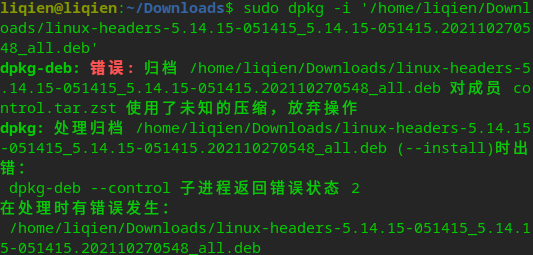
deepin 一直安装不了

就下这4个文件就可以了,把这4个文件放进一个干净的目录,然后在目录里面sudo dpkg -i *.deb
deepin
就下这4个文件就可以了,把这4个文件放进一个干净的目录,然后在目录里面sudo dpkg -i *.deb
就是这么安装的 然后就提示图片上面的
deepin 就是这么安装的 然后就提示图片上面的
sudo apt install zstd
然后再安装呢
deepin sudo apt install zstd
然后再安装呢
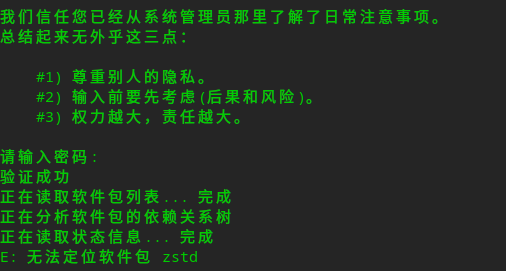
deepin
这个有点奇怪,uos家庭版源里面就有zstd,
https://packages.ubuntu.com/bionic/amd64/zstd/download
点击中间那一个链接,就可以下载zstd了
deepin 这个有点奇怪,uos家庭版源里面就有zstd,
https://packages.ubuntu.com/bionic/amd64/zstd/download
点击中间那一个链接,就可以下载zstd了
整懵逼了 安装了zstd 依旧不行 不整了
deepin 整懵逼了 安装了zstd 依旧不行 不整了
我查了一下资料,发现现在ubuntu编译的内核没有考虑(不支持)debian系的系统了,
deepin更新比较快,下一次更新应该就会有更新的内核出来了
deepin 我查了一下资料,发现现在ubuntu编译的内核没有考虑(不支持)debian系的系统了,
deepin更新比较快,下一次更新应该就会有更新的内核出来了
好吧 谢谢你 我等deepin更新内核吧
deepin 好吧 谢谢你 我等deepin更新内核吧
如果要体验5.14内核的话,可以直接按照论坛置顶的帖子加入内测源,就可以直接升级到5.14内核
deepin 如果要体验5.14内核的话,可以直接按照论坛置顶的帖子加入内测源,就可以直接升级到5.14内核
这就很神奇 我安装deepin 内核5.10 显卡驱动不了 然后安装优麒麟 也是内核5.10 就没有任何问题
deepin 这就很神奇 我安装deepin 内核5.10 显卡驱动不了 然后安装优麒麟 也是内核5.10 就没有任何问题
优麒麟基于ubuntu的,ubuntu的包都是最新的,deepin基于debian,debian的包都比较老
Popular Ranking
ChangePopular Events
More


 The settings menu needs to be translated into Russian.
i5-11400核显 安装20.2.4版本无法驱动显卡,分辨率调整不了